
You are using an out of date browser. It may not display this or other websites correctly.
You should upgrade or use an alternative browser.
You should upgrade or use an alternative browser.
Using Imacros for Bulk Upload
- Thread starter Zorbas
- Start date


blasouveir
Junior Member
- Mar 8, 2016
- 109
- 54
Try downgrading to Firefox 47.0.2 and imacros 8.9.7
I've found that to be the optimal solution in terms of supported features. Since Firefox added multi process support, also restricting certain DOM access, lots of the functionalities of imacros were lost.
I've found that to be the optimal solution in terms of supported features. Since Firefox added multi process support, also restricting certain DOM access, lots of the functionalities of imacros were lost.
For automating file uploads, there is also Kantu Web Automation, which is based on Chromium.
Automating web browser file uploads is very easy with Kantu: Create a click command with the screenshot of the file upload "Browse" button and then select the file you want to upload from the native browser file upload dialog that appears. That is all. Kantu records path of the selected file and then fills it in during replay. Kantu works with all file upload methods that you can find on the web. If you specify a folder name instead of a file name, Kantu will upload every file in the folder.
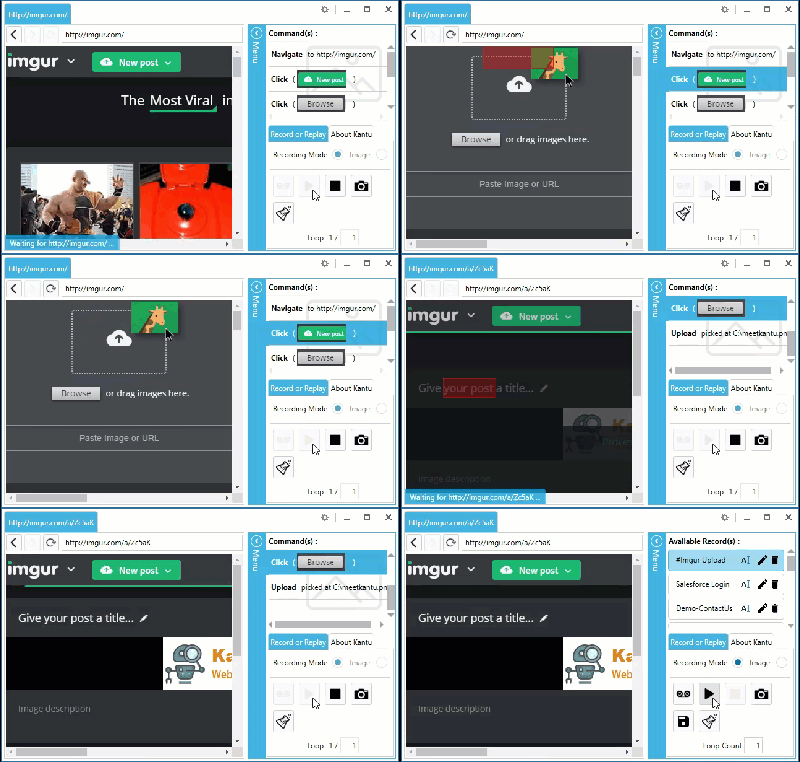
Text /image from from the website since I can not add links yet
Automating web browser file uploads is very easy with Kantu: Create a click command with the screenshot of the file upload "Browse" button and then select the file you want to upload from the native browser file upload dialog that appears. That is all. Kantu records path of the selected file and then fills it in during replay. Kantu works with all file upload methods that you can find on the web. If you specify a folder name instead of a file name, Kantu will upload every file in the folder.
Text /image from from the website since I can not add links yet

Zorbas
Newbie
- Mar 19, 2017
- 22
- 0
For automating file uploads, there is also Kantu Web Automation, which is based on Chromium.
Automating web browser file uploads is very easy with Kantu: Create a click command with the screenshot of the file upload "Browse" button and then select the file you want to upload from the native browser file upload dialog that appears. That is all. Kantu records path of the selected file and then fills it in during replay. Kantu works with all file upload methods that you can find on the web. If you specify a folder name instead of a file name, Kantu will upload every file in the folder.
Text /image from from the website since I can not add links yet
Thanks man I will check it out!
Zorbas
Newbie
- Mar 19, 2017
- 22
- 0
Try downgrading to Firefox 47.0.2 and imacros 8.9.7
I've found that to be the optimal solution in terms of supported features. Since Firefox added multi process support, also restricting certain DOM access, lots of the functionalities of imacros were lost.
I did and it worked now but the code is somehow not too perfect - it uploaded 50 or sometimes 70 photos and then stopped with no reason lol
Zorbas
Newbie
- Mar 19, 2017
- 22
- 0
For automating file uploads, there is also Kantu Web Automation, which is based on Chromium.
Automating web browser file uploads is very easy with Kantu: Create a click command with the screenshot of the file upload "Browse" button and then select the file you want to upload from the native browser file upload dialog that appears. That is all. Kantu records path of the selected file and then fills it in during replay. Kantu works with all file upload methods that you can find on the web. If you specify a folder name instead of a file name, Kantu will upload every file in the folder.
Text /image from from the website since I can not add links yet
I saw that they don't have a version for mac yet lol

HoNeYBiRD
Elite Member
- May 1, 2009
- 10,187
- 11,781
Try the standalone iMacros browser then, i think the "discounted" copies are available in the download section, if you know what i mean.I did and it worked now but the code is somehow not too perfect - it uploaded 50 or sometimes 70 photos and then stopped with no reason lol

CuriousMe :)
BANNED
- Jun 23, 2017
- 368
- 83
Try fiddler
I want to upload multi image on folder with csv data for each image the uploader already accept multi image but want to automate the task with kantu do you think it's possible
For automating file uploads, there is also Kantu Web Automation, which is based on Chromium.
Automating web browser file uploads is very easy with Kantu: Create a click command with the screenshot of the file upload "Browse" button and then select the file you want to upload from the native browser file upload dialog that appears. That is all. Kantu records path of the selected file and then fills it in during replay. Kantu works with all file upload methods that you can find on the web. If you specify a folder name instead of a file name, Kantu will upload every file in the folder.
Text /image from from the website since I can not add links yet