

thetrustedzone
Elite Member
- Jun 15, 2010
- 3,994
- 3,174
Hey All
This is an easy-to-follow tutorial but useful for any beginner; In contrast, this tutorial code is written in c#, but the same concept applied for other programming languages.
to get the 100% benefits of this tutorial, the following prerequisites are:
1. basic c# knowledge; if not, could see a free course C# Fundamentals for Absolute Beginners.
2. basic HTTP programming understanding; if not, I made and shared a free course here
Complete Source code with sample pages of this tutorial could be downloaded/viewed on GitHub here.
Introduction:
to do web data mining or web scraping, you usually send an HTTP request and get the response to the following pages:
A. API page retrieving either JSON or XML data type ( for instance, Instagram API, Twitter API ...etc.)
B. regular web page retrieving unorganized HTML code (for instance, Google search pages results, yellow pages ..etc.)
In this tutorial, I'm going to show you how to scrape and extract these page types easily using c#, so you will be able to build any kind of scraper.
JSON pages :
JSON is the most popular type for API data retrieving nowadays. JSON pages content look something like this:
Above is a simple example of that page, notice the value for Id is 1, and for Name is John and for Salary is 2300.
If I have thousands of similar Json pages with different values, how could I write only one extraction function applied for all those pages?
fortunately, C# has a few ready libraries/classes to extract values from JSON pages easily, like Json.NET (third party library) or
System.Text.Json (in new .Net/.Net core versions), but in this tutorial, I will use a built-in class JavaScriptSerializer (under System.Web.Script.Serialization namespace).
Getting the values from the JSON page to standard text called Deserialization and vice versa called Serialization.
In this tutorial, you will learn how to do both.
1. Deserialize using custom type:
create a class called DeveloperJson (or any other name) but should contain the same static parameters we want to extract values from:
and Deserializing code :
Using the Winforms framework for simplicity, richTextBox2 contains JSON input, and richTextBox4 has the output values.
2.Deserialize using dynamic keyword:
another approach you could use dynamic keyword without creating a custom class, so the code in this case is:
XML pages :
XML pages look something like this:
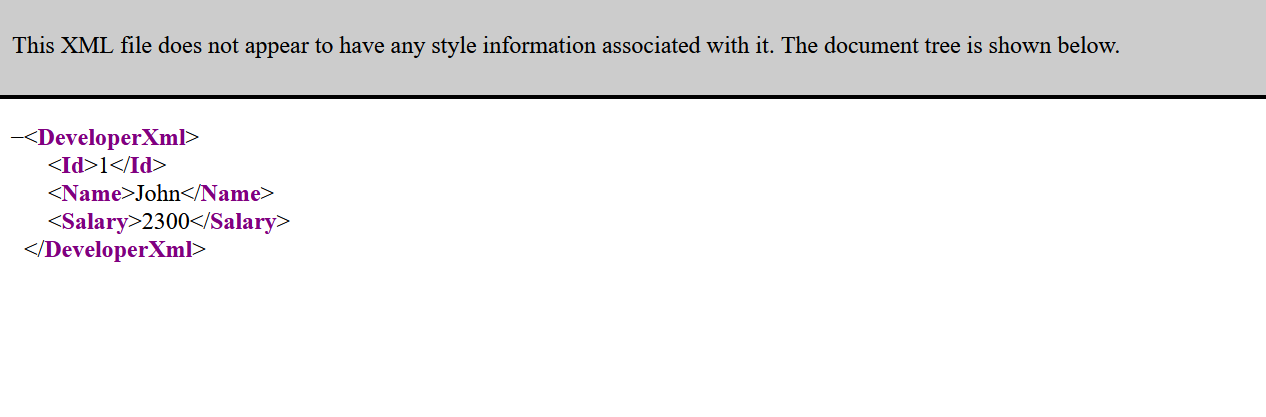
and if you view it in your browser probably you will see something like this:
As JSON example, there are multiple libraries/classes to use for XML Serialization & Deserialization... in this tutorial; I will use XmlSerializer
class (under System.Xml.Serialization namespace)
first, create a public class DeveloperXml with [Serializable] attribute :
Notice without public access modifier and [Serializable] attribute, the XmlSerializer will not work, so don't forget to add them.
now the XML DeSerialization code:
richTextBox1 contains the XML content, while richTextBox3 contains the DeSerialized values.
Unorganized HTML Pages :
in this case, we could use multiple extraction libraries/classes. One of them is the Html Agility Pack library, but in this tutorial, I will use the usual string manipulation technique.
I made a simple HTML page :
if you view that page in your browser, you will see :
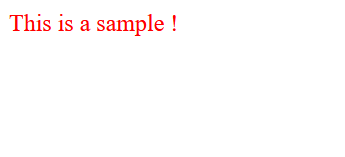
now, if I want to get the "This is a sample !" sentence without HTML tags, I could use string manipulation technique with code like this:
richTextBox5 contains the HTML page source, while the richTextBox6 contains the required sentence.
Remote Pages :
since you are doing WEB scraping, the pages will not be available on your machine, so you need to send an HTTP request to download the web page before trying to deserialize it, and as before, there are multiple libraries/classes to do that in c#, but in this tutorial, I will use HttpClient class (under System.Net.Http namespace), an example code to download JSON page and deserialize it:
Download and install XAMPP to simulate HTTP request or upload them to your real hosting if have one, both you should get the same result.
To see how serialization is done see Form1_Load void in the source code shared on GitHub, while you don't need to know the serialization
in scraping but it's a must if you are going to build web apps.
If you have questions/comments feel free to reply to this thread but please no PMs questions.
This is an easy-to-follow tutorial but useful for any beginner; In contrast, this tutorial code is written in c#, but the same concept applied for other programming languages.
to get the 100% benefits of this tutorial, the following prerequisites are:
1. basic c# knowledge; if not, could see a free course C# Fundamentals for Absolute Beginners.
2. basic HTTP programming understanding; if not, I made and shared a free course here
Complete Source code with sample pages of this tutorial could be downloaded/viewed on GitHub here.
Introduction:
to do web data mining or web scraping, you usually send an HTTP request and get the response to the following pages:
A. API page retrieving either JSON or XML data type ( for instance, Instagram API, Twitter API ...etc.)
B. regular web page retrieving unorganized HTML code (for instance, Google search pages results, yellow pages ..etc.)
In this tutorial, I'm going to show you how to scrape and extract these page types easily using c#, so you will be able to build any kind of scraper.
JSON pages :
JSON is the most popular type for API data retrieving nowadays. JSON pages content look something like this:
JSON:
{"Id":1,"Name":"John","Salary":2300}Above is a simple example of that page, notice the value for Id is 1, and for Name is John and for Salary is 2300.
If I have thousands of similar Json pages with different values, how could I write only one extraction function applied for all those pages?
fortunately, C# has a few ready libraries/classes to extract values from JSON pages easily, like Json.NET (third party library) or
System.Text.Json (in new .Net/.Net core versions), but in this tutorial, I will use a built-in class JavaScriptSerializer (under System.Web.Script.Serialization namespace).
Getting the values from the JSON page to standard text called Deserialization and vice versa called Serialization.
In this tutorial, you will learn how to do both.
1. Deserialize using custom type:
create a class called DeveloperJson (or any other name) but should contain the same static parameters we want to extract values from:
C#:
 class DeveloperJson
    {
        public int Id { get; set; }

        public string Name { get; set; }

        public Decimal Salary { get; set; }

    }
and Deserializing code :
C#:
JavaScriptSerializer serializerJson = new JavaScriptSerializer();

            DeveloperJson developerJson = serializerJson.Deserialize<DeveloperJson>(richTextBox2.Text);


            richTextBox4.AppendText(developerJson.Id.ToString() + Environment.NewLine);

            richTextBox4.AppendText(developerJson.Name + Environment.NewLine);

            richTextBox4.AppendText(developerJson.Salary.ToString() + Environment.NewLine);
Using the Winforms framework for simplicity, richTextBox2 contains JSON input, and richTextBox4 has the output values.
2.Deserialize using dynamic keyword:
another approach you could use dynamic keyword without creating a custom class, so the code in this case is:
C#:
 JavaScriptSerializer serializerJson = new JavaScriptSerializer();

            dynamic developerJson = serializerJson.Deserialize<dynamic>(richTextBox2.Text);

            richTextBox4.AppendText(developerJson["Id"].ToString() + Environment.NewLine);

            richTextBox4.AppendText(developerJson["Name"] + Environment.NewLine);

            richTextBox4.AppendText(developerJson["Salary"].ToString() + Environment.NewLine);
XML pages :
XML pages look something like this:
XML:
<?xml version="1.0" encoding="utf-16"?>
<DeveloperXml xmlns:xsi="http://www.w3.org/2001/XMLSchema-instance" xmlns:xsd="http://www.w3.org/2001/XMLSchema">
  <Id>1</Id>
  <Name>John</Name>
  <Salary>2300</Salary>
</DeveloperXml>
and if you view it in your browser probably you will see something like this:
As JSON example, there are multiple libraries/classes to use for XML Serialization & Deserialization... in this tutorial; I will use XmlSerializer
class (under System.Xml.Serialization namespace)
first, create a public class DeveloperXml with [Serializable] attribute :
C#:
  [Serializable]
   public  class DeveloperXml
    {

        public int Id { get; set; }

        public string Name { get; set; }

        public Decimal Salary { get; set; }

    }
Notice without public access modifier and [Serializable] attribute, the XmlSerializer will not work, so don't forget to add them.
now the XML DeSerialization code:
C#:
  XmlSerializer serializerXml = new XmlSerializer(typeof(DeveloperXml));

            using (var stringreader = new StringReader(richTextBox1.Text))
            {

              DeveloperXml developerxml = (DeveloperXml)  serializerXml.Deserialize(stringreader);

                richTextBox3.AppendText(developerxml.Id.ToString() + Environment.NewLine);

                richTextBox3.AppendText(developerxml.Name + Environment.NewLine);

                richTextBox3.AppendText(developerxml.Salary.ToString() + Environment.NewLine);

            }
richTextBox1 contains the XML content, while richTextBox3 contains the DeSerialized values.
Unorganized HTML Pages :
in this case, we could use multiple extraction libraries/classes. One of them is the Html Agility Pack library, but in this tutorial, I will use the usual string manipulation technique.
I made a simple HTML page :
HTML:
<!DOCTYPE html>
<html>

<p style='color:red'> This is a sample ! </p>


     </html>
if you view that page in your browser, you will see :
now, if I want to get the "This is a sample !" sentence without HTML tags, I could use string manipulation technique with code like this:
C#:
string page = richTextBox5.Text;

            string start = "red'>";

            int start_index = page.IndexOf(start);

            string end = "</p>";

            int end_index = page.IndexOf(end);

            string target = page.Substring(start_index, end_index - start_index)
                .Replace(start,"");

            richTextBox6.Text = target;
richTextBox5 contains the HTML page source, while the richTextBox6 contains the required sentence.
Remote Pages :
since you are doing WEB scraping, the pages will not be available on your machine, so you need to send an HTTP request to download the web page before trying to deserialize it, and as before, there are multiple libraries/classes to do that in c#, but in this tutorial, I will use HttpClient class (under System.Net.Http namespace), an example code to download JSON page and deserialize it:
C#:
private static HttpClient client = new HttpClient();

        private async  void button1_Click(object sender, EventArgs e)
        {

            try
            {

           // install xampp and put the sample file inside htdocs folder  and start xampp before sending the request

                string page = await client.GetStringAsync("http://localhost/sample.json");

                richTextBox7.Text = page;

                JavaScriptSerializer serializerJson = new JavaScriptSerializer();

                dynamic developerJson = serializerJson.Deserialize<dynamic>(page);

                richTextBox8.AppendText(developerJson["Id"].ToString() + Environment.NewLine);

                richTextBox8.AppendText(developerJson["Name"] + Environment.NewLine);

                richTextBox8.AppendText(developerJson["Salary"].ToString() + Environment.NewLine);


            }

            catch(Exception ex)
            {
                MessageBox.Show(ex.Message);
            }

        }
Download and install XAMPP to simulate HTTP request or upload them to your real hosting if have one, both you should get the same result.
To see how serialization is done see Form1_Load void in the source code shared on GitHub, while you don't need to know the serialization
in scraping but it's a must if you are going to build web apps.
If you have questions/comments feel free to reply to this thread but please no PMs questions.


 But I won't forget a second time, as I just needed this info and spent hours digging about on stack, when I couldn've just came back to this post! lol What a dummy to forget to bookmark in my mindmap. Cheers again