

oskar2002
Registered Member
- Dec 25, 2013
- 58
- 83
Let's see how we can publish on our PBN with Wordpress from GSASER.
[1] Create a php file with the name zd and paste the following php code.
Edit "$key = 'ENTER_KEY';" with a value that is safe enough so that it cannot be guessed.
Save the file and upload it to the ROOT of each domain of your PBN with wordpress.
[2] Create a .ini file with the name ZD_Wordpress and paste the following code:
Save the changes, copy and paste ZD_Wordpress.ini into the Engines folder where you have installed GSASER.
Now, you can create a campaign by specially configuring the KEY of zd.php.
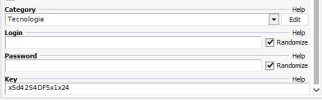
You do not need to create categories in Wordpress, the PHP script automatically takes care of it if the category configured in GSASER does not exist, it will create it and use it to publish your article.
This is just a small example of all the things you can do (by tricking GSASER a little) to publish one or more articles on the same domain of your PBN. Very useful if you plan to create a large PBN and want to save as much time as possible.
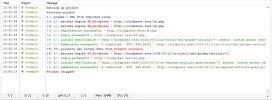
Remember, you will have to create a URL format to import into GSASER like the following:
(I use httpx to avoid generating a toxic link in the forum)
If someone tries to access zd.php they will not be able to identify whether it exists or not, they will simply see a 404 error from wordpress.
By the way, the script will randomly attribute each article to your Wordpress authors, so make sure that at least one exists.
Greetings blackhaters!
PS. Sorry for the previous post without attachment verification.
[1] Create a php file with the name zd and paste the following php code.
PHP:
<?php
/**
 * @author ZombiDev
 */

// Requerir
require __DIR__ . '/wp-load.php';

// Global
global $wpdb;

// Key
$key = 'ENTER_KEY';

// Variables post
$post_key = isset( $_POST['key'] ) ? $_POST['key'] : '';
$post_register = isset( $_POST['register'] ) ? $_POST['register'] : '';
$post_login = isset( $_POST['login'] ) ? $_POST['login'] : '';
$post_title = isset( $_POST['title'] ) ? $_POST['title'] : '';
$post_content = isset( $_POST['content'] ) ? $_POST['content'] : '';
$post_category = isset( $_POST['category'] ) ? $_POST['category'] : '';

// Comprobar key
if( $post_key != $key ) {
    load_template( locate_template( '404.php' ) );
    exit;
}

// Register
if( $post_register ) {
    die('Register success');
}

// Login
if( $post_login ) {
    die('Login success');
}

// Comprobar variables
if( empty( $post_title) ) {
    die( 'Empty title' );
} else if( empty( $post_content ) ) {
    die( 'Empty content' );
} else if( empty( $post_category ) ) {
    die( 'Empty category' );
}

// Autores
$authors = get_users( [
    'role__in' => [ 'author' ]
] );

// Comprobar autores
if( ! count( $authors ) ) {
    die( 'No authors on wordpress' );
}


// Prepost
$post_id = wp_insert_post( [
    'post_title' => $post_title,
    'post_content' => $post_content,
    'post_author' => $authors[ array_rand( $authors) ]->ID,
    'post_type' => 'post',
    'post_status' => 'draft'
] );


// Categoria
$term_id = 0;
if( $term = term_exists( $post_category, 'category' ) ) {
    $term_id = $term['term_id'];
}

// Si no existe
if( ! $term_id ) {
    $term = wp_insert_term( $post_category, 'category' );
    $term_id = $term['term_id'];
}

// Actualizar post
wp_update_post( [
    'ID' => $post_id,
    'post_content' => $post_content,
    'post_category' => array( $term_id ),
    'post_status' => 'publish'
] );

// Redirección
if( $post_url = get_permalink( $post_id ) ) {
    wp_redirect( $post_url );
}

// Error
die( 'Submit failed' );
Edit "$key = 'ENTER_KEY';" with a value that is safe enough so that it cannot be guessed.
Save the file and upload it to the ROOT of each domain of your PBN with wordpress.
[2] Create a .ini file with the name ZD_Wordpress and paste the following code:
INI:
[setup]
enable=1
default checked=0
engine type=[ZD] Engines
description=Submit articles to your PBN (WordPress).
********=1
anchor text=1
creates own page=1
uses pages=0
url must have=/zd.php
add keyword to search=0
use blog search=0
extract keywords=0
[URL]
type=url
[Key]
type=text
hint=Enter the KEY of your Wordpress PBN.
[Anchor_Text]
type=text
alternate data=%spinfile-generic_anchor_text.dat%
[Article_Title]
type=text
allow html=0
must be filled=1
hint=capitalize each word.
auto modify=0
[Article]
type=memo
allow html=1
must be filled=1
hint=The full article comes here.
auto modify=0
auto add anchor url=2
auto add anchor url content=%file-auto_anchor-article.dat%
custom mode=1
[Category]
type=category
must be filled=1
hint=See some sample sites what categories exist. It is a bit complex to define the right one though.
[Login]
type=login
must be filled=1
hint=The login for websites that need an account. Use numbers and letters only.
min length=6
static=1
[Password]
type=password
must be filled=1
hint=A password used for websites that need an account. Use numbers and letters only.
min length=8
static=1
[REGISTER_STEP1]
modify url=/zd.php
submit success=Register success
post data=key=%key%®ister=1&username=%login%&password=%password%
encode post data=1
just download=1
[LOGIN_STEP1]
modify url=/zd.php
submit success=Login success
post data=key=%key%&login=1&username=%login%&password=%password%
encode post data=1
just download=1
[STEP1]
link type=Article
submit success=%url%|%article_title%
submit error=Empty title|Empty content|Empty category|No authors on wordpress|Submit failed
verify on unknown status=1
verify submission=0
verify interval=1
verify timeout=1
verify by=url
verify search for=%article_title%,%url%
first verify=1
modify url=/zd.php
post data=key=%key%&title=%article_title%&content=%article%&category=%category%
encode post data=1
just download=1Save the changes, copy and paste ZD_Wordpress.ini into the Engines folder where you have installed GSASER.
Now, you can create a campaign by specially configuring the KEY of zd.php.
You do not need to create categories in Wordpress, the PHP script automatically takes care of it if the category configured in GSASER does not exist, it will create it and use it to publish your article.
This is just a small example of all the things you can do (by tricking GSASER a little) to publish one or more articles on the same domain of your PBN. Very useful if you plan to create a large PBN and want to save as much time as possible.
Remember, you will have to create a URL format to import into GSASER like the following:
Code:
httpx://www.yourdomain.com/zd.php
httpx://www.yourdomain2.com/zd.php
more..
(I use httpx to avoid generating a toxic link in the forum)
If someone tries to access zd.php they will not be able to identify whether it exists or not, they will simply see a 404 error from wordpress.
By the way, the script will randomly attribute each article to your Wordpress authors, so make sure that at least one exists.
Greetings blackhaters!
PS. Sorry for the previous post without attachment verification.


