oskar2002
Registered Member
- Dec 25, 2013
- 58
- 83
Hello blackhateros, it's been a long time since I've shared anything and what better way to teach how to make an automatic website, whether it's PPA (which has become so fashionable due to how old it is), Amazon or any other type of website.
What do we need to embark on this exciting adventure?
[*] CMS Wordpress.
[*] ZD Content Generator (free plugin that I designed) download and documentation:
[*] Want to work a little.
# Step 1: Configuration
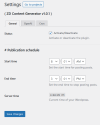
To do this, we go to Plugin Settings and once there, I leave you some screenshots detailing each configuration section.
## General settings
In general settings you can activate and deactivate the plugin and define a publishing schedule, for example you can make the plugin work certain hours of the day to simulate a work schedule.
## OpenAi settings
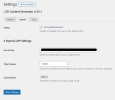
Likewise, you can activate and deactivate the use of the OpenAi API in your projects. If you activate it, you must fill in the secret key and total tokens fields. The latter allows you to configure a maximum consumption budget. Once the plugin is exhausted, deactivates.
## Cron settings
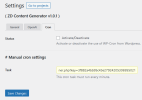
I recommend disabling the use of WP-Cron or leaving it active but adding in your wp-config.php "define('DISABLE_WP_CRON', true);", then add a task as instructed by the plugin. But, you can ignore this part and add a cron task with the command provided by the plugin that adds a key to avoid misuse by third parties.
Well, this is all the configuration you need to know, now let's create a project and see the full potential of the plugin.
# Step 2: Create project
Below we are going to detail the options available when creating a new project (ignoring the templates section that we will see at the end).
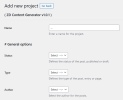
As you can see, not much explanation is needed, but even so, I detail each thing:
- Name: Here I recommend that you write not only a name, but also more information about the automation to be carried out, so you will have an easier time knowing what each project does.
- Status: You can choose to publish the entries directly or have them remain in draft, more than anything in case you want to give the content a touch-up before publishing it.
- Type: The type of entry you want to create, it can be page or post.
- Author: It is a good idea to use different authors for your posts, so you can simulate that a great team of "professionals" works on your website.
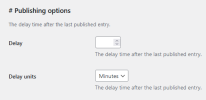
This is the final part (before we move on to the templates) for the project configuration, here you just have to choose how many minutes, hours or days you want the entries to be processed.
- Delay: Numeric value.
- Delay units: It can be minutes, hours or days.
And with this finished, we move on to the templates section.
# Entry options
In the entry options we find the following:
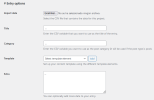
- Import data: Here we will load the CSV file with all the necessary data.
- Title: Here we will enter the variable defined in the CSV as the title of the entry.
- Category: Likewise, we will introduce the variable defined in the CSV as the category to use.
- Template: You have different templates to use, chat and complete modes of OpenAi and Wordpress, you can also customize the values of the OpenAi API as we will see at the end (spintax is operational in all template elements).
- Extra: Here we can add a featured image and post_metas to configure, among others, the YoastSEO meta_title and meta_description.
## PAA mode
Below you have an example of a CSV file to create a PAA website.

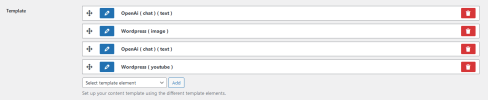
Template item: OpenAi ( chat ) ( text )
Template item: Wordpress ( image )
Template item: OpenAi ( chat ) ( text )
Template item: Wordpress ( youtube )
Extra field
## OpenAi API Customization
Below I show you several shortcodes that you can use within each OpenAi template element to configure the different API values.
OpenAi ( chat )
OpenAi ( complete )
Basically, using these shortcodes we can customize the default values that are sent to the OpenAi API.
And that's it, save changes and you would have the project completed to generate a PAA website automatically without the need to use third-party APIs (which are quite expensive).
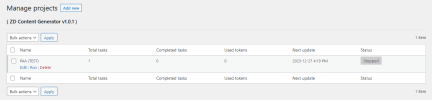
In the project list you will have access to launch, stop or delete each project, both one by one and in bulk mode. All the information is updated every 3 seconds to give it a more elegant feel and so you don't have to refresh the browser.
Once you have a completed CSV file (this is what will cost you the most work) you can set up as many websites as you want.
You can add more data to the CSV and add more template elements, such as quotes, tables, shortcodes (for example aawp), etc...
This plugin is designed to be versatile, you can make any type of website whatever the format, you can also skip the use of OpenAi and make websites with spintax + variables, I have used this for years for temporary Amazon niches (before Christmas to plant cookies).
I hope you liked this little plugin that I have prepared these weeks and that is completely free, this way the money you save can really be dedicated to what matters, family and your loved ones, especially at this time.
As always, questions and answers in this thread, have happy holidays and may we spread the g**gle much more next year.
Greetings blackhateros and again, happy holidays!
What do we need to embark on this exciting adventure?
[*] CMS Wordpress.
[*] ZD Content Generator (free plugin that I designed) download and documentation:
Code:
https://www.zombidev.com/zd-content-generator/# Step 1: Configuration
To do this, we go to Plugin Settings and once there, I leave you some screenshots detailing each configuration section.
## General settings
In general settings you can activate and deactivate the plugin and define a publishing schedule, for example you can make the plugin work certain hours of the day to simulate a work schedule.
## OpenAi settings
Likewise, you can activate and deactivate the use of the OpenAi API in your projects. If you activate it, you must fill in the secret key and total tokens fields. The latter allows you to configure a maximum consumption budget. Once the plugin is exhausted, deactivates.
## Cron settings
I recommend disabling the use of WP-Cron or leaving it active but adding in your wp-config.php "define('DISABLE_WP_CRON', true);", then add a task as instructed by the plugin. But, you can ignore this part and add a cron task with the command provided by the plugin that adds a key to avoid misuse by third parties.
Well, this is all the configuration you need to know, now let's create a project and see the full potential of the plugin.
# Step 2: Create project
Below we are going to detail the options available when creating a new project (ignoring the templates section that we will see at the end).
As you can see, not much explanation is needed, but even so, I detail each thing:
- Name: Here I recommend that you write not only a name, but also more information about the automation to be carried out, so you will have an easier time knowing what each project does.
- Status: You can choose to publish the entries directly or have them remain in draft, more than anything in case you want to give the content a touch-up before publishing it.
- Type: The type of entry you want to create, it can be page or post.
- Author: It is a good idea to use different authors for your posts, so you can simulate that a great team of "professionals" works on your website.
This is the final part (before we move on to the templates) for the project configuration, here you just have to choose how many minutes, hours or days you want the entries to be processed.
- Delay: Numeric value.
- Delay units: It can be minutes, hours or days.
And with this finished, we move on to the templates section.
# Entry options
In the entry options we find the following:
- Import data: Here we will load the CSV file with all the necessary data.
- Title: Here we will enter the variable defined in the CSV as the title of the entry.
- Category: Likewise, we will introduce the variable defined in the CSV as the category to use.
- Template: You have different templates to use, chat and complete modes of OpenAi and Wordpress, you can also customize the values of the OpenAi API as we will see at the end (spintax is operational in all template elements).
- Extra: Here we can add a featured image and post_metas to configure, among others, the YoastSEO meta_title and meta_description.
## PAA mode
Below you have an example of a CSV file to create a PAA website.
Template item: OpenAi ( chat ) ( text )
Code:
[system]
You will be provided with a keyword topic and your task will be to generate an introductory text of maximum 60 words using the text model.
[/system]
[user]
Topic: [title].
Keywords: "{Do you need to know?|Do you want to learn?}", "{you are in luck|you have come to the right place|you are in the right place}", "in this article", "keep reading".
Text model: <p>text</p>.
[/user]
Template item: Wordpress ( image )
Code:
[image]Template item: OpenAi ( chat ) ( text )
Code:
[system]
You will be provided with several questions and your task is to give an answer using the model text with a minimum of 700 words.
[/system]
[user]
Questions: [paa].
Model text: <h2>Question</h2><p>answer</p>.
[/user]
Template item: Wordpress ( youtube )
Code:
[youtube]Extra field
Code:
[post_thumbnail var="[image]"]
[post_meta name="_yoast_wpseo_title" value="[title]"]
[post_meta name="_yoast_wpseo_metadesc" value="[meta_description]"]
## OpenAi API Customization
Below I show you several shortcodes that you can use within each OpenAi template element to configure the different API values.
OpenAi ( chat )
Code:
[model var="modelname"]
[temperature var="number"]
[top_p var="number"]
[presence_penalty var="number"]
[frequency_penalty var="number"]
[system]prompt[/system]
[user]prompt[/user]
OpenAi ( complete )
Code:
[model var="modelname"]
[temperature var="number"]
[top_p var="number"]
[presence_penalty var="number"]
[frequency_penalty var="number"]
[prompt]prompt[/prompt]
Basically, using these shortcodes we can customize the default values that are sent to the OpenAi API.
And that's it, save changes and you would have the project completed to generate a PAA website automatically without the need to use third-party APIs (which are quite expensive).
In the project list you will have access to launch, stop or delete each project, both one by one and in bulk mode. All the information is updated every 3 seconds to give it a more elegant feel and so you don't have to refresh the browser.
Once you have a completed CSV file (this is what will cost you the most work) you can set up as many websites as you want.
You can add more data to the CSV and add more template elements, such as quotes, tables, shortcodes (for example aawp), etc...
This plugin is designed to be versatile, you can make any type of website whatever the format, you can also skip the use of OpenAi and make websites with spintax + variables, I have used this for years for temporary Amazon niches (before Christmas to plant cookies).
I hope you liked this little plugin that I have prepared these weeks and that is completely free, this way the money you save can really be dedicated to what matters, family and your loved ones, especially at this time.
As always, questions and answers in this thread, have happy holidays and may we spread the g**gle much more next year.
Greetings blackhateros and again, happy holidays!
Last edited: