[Step By Step Guide] DR 73 High Quality Contextual Link That Rank - Index Within 12 Hours

Ranking Expert

Elite Member
Jr. VIP
Joined
Mar 26, 2019
Messages
3,523
Reaction score
1,798
Code:
https://push.fm/

DR 73.PNG

Step 1: Go to push.fm and Create Free Account


Step 2: Click on Create new Link then go to Smart Links

2.PNG


Step: 3 Go to Custom Link

4.PNG

Step: 4 Fill all details like Title, Description, Custom Link and Add Image.

5.PNG


Step: 5 Click on Add Links then Add new Link

7.PNG

8.PNG

Step 6: Add Link Name, Logo and URL (you can also use Custom Text)

9.PNG

Step 7: Click on Next Step then Launch Link

10.PNG

Step 8: Click on Share Button and Copy Your Link!

12.PNG


Indexing Proof Within 12 Hour:

Index.PNG

 
That's pretty cool, just curious can that be used to prompt any link? Social media links for example?
 
very cool thanks for the share. have a site that needs a little boost. Need to move from ~7 to top 3
 
I am sorry, what should i put in the title and description? Something relevant to my website? Thank you
 
I am sorry, what should i put in the title and description? Something relevant to my website? Thank you
Yeah.

Use it for the backlink and it's great for branding or it seems parasiting low comp keywords.

It indexed and ranked for a low comp keyword for me in 24ish hours.

1000000392.png
:eek:

Not bad for the price of free huh.

Thanks OP.
 
Nice Guide, Hope this Easy Step by Step Guide will be Helpful for Some Members..

Thanks for sharing...
 
Code:
https://push.fm/

View attachment 420417

Step 1: Go to push.fm and Create Free Account


Step 2: Click on Create new Link then go to Smart Links

View attachment 420441


Step: 3 Go to Custom Link

View attachment 420424

Step: 4 Fill all details like Title, Description, Custom Link and Add Image.

View attachment 420442


Step: 5 Click on Add Links then Add new Link

View attachment 420443

View attachment 420430

Step 6: Add Link Name, Logo and URL (you can also use Custom Text)

View attachment 420431

Step 7: Click on Next Step then Launch Link

View attachment 420446

Step 8: Click on Share Button and Copy Your Link!
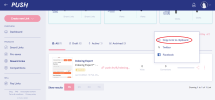
View attachment 420448


Indexing Proof Within 12 Hour:

View attachment 420449
Can you check what's the DR now? I see lower number
 
I tried 2 links and after a couple of days they're not indexed
 
Code:
https://push.fm/

View attachment 420417

Step 1: Go to push.fm and Create Free Account


Step 2: Click on Create new Link then go to Smart Links

View attachment 420441


Step: 3 Go to Custom Link

View attachment 420424

Step: 4 Fill all details like Title, Description, Custom Link and Add Image.

View attachment 420442


Step: 5 Click on Add Links then Add new Link

View attachment 420443

View attachment 420430

Step 6: Add Link Name, Logo and URL (you can also use Custom Text)

View attachment 420431

Step 7: Click on Next Step then Launch Link

View attachment 420446

Step 8: Click on Share Button and Copy Your Link!

View attachment 420448


Indexing Proof Within 12 Hour:

View attachment 420449
Great share!
 
Back
Top