

- Mar 22, 2013
- 9,193
- 10,496
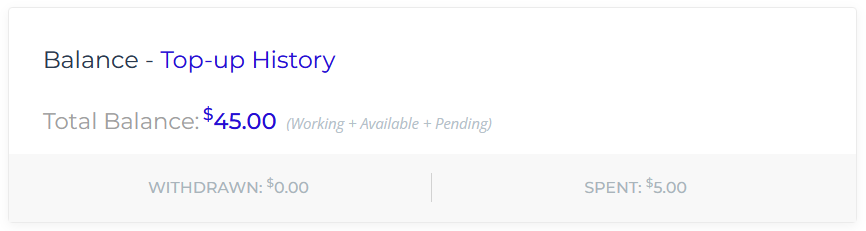
So we have this code:
And it creates this:
If we turn it into this code:
It makes this:

Looks good. But what I would like is for "WITHDRAWN: $0.00" to become "Total Balance: $45.00"
Maybe it's simple or maybe it's complicated. It feels simple, but then every damn thing I tried either removes something or just breaks half the page. The fact that there's no "WITHDRAWN" text anywhere in the PHP file makes me think that entire thing gets created from someplace else, and that makes it complicated then.
Can anyone help?
PHP:
<?php
    global $user_ID;
    $revenues = ae_credit_balance_info($user_ID);
    $total_earned = mje_format_price($revenues['working']->balance + $revenues['available']->balance +$revenues['freezable']->balance);
?>

<div class="revenues box-shadow">
    <div class="title"><?php _e('Balance', 'enginethemes'); ?> - <span class="sub"><a href="javascript:void(0)" class="topup-user-show"><?php _e( 'Top-up History', 'enginethemes' ); ?></a></span></div>


    <?php echo apply_filters('revenue_total_balance',$content="", $total_earned);  ?>

    <?php echo apply_filters('revenue_withdraw_spent',$content="", $revenues['withdrew_text'], $revenues['checkout_text']);  ?>
</div>
And it creates this:
If we turn it into this code:
PHP:
<?php
    global $user_ID;
    $revenues = ae_credit_balance_info($user_ID);
    $total_earned = mje_format_price($revenues['working']->balance + $revenues['available']->balance +$revenues['freezable']->balance);
?>

<div class="revenues box-shadow">
    <div class="title"><?php _e('Balance', 'enginethemes'); ?> - <span class="sub"><a href="javascript:void(0)" class="topup-user-show"><?php _e( 'Top-up History', 'enginethemes' ); ?></a></span></div>


    <?php echo apply_filters('revenue_withdraw_spent',$content="", $revenues['withdrew_text'], $revenues['checkout_text']);  ?>
</div>
It makes this:
Looks good. But what I would like is for "WITHDRAWN: $0.00" to become "Total Balance: $45.00"
Maybe it's simple or maybe it's complicated. It feels simple, but then every damn thing I tried either removes something or just breaks half the page. The fact that there's no "WITHDRAWN" text anywhere in the PHP file makes me think that entire thing gets created from someplace else, and that makes it complicated then.
Can anyone help?
