Slow Loading Wordpress Theme (even with WP Rocket) How Can I Speed it up?

homeriscool

Elite Member
Jr. VIP
Joined
Jun 24, 2013
Messages
2,398
Reaction score
3,650
Hi all, I've got a great theme. The website looks great. I have fast hosting too. But the theme is loading really slow.

Any ideas how to speed it up?
 
How many plugins are you running, what hosting is it on?

Hi, I'm on siteground.....
the theme comes with quite a few plugins too.
The theme is built will Elementor too....
 
Here are some tips buddy. I was in your shoes once.


There's a WP Rocket setting called Remove Unnecessary CSS that killed my site's loading speed. I downloaded WP Optimize and deleted a 10gb file in my database that WP Rocket put there.Make sure you have that feature off.

Go to bunny.net and get their CDN. You can integrate it with WP Rocket and also their own Bunny wordpress app.

Deactivate all plugins you don't need.

Play around with WP Rocket until you get the results you're looking for that's not breaking your site.

You can also get Asset CleanUp Pro and use it in correlation with WP Rocket and WP Optimize to further optimize how your site loads.Also, if you have plugins that you only need running on certain pages, this plugin will "offload" those plugins on certain pages so they don't slow down that page.

Make sure you smush down all the large images on your site with some kind of compression app or use tinypng.com and get all the important images down to size.

Go to GTMetrix and figure out what's causing the delays/slow loading on your site's waterfall. Sometimes it'll be a weird plugin causing issues.

Siteground has some caching and optimizing plugins you can use that they might pre-install. I'm guessing they might make you use it for Redis / or whatever their object caching system is.
 
Here are some tips buddy. I was in your shoes once.


There's a WP Rocket setting called Remove Unnecessary CSS that killed my site's loading speed. I downloaded WP Optimize and deleted a 10gb file in my database that WP Rocket put there.Make sure you have that feature off.

Go to bunny.net and get their CDN. You can integrate it with WP Rocket and also their own Bunny wordpress app.

Deactivate all plugins you don't need.

Play around with WP Rocket until you get the results you're looking for that's not breaking your site.

You can also get Asset CleanUp Pro and use it in correlation with WP Rocket and WP Optimize to further optimize how your site loads.Also, if you have plugins that you only need running on certain pages, this plugin will "offload" those plugins on certain pages so they don't slow down that page.

Make sure you smush down all the large images on your site with some kind of compression app or use tinypng.com and get all the important images down to size.

Go to GTMetrix and figure out what's causing the delays/slow loading on your site's waterfall. Sometimes it'll be a weird plugin causing issues.

Siteground has some caching and optimizing plugins you can use that they might pre-install. I'm guessing they might make you use it for Redis / or whatever their object caching system is.

Hey that's a great help.

Thank you very much for taking the time to write all of this.

I'll get to work on it now.

Thanks again.
 
Hey that's a great help.

Thank you very much for taking the time to write all of this.

I'll get to work on it now.

Thanks again.

I have 40+ active plugins on my site, a theme that's not super optimized for SEO, gigabytes of files , thousands of users and transactions, and an old, old database. But mind you, I also have a dedicated server.

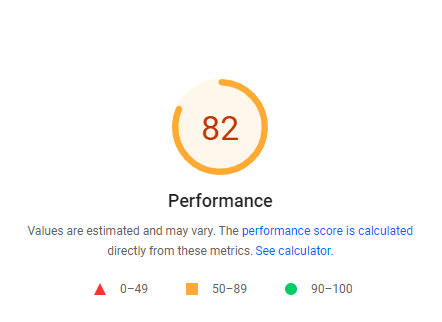
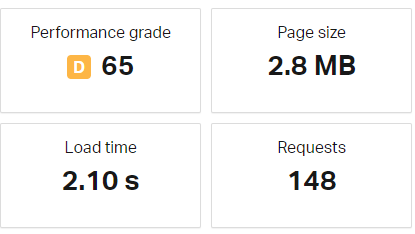
It's not much, but it's honest work. If I can speed things up, you can. This is what I get on my site, currently. I'm still trying to bump my points up.

af63c5b15d66a7662e6c7d597461928c.png


f4a2fc2db024a55370081d5aaf292728.png


97593f7ed21c9c22bb1e64bd800ee431.png
 
I'll do a speed test in a min and see what i can get....
 
This is not good, mate. Something is wrong.

I'll have a play around with it over the next week....
That is slow isn't it. I think its elementor
 
Any ideas how to speed it up?
It´s really hard to pinpoint the areas you need to optimize in order to improve your site´s (or any site) page loading speed and/or performance.

Feel free to send me your site´s URL and I will gladly run a quick performance audit and share with you my insights and recommendations free of charge.

The best I can do is share general advice as to what areas affect or impact the most on a site´s performance.
  • Hosting - Be sure your site is capable of providing a quick response time measured on a time to the first byte below 200ms
  • CDN - Unless you´re targeting a local market the use of a CDN service is close to mandatory nowadays. My top choice would be BunnyCDN
  • Theme - Using a lightweight and fast-loading theme plays a big part of the process as well. There are a lot of "overbloated" and poorly coded themes out there.
  • Plugins - Not because a plugin does the job or offers a lot of features it means it is beneficial for you as usual, that comes with a price and the trade-off falls over performance and/or page loading speed. If you can, avoid using these plugins.
  • Images - It amazes me the amount of time I work on-site where images are NOT optimized for mobile devices/connections. I´ve seen images 1920px in width and bigger that usually trigger LCP issues. Remember, the viewport of mobile devices is NOT bigger than 700px (I resize images to around 500px keeping the same aspect ratio).
  • CSS and JS delivery - CSS is render-blocking by nature but this doesn´t mean we can´t do anything to optimize the way our site delivers and render CSS and JS. The best approach is to generate the critical part and just defer the rest.
  • External resources - The two most common are scripts (third-party apps) and fonts. With fonts, we can just download and host them locally and, with external scripts, we can just delay their execution. There are also other ways to optimize these by using some called "hints" like preload, preconnect, and prefetch. The usage of them highly depends on the resource, its importance, and what we want to accomplish.
I hope this helps, cheers!!
 
I missed this, usually, an LCP that high is related to images NOT being optimized for mobile devices/connections.

Also, a TBT and TTI in the red, usually mean you have external resources causing issues as well.

I am a bit worried about the Speed Index metric result. According to the guys at Web.Dev...

...speed index measures how quickly content is visually displayed during page load....
This can be also related to external resources "blocking" the rendering of the content.

But, again, without auditing the site it´s really hard to pinpoint specific issues as to why are the main factors negatively affecting your site´s performance.
 
My site is Elementor, mate.

Shoot me over your wordpress login if you want and I'll take a look at your settings.

I've binned that theme mate.

I've decided to rebuild the theme myself using generatepress and generate blocks.

But thanks for the offer - much appreciated.
 
It´s really hard to pinpoint the areas you need to optimize in order to improve your site´s (or any site) page loading speed and/or performance.

Feel free to send me your site´s URL and I will gladly run a quick performance audit and share with you my insights and recommendations free of charge.

The best I can do is share general advice as to what areas affect or impact the most on a site´s performance.
  • Hosting - Be sure your site is capable of providing a quick response time measured on a time to the first byte below 200ms
  • CDN - Unless you´re targeting a local market the use of a CDN service is close to mandatory nowadays. My top choice would be BunnyCDN
  • Theme - Using a lightweight and fast-loading theme plays a big part of the process as well. There are a lot of "overbloated" and poorly coded themes out there.
  • Plugins - Not because a plugin does the job or offers a lot of features it means it is beneficial for you as usual, that comes with a price and the trade-off falls over performance and/or page loading speed. If you can, avoid using these plugins.
  • Images - It amazes me the amount of time I work on-site where images are NOT optimized for mobile devices/connections. I´ve seen images 1920px in width and bigger that usually trigger LCP issues. Remember, the viewport of mobile devices is NOT bigger than 700px (I resize images to around 500px keeping the same aspect ratio).
  • CSS and JS delivery - CSS is render-blocking by nature but this doesn´t mean we can´t do anything to optimize the way our site delivers and render CSS and JS. The best approach is to generate the critical part and just defer the rest.
  • External resources - The two most common are scripts (third-party apps) and fonts. With fonts, we can just download and host them locally and, with external scripts, we can just delay their execution. There are also other ways to optimize these by using some called "hints" like preload, preconnect, and prefetch. The usage of them highly depends on the resource, its importance, and what we want to accomplish.
I hope this helps, cheers!!

Hey thanks!

These are all really good on page seo tips.

I've decided to bin that theme I was going to use and replicate it using generatepress.

My favourite theme.

Lightning fast too!
 
LOOOOOOOOOOOOOOOOOOOOOOOOOOOOOOOOOL!!!

Yeah, many people just fall in love with a theme look, design, and the features it has and often forgets those might cause serious performance issues down the line. Especially, when you start activating plugins.

GeneratePress is a GREAT choice and it´s hard to find a better one that offers a well-balanced ratio between performance and features. Maybe the Astra theme but I am not going to elaborate on that :D :P

#ilovegreen :D :P

Cheers!!
 
I also agree with above generatepress and generate blocks is good. Another alternate is kadence theme with kadence blocks. Both these combos of themes and page builders are the best when it comes to page speed. If you want to get even more speed optimizatin then just go with gutenberg but beware its nothing like your regular page builder and has a learning curve and limited functionality so you need to make many tweaks. If you dont have the time to spend learning gutenberg to build pages then try Nimble builder (very fast and easy to learn) or Live canvas (need little understanding of css and html). Both of these builders are very good alternate for gutenberg and much better then old page builders like elementor, divi etc or just stick with block builders like generate blocks or kadence blocks.
 
Yeah, many people just fall in love with a theme look, design, and the features it has and often forgets those might cause serious performance issues down the line. Especially, when you start activating plugins.

That's exactly what I did.

But I prioritise performance.....and that other theme just wasn't cutting it. Even after tinkering with it to speed up the loading time.

Thanks for your input anyway.
 
Back
Top