
You are using an out of date browser. It may not display this or other websites correctly.
You should upgrade or use an alternative browser.
You should upgrade or use an alternative browser.
Shooting Target Disk Evaluation
- Thread starter knabis
- Start date

Chris22
Regular Member
- Sep 29, 2010
- 400
- 969
Do you have an image of a scanned one that hasnt been shot and a scanned one of a couple that have to hand? It's kind of hard to advise when there isn't much information at hand.
Edit: What data do you need to extract from them? The x,y position of them? Size?
Edit: What data do you need to extract from them? The x,y position of them? Size?
Last edited:

- Mar 21, 2013
- 24,878
- 30,940
Interesting project.
I think this will do what you want: http://rsb.info.nih.gov/ij/
It's programmable too.
I think this will do what you want: http://rsb.info.nih.gov/ij/
It's programmable too.
Hey,
thank you guys and sorry for my late reply...
first here is a target disk, but both shot at already... hope thats okay:
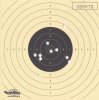

now let me be honest, this is not my project its my friends and Im just trying to help her. Told her I know where I can find them pros
Okay @ bartosimpsonio: She said Java is not allowed(?). Do you think theres a chance to realise this in C anyway?
And @ Chris22: Yes the x,y position for assigning the score values. Size maybe, for checking if a hit is only one hit or two very close ones. But she said thats not her problem, she can code that. She simply just does not understand how you can figure out that the application "identifies" the bullet holes... How it differs between blank space and a green or white (see images) area...
Again thanks for your help! Much appreciated!
thank you guys and sorry for my late reply...
first here is a target disk, but both shot at already... hope thats okay:
now let me be honest, this is not my project its my friends and Im just trying to help her. Told her I know where I can find them pros
Okay @ bartosimpsonio: She said Java is not allowed(?). Do you think theres a chance to realise this in C anyway?
And @ Chris22: Yes the x,y position for assigning the score values. Size maybe, for checking if a hit is only one hit or two very close ones. But she said thats not her problem, she can code that. She simply just does not understand how you can figure out that the application "identifies" the bullet holes... How it differs between blank space and a green or white (see images) area...
Again thanks for your help! Much appreciated!

jazzc
Elite Member
- Jan 27, 2009
- 2,964
- 13,447
http://ehm.kocaeli.edu.tr/duyuru/dosyalar/1058/Hough_Transform_SE.ppt See slides 4.2 & 4.3.
Btw, if she 's allowed to use OpenCV, it 's a trivial thing to do.
Btw, if she 's allowed to use OpenCV, it 's a trivial thing to do.
Chris22
Regular Member
- Sep 29, 2010
- 400
- 969
It should be simple enough by using an image processing library, I'm going to show you AForge.net since you asked in the C# forum
The first step is to filter out the background since the image already has a lot of circles by design, and running any old circle detection on it isn't going to work because it's going to register the target as a circle too.
The green background behind the bullet holes gives us an ideal colour to isolate, since it's quite far off from the other colours. We are going to make every colour in the image black except for colours that are close to green. I used these settings in my test:
Which gave me this:

Now that the background is gone and just the holes are remaining, the finish line is in sight. AForge has a class called BlobCounter which will detect standalone objects in an image (in our case these green dots). It also gives you a class that will let you identify the shapes of these blobs.
It's important to set the distortion limit on the shape checker, because more often than not these holes are going to be imperfect circles.
The last step is to just iterate through the blobs and do what you want with the data
Not bad for a first attempt

On the middle left hand side it detected two of the holes as a single blob, this is probably because they are just about overlapping. You need to have a look into further filtering and refine those edges more, or just make it a feature in your system.
Here's the code I used (minus the designer junk), but it should be enough to get you started
http://pastebin.com/zCbpDy99
The first step is to filter out the background since the image already has a lot of circles by design, and running any old circle detection on it isn't going to work because it's going to register the target as a circle too.
The green background behind the bullet holes gives us an ideal colour to isolate, since it's quite far off from the other colours. We are going to make every colour in the image black except for colours that are close to green. I used these settings in my test:
Code:
EuclideanColorFiltering filter = new EuclideanColorFiltering();
filter.CenterColor = new RGB(99, 170, 94);
filter.Radius = 35;
filter.ApplyInPlace(bmp);
Which gave me this:
Now that the background is gone and just the holes are remaining, the finish line is in sight. AForge has a class called BlobCounter which will detect standalone objects in an image (in our case these green dots). It also gives you a class that will let you identify the shapes of these blobs.
Code:
BlobCounter counter = new BlobCounter();
counter.FilterBlobs = true;
counter.MinHeight = 5;
counter.MinWidth = 5;

counter.ProcessImage(bmpData);
Blob[] blobs = counter.GetObjectsInformation();
bmp.UnlockBits(bmpData);

SimpleShapeChecker checker = new SimpleShapeChecker();
checker.RelativeDistortionLimit = 0.2f;
It's important to set the distortion limit on the shape checker, because more often than not these holes are going to be imperfect circles.
The last step is to just iterate through the blobs and do what you want with the data
Code:
for (int i = 0; i < blobs.Length; i++)
            {
                List<IntPoint> edges = counter.GetBlobsEdgePoints(blobs[i]);

                AForge.Point center;
                float radius;

                if (checker.IsCircle(edges, out center, out radius))
                {
                    graphics.DrawEllipse(Pens.Red,
                        (float)(center.X - radius), (float)(center.Y - radius),
                        (float)(radius * 2), (float)(radius * 2));
                }
            }
Not bad for a first attempt
On the middle left hand side it detected two of the holes as a single blob, this is probably because they are just about overlapping. You need to have a look into further filtering and refine those edges more, or just make it a feature in your system.
Here's the code I used (minus the designer junk), but it should be enough to get you started
http://pastebin.com/zCbpDy99
Wow, thank you so much!
Especially Chris22, I cant put in words how thankful I am!
Once again you showed me BHW is the best place to be online. You're the best!
I will reply with the results when she`s finished...
Have a good one all!
Especially Chris22, I cant put in words how thankful I am!
Once again you showed me BHW is the best place to be online. You're the best!
I will reply with the results when she`s finished...
Have a good one all!
Chris22
Regular Member
- Sep 29, 2010
- 400
- 969
Sorry to bother you guys but when using the source code my friend just gets errors...
Chris, could you please upload the complete project for the code above?
It's long been deleted. What are the errors?