scrapebox's crappy experience and want solutions.

Ok, I changed my tag ... but you see only 1 who checked, why hang on. I'm running 40 threads of storm proxies yet why not take this little amount ??

1wdl2Vf

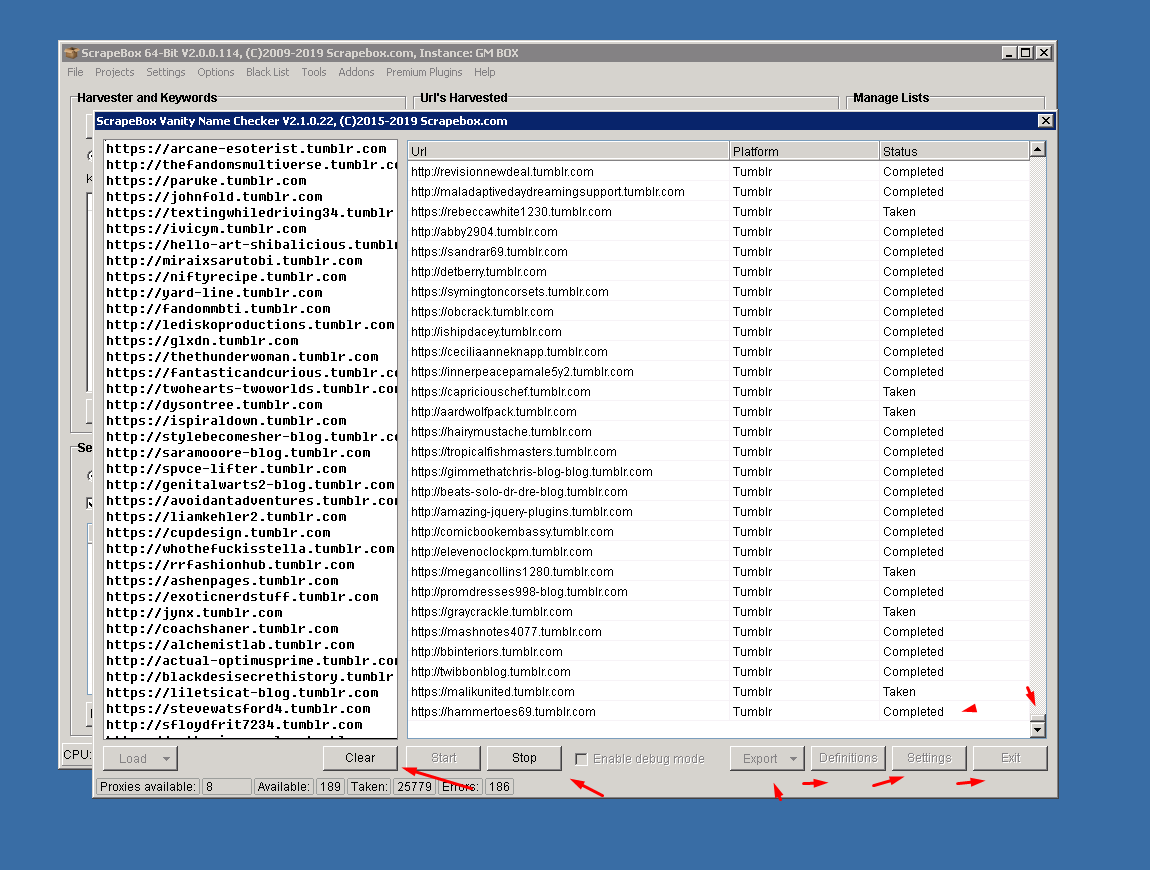
Im very confused by this screenshot and all your arrows and what you are asking?

What are you asking or saying?

The only thing I see is that sometimes it says completed and not taken/available. That means the connection completed but there was no markers that matched either taken or available so Scrapebox doesn't know which it is.

So you can try a test with no proxies on some of those domains, as its possible that tumblr is just tossing up a page about something like privacy before it lets you go to the page. In which case you don't want to use EU proxies, so ideally just USA.
 
Ok so it worked for 2 years and the problems started in the last few months, what did you change in the last few months? Is that when you started using these proxies?


If you are sending 8 to 10 million hits to the Tumblr website, that's a pretty crazy amount of traffic and what you are doing bordering on a DDOS attack. StormProxies i believe only has around 50k proxies, so you are probably single handedly banning all the proxies for the Stormproxies userbase. You may want to scale things down a bit and try dedicated private proxies.


Again, proxies make all the difference in something working or not working. Feel free to post just a single URL that ScrapeBox is getting the wrong result for so we can check.

The index checker is undoubtedly broken, it says 99% of links are not indexed, when most are.

Then you run it again, and get another 1% indexed. There are no “errors” as if the proxies are banned by Google.
 
The index checker is undoubtedly broken, it says 99% of links are not indexed, when most are.

Then you run it again, and get another 1% indexed. There are no “errors” as if the proxies are banned by Google.

The index checker is not broken. The only broken thing is the misconception that there is such a thing as indexed and not indexed.

Here is the best I can explain it.
Firstly make sure you are using the latest version of Scrapebox as google made some changes in March 2019 that broke the old index checker and they had to fix it.

Second it now uses the site: operator.


The site: operator is not like the old info: operator.


With info it seemed to access a global type data center for info, meaning that if it was a strong enough link to show up for info: it would show up in all google data centers for all googles world wide. That was the benefit of the info: operator. However google changed how the info operator worked in March of 2019.


So now they must use the site: operator. The site: operator is "weaker" if you will. It is more subjective to local google data centers and local googles. Meaning if you use a proxy from Italy it may show up as indexed. Where as a proxy from the UK may show up as not indexed and a proxy from the USA may again show indexed. If a link is very strong it will show indexed everywhere, but if a link is weaker or average it may not show up as being indexed in every data center so the geo location of the proxies/ips you are using plays a part in that perceived variance. In reality its no variance. If you put the proxy in the browser you will get the same result when using the site: operator.


When they used the info: operator people would email with the opposite issue, they would say in their local google that a url was indexed for site: but it would show as not indexed in scrapebox because we used the info: operator which was more "global" if you will and the url wasn't strong enough to make it to that "level".


Now that google changed how the info: operator works and made it so it can't be used for index checking, the next best option is site: and it’s a limitation of the site: operator that its more localized so if it’s a weaker/average url then it may show different statuses for various geographic ips/proxies.


In short google shows different results as far as indexed or not for different ips. So whatever ip/proxy your using, its going to show in scrapebox and in a browser the same indexed or not, but whether its indexed in on google data center vs another, that will vary. Scrapebox simply reports what google tells it. This is not an "issue" with scrapebox, this is simply the reality of how google works.

So if when you rerun it it has an ip that accesses a different google datacenter, then you get a different result. Thats why it appears broken, when in fact its just a misunderstanding of how google works.
 
The index checker is not broken. The only broken thing is the misconception that there is such a thing as indexed and not indexed.

Here is the best I can explain it.
Firstly make sure you are using the latest version of Scrapebox as google made some changes in March 2019 that broke the old index checker and they had to fix it.

Second it now uses the site: operator.


The site: operator is not like the old info: operator.


With info it seemed to access a global type data center for info, meaning that if it was a strong enough link to show up for info: it would show up in all google data centers for all googles world wide. That was the benefit of the info: operator. However google changed how the info operator worked in March of 2019.


So now they must use the site: operator. The site: operator is "weaker" if you will. It is more subjective to local google data centers and local googles. Meaning if you use a proxy from Italy it may show up as indexed. Where as a proxy from the UK may show up as not indexed and a proxy from the USA may again show indexed. If a link is very strong it will show indexed everywhere, but if a link is weaker or average it may not show up as being indexed in every data center so the geo location of the proxies/ips you are using plays a part in that perceived variance. In reality its no variance. If you put the proxy in the browser you will get the same result when using the site: operator.


When they used the info: operator people would email with the opposite issue, they would say in their local google that a url was indexed for site: but it would show as not indexed in scrapebox because we used the info: operator which was more "global" if you will and the url wasn't strong enough to make it to that "level".


Now that google changed how the info: operator works and made it so it can't be used for index checking, the next best option is site: and it’s a limitation of the site: operator that its more localized so if it’s a weaker/average url then it may show different statuses for various geographic ips/proxies.


In short google shows different results as far as indexed or not for different ips. So whatever ip/proxy your using, its going to show in scrapebox and in a browser the same indexed or not, but whether its indexed in on google data center vs another, that will vary. Scrapebox simply reports what google tells it. This is not an "issue" with scrapebox, this is simply the reality of how google works.

So if when you rerun it it has an ip that accesses a different google datacenter, then you get a different result. Thats why it appears broken, when in fact its just a misunderstanding of how google works.

Brother, I have been using Scrapebox for almost 10 years. I have 5 copies of it on several VPSs. I know what broken index checking looks like.

No matter if I use private, dedicate proxies or test with no proxies at all, SB does not properly check indexing. It’s not a matter of datacenters, we’re talking about links that have been indexed for months, way long enough for them to be indexed across all DC’s. SB still detects them as not indexed.

Of course I understand the site: operator is not as reliable, but it shouldn’t be hard to verify if the URL exists when using the operator. I’m not saying it’s all SB’s fault btw, it could very well be something G is doing to prevent it... but I was checking some PBN links last night that I know for a fact are indexed (tripled checked) and SB shows them as not indexed.

Well, it shows 1% as indexed. Then run again, another 1%, and so on. These are months old PBN links that have been indexed for months.
 
Brother, I have been using Scrapebox for almost 10 years. I have 5 copies of it on several VPSs. I know what broken index checking looks like.

No matter if I use private, dedicate proxies or test with no proxies at all, SB does not properly check indexing. It’s not a matter of datacenters, we’re talking about links that have been indexed for months, way long enough for them to be indexed across all DC’s. SB still detects them as not indexed.

Of course I understand the site: operator is not as reliable, but it shouldn’t be hard to verify if the URL exists when using the operator. I’m not saying it’s all SB’s fault btw, it could very well be something G is doing to prevent it... but I was checking some PBN links last night that I know for a fact are indexed (tripled checked) and SB shows them as not indexed.

Well, it shows 1% as indexed. Then run again, another 1%, and so on. These are months old PBN links that have been indexed for months.

Ok can you please post one single URL that doesnt work, every time i ask someone for just one URL nobody can supply one. You can use 3 methods of checking if a URL is indexed either using site:domain.com, just the domain or the domain in quotes ie

site:http://www.domain.com
http://www.domain.com
"http://www.domain.com"

All ScrapeBox is doing it taking the URL you load as per the option you select, entering it in to Google and reporting what Google returns.
 

Attachments

  • index.png
    index.png
    15.5 KB · Views: 4
For almost 2 years I have never dealt with the crap that I've been scrapebox. Everything was fine in the last few months !! But as soon as the problem started ...

The two problems I have to face the most are:
◘ scrapebox verify checker
◘ Index Checker


Previously I could check around 8-10 million Tumblr simultaneously with the scrap box verify checker without any problems. But it's been a while since I've been able to do it anymore, mainly since their new version works just fine...

I can't solve it in any way ...:weep::weep:

I have talked to them many times about this, but they cannot give a proper way. Or any solution.

On top of that, I think their Google Index Checker tool does not work at 1%.

The reason is that if I check here manually, then its result shows all the opposite.

I use these tools to run Paid Proxy https://stormproxies.com/ Service and High-Speed RDP Server https://www.cheapseovps.net/ :devil::devil:

I am not recommending it to anyone else because they cannot solve my own problem.

Please if anyone can solve these problems. Would be very beneficial to me. I know there is an admin of scrapebox here! But I am telling him but he could not give any solution.
Then you help me ...

Dude, You could have reached to loopline or sweetfunny directly here[you didn't]. These guys are pretty much responsive on BHW.
Always reach to the product support directly before posting anything crap. :)
 
im sorry but

8-10 million Tumblr

jfl what a spammer

how did you scrape 8 million?


also maybe your SB is freezing because you add too many urls? i had it happening with certain addons

just add less urls? and set less threads. 8 proxies for 20k tumblrs will get them temporarily banned instantly.
 
Brother, I have been using Scrapebox for almost 10 years. I have 5 copies of it on several VPSs. I know what broken index checking looks like.

No matter if I use private, dedicate proxies or test with no proxies at all, SB does not properly check indexing. It’s not a matter of datacenters, we’re talking about links that have been indexed for months, way long enough for them to be indexed across all DC’s. SB still detects them as not indexed.

Of course I understand the site: operator is not as reliable, but it shouldn’t be hard to verify if the URL exists when using the operator. I’m not saying it’s all SB’s fault btw, it could very well be something G is doing to prevent it... but I was checking some PBN links last night that I know for a fact are indexed (tripled checked) and SB shows them as not indexed.

Well, it shows 1% as indexed. Then run again, another 1%, and so on. These are months old PBN links that have been indexed for months.
Ive used scrapebox since the beginning too and have it on more then a dozen VPS. I hear you, but you hit the nail on the head, but I don't think you realized it. Here let me quote you

we’re talking about links that have been indexed for months, way long enough for them to be indexed across all DC’s.

Thats exactly it, it doesn't matter if they have been "indexed" for years, that doesn't mean that today they will be indexed across all DCs.

The Geographic region of the ip now redirects to its own google and google no longer just flat indexes all links across all DCs, they only index the links for a given DC that it thinks are relevant for that DC.

That or they only display that information, Im sure they "know" about it but whether or not they display it is different, and scrapebox can only go by what is displayed.

So while they may have previously indexed across all googles/DCs that is not the case today, is what Im saying. Its just not. Thats why I said its a misconception that its as simple as indexed or not indexed, its not that simple these days, because some links that are indexed in some googles may never be "indexed" - and by indexed I mean displayed when searched for - in other googles/DCs.

None the less, as Sweetfunny said, if you can post just 1 url that does this consistently, then they can look at it. But Ive fielded this exact same question dozens of times, much of which was here on BHW, and in 100% of cases it has been a google/DC not showing it as indexed, most often due to various GEOs of ips. Not yet have I seen a single url that with the same ip will go from indexed to not indexed.

But if you can post such, then of course they have been working on Scrapebox 365 days a year, and even 366 on leap year, for 10 years now, so I know SweetFunny always puts 100% in. So just need an example url that varies with the same IP. Not a url that varies when you use different ips.

So test with either only 1 proxy or no proxies.
 
Im very confused by this screenshot and all your arrows and what you are asking?

What are you asking or saying?

The only thing I see is that sometimes it says completed and not taken/available. That means the connection completed but there was no markers that matched either taken or available so Scrapebox doesn't know which it is.

So you can try a test with no proxies on some of those domains, as its possible that tumblr is just tossing up a page about something like privacy before it lets you go to the page. In which case you don't want to use EU proxies, so ideally just USA.

My main problem is vanity checkers:
==

Previously I could check with 1 million URL vanity checkers together without any problem.

But now I can't check even 3,000 at a time.

When I give Vanity Checker 1-2 lakhs or more at a time, it hangs at when 8-20%, and doesn't work, what could be the reason for this ??

I have disabled my antivirus, I use the new version, I use StormProxy's rotating proxy, I have changed my RDP.. but problem do not solve yet....

and This is my main problem .. can you please tell me How can i check 1-2 million URL at a time ?

It is mentioning that I have previously checked 1 to 2 million URL using Rotation Proxy without any problem.
 
My main problem is vanity checkers:
==

Previously I could check with 1 million URL vanity checkers together without any problem.

But now I can't check even 3,000 at a time.

When I give Vanity Checker 1-2 lakhs or more at a time, it hangs at when 8-20%, and doesn't work, what could be the reason for this ??

I have disabled my antivirus, I use the new version, I use StormProxy's rotating proxy, I have changed my RDP.. but problem do not solve yet....

and This is my main problem .. can you please tell me How can i check 1-2 million URL at a time ?

It is mentioning that I have previously checked 1 to 2 million URL using Rotation Proxy without any problem.
So it worked before and it doesn't work now. Something changed. Scrapebox is the same, so what else changed?

Based on your statement of that it hangs it sounds like locked threads. Ill put more info on locked threads from scrapebox support below, however you should note disabling security software does nothing to solve it really. Because that just stops new rules from forming, but it allows existing rules to still fire.

you have totally whitelist in security software or you have to uninstall security software.

A simple test for you is to restart scrapebox in safe mode with networking. Does it work?

from support:

That means that something has locked 1 or more of the threads. This can be security software such as anti-virus, malware checkers and firewalls. So you should whitelist scrapebox in all security software and then you can whitelist the entire scrapebox folder as well.

Further any program that accesses the internet can lock threads, things like skype, utorrent etc… So you can try closing down any unneeded programs. Then if its working you can turn programs back on 1 by 1 to find the culprit.

Further computer optimization software can lock threads so you can shut any such software down.

Take note that disabling security software (such as anti-virus, malware checkers and firewalls) often only stops new rules form forming, but allows existing rules to still fire. So you have to fully whitelist in the security software or uninstall the security software(as a test).

Further some security softwar requires you to whitelist in more then one place before it takes effect.

Also note that disabling a router firewall, does actually fully disable it.


Basically you have to sort out what is locking the threads, because scrapebox is forced to wait until all threads are released. On occasion it can be your operating system that does it, so you can try restarting your machine and/or lowering total connections.

One other thing to note is that this can happen with proxies that keep returning small amounts of data, it won't trigger the timeout because teh connections is still active. So try a test using no proxies or make sure you are using some quality private proxies.

Lastly if your running mac, you can try lowering the connections. Mac has terrible error handling when it comes to lots of errors stacking up quickly. So if there are too many errors stacking up too quick mac can choke, so lowering the threads fixes this. This is a non issue on windows.


Could be the proxies too, try storm proxies 15 minute proxies, do they work better? If you have some fully private proxies you can try those.


Important note:
Some like tumblr etc.. are no giving splash screens of GDPR notice when you use an ip from a EU country. So using storm proxies and not knowing the geographic region of the ip can result in the vanity checker simply saying "completed" but not saying taken or avaialble. This is not the fault of the vanity checker, there is no way around the splash page, so the solution is use proxies not from the EU or any region giving the splash screen. USA works fine.
 
if you see my thread about attempting to post 3.4 million comment backlinks, well that worked fine :)
I use stormproxies and never had a problem.

But my pro tip for massive scrapes & SB runs is this :

Use the split function and take the huge files down to a manageable size.
I use the split files with automator following @loopline 's tutorials and have it running for days at a time without a problem.
Plus if SB crashes (and it does now and then) you can check the logs and see at which file it failed, so you don't have to re run the huge file from the beginning.

Image not found: OA5Td6d


Image not found: 1HSHd8d
 
Use only proxies outside EU OP.

At least you can check how tumblr works in real life, before pointing fingers at scrapebox.
If you have proxies from EU, the first page on any tumblr will be a huge ass page with GDPR notice.
 
See the post directly above yours
Yes, saw it. I have US proxies from buyproxies.org. Just asked them to replace them, will check again then.

Any tips for the settings? I tried it slow with just 1 connection and a timeout of 5. All results were on "completed". Then I tried 70 connections, started again and some were shown as taken. Shouldn't it be more accurate, when I do it slowly? Kinda confused.
 
Yes, saw it. I have US proxies from buyproxies.org. Just asked them to replace them, will check again then.

Any tips for the settings? I tried it slow with just 1 connection and a timeout of 5. All results were on "completed". Then I tried 70 connections, started again and some were shown as taken. Shouldn't it be more accurate, when I do it slowly? Kinda confused.
Yes in theory it should be better on slow, but it depends on the issue. Go into the definitions section in the addon and there is an option to download the latest definition files. Do that, your definition file may be out of date.
 
Back
Top