Scrapebox new browser based scraper has stopped working

mancunian

Regular Member
Jr. VIP
Joined
Jan 26, 2010
Messages
430
Reaction score
109
Upgraded Scrapebox to the latest version which now uses a browser to scrape Google due to javascript requirement.
It worked for a short while ( 1 hour) but then stopped launching the browser altogether when starting up again later that day ?!

This means the Rank Checker/ Scraper does not work at all.

Various errors have appeared

e.g. OSError: [WinError 14001] The application has failed to start because its side-by-side configuration is incorrect

and sometimes permission errors.

I did move some directories around from an old install but even completely fresh installs do not work. It is running with not the latest version of Chrome but it definitely worked on this version to start with and I have checked that the version of chromedriver.exe is correct

Not heard back from Support and would appreciate others advice/opinion please. Thanks in advance
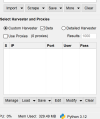
 
It's working for me right now. I am able to scrape google with chrome browser. You need to check the beta box next to custom harvester. Then press harvest. A harvester dialogue box will pop up as usual, but it is a new harvester dialog box with SE options.

beta box.png

harvester.png
 
Thank you for your assistance.

I just receive prompts to install a Chrome browser. It is already installed and was working previously for an hour or so. I suspect it is something to do with chrome driver.

I will hack around and see where the path to the Chrome installation is stored in ScrapeBox code as it may need editing.

I have to say Support is not swift to reply.
 
Thank you for your assistance.

I just receive prompts to install a Chrome browser. It is already installed and was working previously for an hour or so. I suspect it is something to do with chrome driver.

I will hack around and see where the path to the Chrome installation is stored in ScrapeBox code as it may need editing.

I have to say Support is not swift to reply.
Did you try uninstalling chrome and reinstalling?

In my experience support usually replies within 12-24 hours to a ticket. Just got to be patient with this. My install of scrabebox is still scraping so I’m not convinced this is an issue with scrape box
 
Thank you for your assistance.

I just receive prompts to install a Chrome browser. It is already installed and was working previously for an hour or so. I suspect it is something to do with chrome driver.

I will hack around and see where the path to the Chrome installation is stored in ScrapeBox code as it may need editing.

I have to say Support is not swift to reply.
Yeah its working for me too.

I would

1 - restart your machine to make sure your working fresh

2 - download a fresh copy and install to a new location. Ensure that its a folder on your desktop or a folder in your documents folder AND that its not in the cloud. One drive loves to put these locations in the cloud.

3 - To my knowledge, all files are portable and contained in the scrapebox directory, so as long as you let scrapebox install everything it needs to it should work.

That said, that assumes your on windows. If your mac, thats a different ball game.
 
Did you try uninstalling chrome and reinstalling?

In my experience support usually replies within 12-24 hours to a ticket. Just got to be patient with this. My install of scrabebox is still scraping so I’m not convinced this is an issue with scrape box

Yes I think you are correct.

  • 64-bit Windows (Default since 2020): C:\Program Files\Google\Chrome\Application\chrome.exe MOVED TO HERE

  • 64-bit Windows (Older Installations): C:\Program Files (x86)\Google\Chrome\Application\chrome.exe AND HERE

  • User's Local AppData: %LocalAppData%\Google\Chrome\Application\chrome.exe WAS HERE
Now the Rank Checker Beta works after the location was changed (and you can see the browser open if you want to) but the Scraper and other functions requiring a Browser e.g Indexed checker still states to install Chrome?!

I have done fresh installs in Documents directory. and I am on Windows.
 
Yes I think you are correct.

  • 64-bit Windows (Default since 2020): C:\Program Files\Google\Chrome\Application\chrome.exe MOVED TO HERE

  • 64-bit Windows (Older Installations): C:\Program Files (x86)\Google\Chrome\Application\chrome.exe AND HERE

  • User's Local AppData: %LocalAppData%\Google\Chrome\Application\chrome.exe WAS HERE
Now the Rank Checker Beta works after the location was changed (and you can see the browser open if you want to) but the Scraper and other functions requiring a Browser e.g Indexed checker still states to install Chrome?!

I have done fresh installs in Documents directory. and I am on Windows.
I’m using windows server. I don’t think that would make a difference.

Do what loopline said to do. That’s probably as much as anyone will be able to help with this issue until support gets back to you.
 
I would recommend everyone using the current version of Scrapebox and their new beta Chrome-based harvester engines, to keep an eye on your VPS memory usage - I'm seeing it ramp up over a few days of use, so I suspect there are some memory leaks, and lots of unclosed instances of Chrome.
 
UPDATE

It is clear ScrapeBox does not like older versions of chrome re scraping and cannot find them. Sometimes older versions are required/ prefered for a variety of reasons but I could only get the Rank Checker Beta to work on older versions.

For scraping and other browser based activity I had to use the latest version of Chrome.

I think that loading 1 browser at a t time is very slow but I understand why. Maybe future releases could utilise multi tabs/ browsers subject to memory constraints and the number could be chosen by the user to suit there needs.

However ScrapeBox has done well to update quickly re recent significant Google changes.
 
Back
Top