ScrapeBox: How do you stay organised?

muchacho

Supreme Member
Joined
May 14, 2009
Messages
1,294
Reaction score
189
I'm trying to get a system going to keep myself organised with Scrapebox.

With lists being moved from folder to folder, I'm wanting to have a flowchart type of system/plan for creating AA lists, where stage 1 is Havesting and it goes through to test posting, link checking, proper test (blog, money site etc). So I know at which stage each URL list is.

I'm wondering if anybody could kindly share their plan, such as how many instances you use; what each instance does; the order from start to finish you do.

I'm finding myself sometimes confused which url list has come from where and what I've already done and still need to do - especially after coming back to it the next day.
 
Here's what I have done:

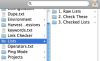
I created a "Lists" folder on my desktop.
In it I have 3 subfolders:

attachment.php


1. Raw Lists
Here are all my raw lists downloaded from BHW, other places, or just raw scrapes

2. Check These
In this folder, I maintain 'processed lists', ie, dups removed, blog analyzer passed etc etc..

3. Checked
Lists ready to blasted off :D

Maybe this can help you.
 

Attachments

  • Screen shot 2011-06-05 at 8.44.31 PM.png
    Screen shot 2011-06-05 at 8.44.31 PM.png
    39 KB · Views: 144
TheMatrix's solution is similar to what I use combined with an Excel spreadsheet with all of my backlinking plans.

I wish someone would build a scheduler for Scrapebox to make the whole process easier.
 
I'm probably over complicating it.

What I currently have as folders is:

Keyword Lists - These are ones I run through when harvesting, with a custom footprint.

Harvested URLs - Obviously lists of what Scrapebox harvested, from the keywords; or, lists I've got from forums. These are all ones which I haven't done anything with yet.

Test Blasts - Lists of URLs which I'm going to do a test blast with. Inside this is a Checked Links folder - which I move to once I've done a link check. I then save the links found as a mini AA list and move it to a folder called 'Auto Approve Lists'

Proper Blasts - Lists which I'll blast to with my money site / article etc

Auto Approve Lists - I save files here after I've done a link check, as I know the ones found are AA. With these I then do 1) Competitor backlink check, from all other sites on these lists and 2) Find out all URLs on the root domain, to find other blog posts on that domain.ext

Master Auto Approve Lists - These are lists that I've finished with and can be used for other websites in the future.


I've now created an excel spreasheet: Along the top will have each step, down the left will be the name of the file which will be worked on. This way I can note when each Blog List has done each stage.

Any suggestions?
 
I have a folder full of harvested or untested urls, which are broken into 100k lines each. For each one I create a new folder inthe big folder for 100k file where I store all the posts, fails, and finally livelinks found.

So...

FOLDER: NEW URLS
urls1.txt
urls2.txt
urls3.txt
FOLDER: 1
posted1.txt
posted2.txt
fail.txt
LL found.txt
FOLDER: 2
posted1.txt
etc.

I will also have a folder for all the AA lists I pick up from other places

FOLDER: NEW AA LISTS
21k AA.txt
100k AA. txt
FOLDER: 21k
posted1.txt
etc.


And lastly I have a folder for all of the auto-approved files that I found, which is my own verified AA list. I would combine all the live links I found above and make a copy here.
 
I have a folder full of harvested or untested urls, which are broken into 100k lines each. For each one I create a new folder inthe big folder for 100k file where I store all the posts, fails, and finally livelinks found.

So...

FOLDER: NEW URLS
urls1.txt
urls2.txt
urls3.txt
FOLDER: 1
posted1.txt
posted2.txt
fail.txt
LL found.txt
FOLDER: 2
posted1.txt
etc.

I will also have a folder for all the AA lists I pick up from other places

FOLDER: NEW AA LISTS
21k AA.txt
100k AA. txt
FOLDER: 21k
posted1.txt
etc.


And lastly I have a folder for all of the auto-approved files that I found, which is my own verified AA list. I would combine all the live links I found above and make a copy here.

Not a bad idea... and then you can delete the folder once you've worked with the list and amended your AA list.

What I'd also do is perhaps have a Master AA and a normal AA list... with the normal AA list you do 2 things:

1) Look for all URLs on that domain. If one blog post is AA the chances are, any other blog posts it has will also be
2) Check the spammer's backlinks and test blast all those

You can get loads simply by doing the above 2 without actually harvesting from scratch yourself.
 
My Scrapebox Workflow goes something like:

Keyword Harvest > Split KW List > Move to Harvester

Harvest > Remove Duplicate URLs > Save Split List (50,000ea)

Load in Commenter

Posted > Save Posted.txt > Link Check > Posted OK > Save AAList#.txt

Failed > Save Failed.txt > Repost > Repeat 3 Times


I keep it organized in folders by work step. I actually have a large hand drawn schematic I use when building good lists but I won't share it here just now.
 
I do use standard way just with folders and notepad stuff :)
 
Back
Top