Run a PHP based app on Windows 10

Roger Marquez

Elite Member
Joined
Apr 17, 2017
Messages
5,123
Reaction score
7,820
Hi there, I would like to run a CRM app locally on my PC.

Can I create a PHP environment on my Windows and run it or do I have to run it through a hosting server provider?

Thanks!
 
Yes you can. You will need to install a web server and PHP.
 
For really fast setup i will recommend you https://laragon.org/
It is a one-click set and go. No hustle or much errors, also you get pretty URL's which I love.
I'm usually running on this when I'm on my Windows PC (the one I'm usually on, really not fan of a laptop and there's my Linux)
 
XAMP or WAMP will work. They're two different attempts to run LAMP stack locally on your computer.

I moved away from XAMPP because they started bloating it with other crap like bitnami.
 
For really fast setup i will recommend you https://laragon.org/
It is a one-click set and go. No hustle or much errors, also you get pretty URL's which I love.
I'm usually running on this when I'm on my Windows PC (the one I'm usually on, really not fan of a laptop and there's my Linux)
Will look into it, thanks!
XAMP or WAMP will work. They're two different attempts to run LAMP stack locally on your computer.

I moved away from XAMPP because they started bloating it with other crap like bitnami.
WAMP installer is 454mb and XAMP is 160mb and, you say XAMP is more bloated?
 
WAMP is only for windows, weights 3x times more and you say is less bloated than XAMP?
 
Ok, I install WAMPP because I found a couple of videos on YouTube and I thought it was supposed to be easy. Now, I have MySQL and Apache both running and don´t know what to do next.
 
Navigate to C:\wamp\www or C:\wamp64\www on the explorer and then place your project folder there.

Once done, run Wamp. Once it shows all green icon on the taskbar, open up a browser and go to 'localhost' or '127.0.0.1'

it should show a dashboard with folders in the 'www' folder. Then you click the folder you want to run.

If it doesn't need a database, it should run as it is. If it needs a database, you will have to create it with phpmyadmin
 
Ok, I install WAMPP because I found a couple of videos on YouTube and I thought it was supposed to be easy. Now, I have MySQL and Apache both running and don´t know what to do next.
Sorry, I mean XAMPP...Does this change anything?

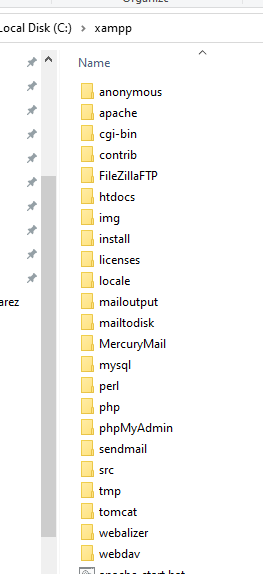
Already looked inside the folder and there´s no www folder in it

Would you recommend WAMPP or XAMPP?
 
Sorry, I mean XAMPP...Does this change anything?

Already looked inside the folder and there´s no www folder in it

Would you recommend WAMPP or XAMPP?
Depends where you installed it, that's the default location. No, I think they are both the same structurally.
 
Depends where you installed it, that's the default location. No, I think they are both the same structurally.
It´s in fact installed on C:

f248aba931769b68da5796126c31102e.png
 
Hi there, I would like to run a CRM app locally on my PC.

Can I create a PHP environment on my Windows and run it or do I have to run it through a hosting server provider?

Thanks!

php based crm is sugarcrm or suitecrm. are you using one of these 2 or something else?
 
It´s in fact installed on C:

f248aba931769b68da5796126c31102e.png
LAMP ,WAMP, XAMPP, doesn't matter much, whatever have you downloaded is just a GUI to start an Apache server along with MySQL database and PHP
If all lights are green, your files go into /www or /htodcs and if it's all ok, you should see them navigating to localhost in browser.
For starters, don't copy the whole project randomly in there. Create new text file, paste this inside:
Code:
<?php

// Show all information, defaults to INFO_ALL
phpinfo();

// Show just the module information.
// phpinfo(8) yields identical results.
phpinfo(INFO_MODULES);

?>
Save as phpinfo.php , place it in htodcs (as per your screenshot), open some browser and go to http://127.0.0.1/phpinfo.php
You should see information related to PHP.
If not, read more on the site where you downloaded WAMP, XAMPP or whatever you got there
 
Back
Top