

Massacre
Power Member
- Apr 1, 2012
- 782
- 322
Hi,
I have a strange issue with ahrefs and not only (Yandex Webmaster acts strange as well) which is causing the errors of TIMEOUT issue in ahrefs reports and other strange things (Yandex webmaster says it cannot access the robots.txt at all), so decided to ask - maybe someone can help here as I cannot find an issue.
These are the main issues - Ahrefs shows for my 14 pages TIMEOUT error - even though those pages are very well accessible (I have tested them numerous times through different devices as well as browsers). I think it somehow has to be associated with the robots.txt which is giving erronoeus results.
Additionally, not only Ahrefs, but Yandex Webmaster gives these errors that robots.txt does not allow fully to index the website.
Can anyone who knows these things help, please? I will highly appreciate any tips to get this fixed.
One additional thing to know is that website was recently moved from one host to another. While moving, it was first moved to HTTP (without SSL) version (migration stupid issue by host), and then I manually activated SSL and changed all links to HTTPs. But it has been done around a month ago. There are no HTTP links left indexed anywhere. Also, all links are forced to HTTPS.

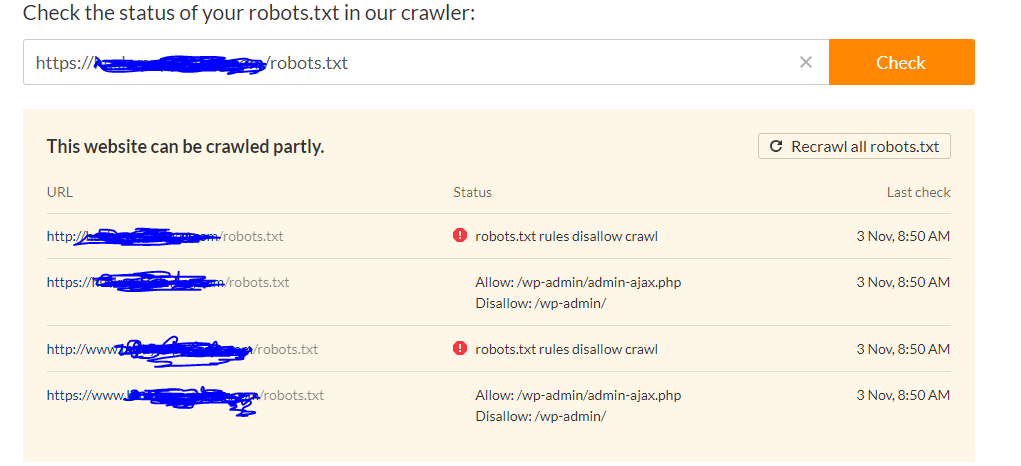
These is the status of the robots.txt when I check it. Both HTTP as well as HTTPS is accessible. Additionally, not sure why it says that robots.txt rules disallow crawl for HTTP only - below you can see that there are no such rules.
Sitemap file itself is this (nothing special):
can anyone help, please? Thanks
I have a strange issue with ahrefs and not only (Yandex Webmaster acts strange as well) which is causing the errors of TIMEOUT issue in ahrefs reports and other strange things (Yandex webmaster says it cannot access the robots.txt at all), so decided to ask - maybe someone can help here as I cannot find an issue.
These are the main issues - Ahrefs shows for my 14 pages TIMEOUT error - even though those pages are very well accessible (I have tested them numerous times through different devices as well as browsers). I think it somehow has to be associated with the robots.txt which is giving erronoeus results.
Additionally, not only Ahrefs, but Yandex Webmaster gives these errors that robots.txt does not allow fully to index the website.
Can anyone who knows these things help, please? I will highly appreciate any tips to get this fixed.
One additional thing to know is that website was recently moved from one host to another. While moving, it was first moved to HTTP (without SSL) version (migration stupid issue by host), and then I manually activated SSL and changed all links to HTTPs. But it has been done around a month ago. There are no HTTP links left indexed anywhere. Also, all links are forced to HTTPS.
These is the status of the robots.txt when I check it. Both HTTP as well as HTTPS is accessible. Additionally, not sure why it says that robots.txt rules disallow crawl for HTTP only - below you can see that there are no such rules.
Sitemap file itself is this (nothing special):
User-agent: *
Disallow: /wp-admin/
Allow: /wp-admin/admin-ajax.php
Sitemap: https://WEBSITE.COM/sitemap_index.xml
can anyone help, please? Thanks
