Restoring a noindex 'd small business website

AussieLocalSEOGuy

Regular Member
Joined
Jan 6, 2013
Messages
251
Reaction score
112
(Correction: GSC rather not 'GSO')

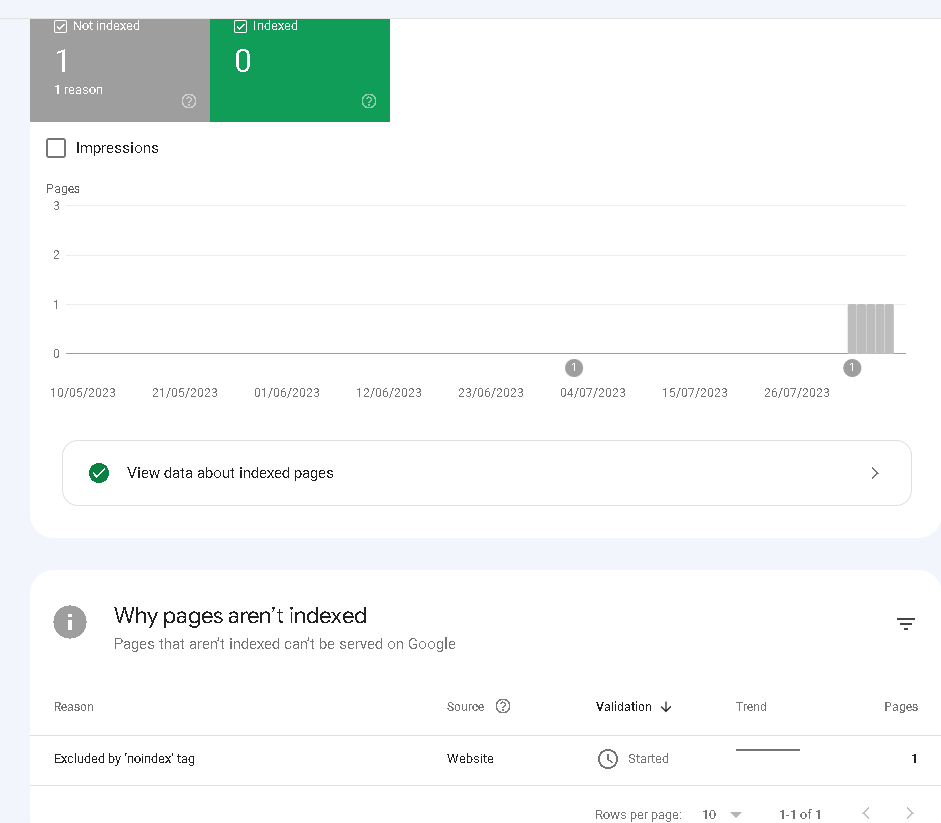
I took over a local paint shop business website for marketing and noticed the wordpress website was set to 'Do not allow search engines to crawl'. After turning this off about a week ago, and then creating sitemap.xml and linking it through to Google search console, it's still not apparent that the home page is crawled, nor the sitemap.xml , in fact 0 pages are indexed according to GSO, however some pages of new content and old content are found in the web search results. But those Google web search indexed pages don't appear in the GSO URL inspection. This is super confusing I dunno what's going on!

I checked the home page source code and there is no mention of any 'noindex' tag. The GSO says the indexing has: Started
Do I just have to wait more time?

TLDR;
The wordpress plugin AIOSEO is connected to the GSO, it shows a tick.

The Google web search returns 0 results on
site:millenniumabrasives.com.au sitemap


And I can't find the home page indexed in either GSO or GWS, but a bunch of other content pages are on the GWS;
site:millenniumabrasives.com.au home

1691482052466.png
 
Last edited:
I searched your site, and it looks to be indexed: site:millenniumabrasives.com.au (approx. 200 results). Give WMT more time to update the stats (24/48/72 hours).
Thanks mate. Yes there are many pages in search, but i dont think the home page is there, nor the sitemap, and all those pages that are there, are coming up as not indexed in the GSO console. Which makes me wonder if the console link is broken or if google is still catching up a week later .
 
Thanks mate. Yes there are many pages in search, but i dont think the home page is there, nor the sitemap, and all those pages that are there, are coming up as not indexed in the GSO console. Which makes me wonder if the console link is broken or if google is still catching up a week later .
Homepage is there, too. If there is no "no-index" tag anymore, you should not worry about.

Try to search from incognito, or from a clean browser.
 
I'm a little worried as it's been maybe 10+ days since removing the 'no index' tag.
In the screenshot, it shows the GSC has progressed to now verifying 'page with redirect' (not sure why as that should never have been an issue).
It's true the home page and many pages are actually in google search, but none of them return true on the GSC URL Inspection and I'm not seeing any rankings in the SERPs via my trackers.

Do I need to just wait longer?
This business listing was orignally in a terrible state, the shop had moved to a new location but hadn't even updated google maps to the new shop location, so it had been marked as permanently closed , plus with the original 'no index' tag, it was pretty much impossible to find.

1691723411834.png
 
I got an update from google;
They are failing the website based on Page redirect ... what on earth would cause that? It's a pretty vanilla wordpress setup for a business.

Redirect checks:
CONGRATULATION. Everything seems to be fine.
https://millenniumabrasives.com.au/200 OK


1691988597255.png
 
Last edited:
The GSC is showing 0 pages are indexed (even though many pages are actually in Googles search results).

1691989239826.png
 
remove all pages within GSC with site paramter as "/ "
this removes all pages from main domain within 4-5 days.
Now let googlebot recrawl your site by submitting it through URL inspection too.
 
Update: yeah it's just doing the same thing after I readded it, but I misunderstood your post - the pages neeed to be removed, then let google reindex them. It's not obvious to me how to do this without permanently removing them. I might try to find someone I can hire to do this. Any suggestions welcome?


Thanks Jenny, that's interesting.... I've added the site again, but left off the "/" at the end. (I've been using the URL prefix method - rather than domain - to add it).
It's changed the logo on this second instance of adding it, to the correct site icon logo, I haven't removed the old one. But maybe the new logo means it's got a better connection now?
Even though the screeenshots shows it with the "/" , I didn't use that character when adding it.

1691994073832.png
 
Last edited:
None of this makes much sense to me , in terms of the google error messages being given, and the lack of indexed pages. It's over my head (if the problems are leaking into http requests, GSC expertise) . Any suggestions of someone who i can hire to do this would be much appreciated?
 
Wow Google giving a list of Problems
 

Attachments

  • Screenshot_20230816_143215_Gmail.jpg
    Screenshot_20230816_143215_Gmail.jpg
    399.6 KB · Views: 30
Back
Top