

tritina
Regular Member
- Dec 4, 2011
- 234
- 127
Hello again,
After my first post was taken down for apparently non appliance to affiliation rules WITHOUT any notice, I repost the same content (Thanks to Apricot) removing those af links and adding current earnings.
Here is the cache of the first thread (minus the "Porn Syndicate" and some precious "blue members" participations) : https://webcache.googleusercontent....kills-required.html+&cd=1&hl=en&ct=clnk&gl=us
It has been a while since I started any thread. The method is simple :
- Dailymotion accounts
- Traffic Exchange accounts
- VPS (optional)
You'll be getting at least $2/day using this method, running it from home with 1IP !
Setting up your Dailymotion Account:
It's pretty easy to make a Dailymotion account and more easier to monetize it. Just follow these steps:
Start here : http://dailymotion.com/monetization


Don't forget to confirm your email.

That's it, you are a Partner with Dailymotion. You can get paid once you reach $100 via Paypal or Payoneer.
You can make as many as accounts you want from 1 IP but you better not abuse it.
Now you can upload some videos. Either re-upload from Youtube using www.clipconverter.cc or make your own videos. You will have to respect these limits:
Dailymotion has 3 upload methods:
Traffic Exchange accounts:
Sign up for as many TE sites as you can, here is a list of the ones I recommend:
I'm testing some other ones, I will be posting them soon.
VPS
Getting a VPS is optional but recommended. You can still run the traffic exchange viewers (in browser or with their apps) on your pc at home. You will need a VPS with a good CPU and enough RAM to keep all your tabs open without crashing the browser. I prefer using Linux over Windows and I know most people aren't familiar with Linux so I'll be posting a tutorial with all the necessary steps to setup your box.
The cheapest one right now is from Arubacloud (1core, 1G Ram, 20G SSD, 2TB BW): https://www.arubacloud.fr/vps/offres-serveur-prive-virtuel.aspx it only costs 1? ~ $1.09 (with paypal fees). For Arubacloud, you won't be able to change you OS, so pick wisely (I recommend Ubuntu 14.04 32bits).
You will have to contact the support before ordering and provide your id that way you won't pay the VAT (if you are outside of the EU). Also, make sure to enter your correct phone number and in case you don't receive your password on it, contact the support (they are not available after 4pm GMT+1).
Setting up your VPS (for Ubuntu 14.04)
You'll need PuTTy (windows) to access your VPS : http://the.earth.li/~sgtatham/putty/latest/x86/putty.exe for Linux and Mac users, you can just ssh from your terminal.
Then do this :
Install X, desktop, VNC programs
Start Tightvncserver to create the config files.
Stop VNC
Edit startup file
Add this at the end of the file
(if you are using vi, press INSERT, paste the line then press ESC + :wq! and Enter to save the file)
(to paste on PuTTY, press "right click")
Start VNC
To access your VNC use RealVNC : http://www.realvnc.com/download/viewer/ and enter YOUR_IP:5901 with the password your entered earlier.
Install Firefox
or Install Chromium (not chrome)
The more TE sites you use and more VPS you run, the more you will earn, it's a matter of quantity and really not quality.
Bonus : Using proxies (Windows)
N.B : This requires a lot of CPU & RAM, do not use proxies on low specs machines (home pc or VPS) instead, get more VPS.
In case some of you have a some private (or maybe shared) proxies, check (or not, this is BHW) with your provider to see if they allow TE.
You'll be using Firefox, install the full version : https://www.mozilla.org/en-US/firefox/new/
Follow these steps to create/change the Firefox profiles : https://support.mozilla.org/en-US/k...refox-profiles#w_starting-the-profile-manager and don't forget to un-check "Use the selected profile without asking at startup".
To change the proxy settings, follow these steps :
- Go to Settings Advanced
- Network
- Under connection, click on Settings

Make a spreadsheet with the names of the profiles, the Traffic Exchange accounts and the assigned proxies to stay organized.
Open as many Firefox instances as you can (depends on the number of proxies), login to 2 or 3 traffic exchange sites per browser (make sure not to use the same accounts on more than 2 proxies).
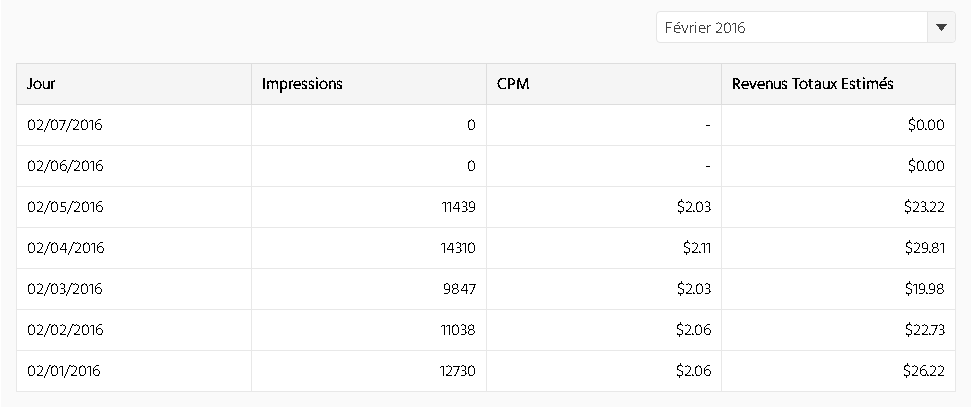
Last thread's earning screenshot:
Tip : If you need disposable emails, use : http://temp-mail.org/en/
Tip : Do not abuse the referral between your OWN accounts or you'll get banned.
Tip : If you are going to send a lot of views (over 500k) divide them between 2 or 3 accounts.
If you have any question, don't hesitate to ask (please, if you are just going to hate and criticize without any valid argument, think about the bandwidth and storage space you're about to waste, think, it shouldn't be that hard).
After my first post was taken down for apparently non appliance to affiliation rules WITHOUT any notice, I repost the same content (Thanks to Apricot) removing those af links and adding current earnings.
Here is the cache of the first thread (minus the "Porn Syndicate" and some precious "blue members" participations) : https://webcache.googleusercontent....kills-required.html+&cd=1&hl=en&ct=clnk&gl=us
It has been a while since I started any thread. The method is simple :
Dailymotion + Traffic Exchange = $$$
What you need :- Dailymotion accounts
- Traffic Exchange accounts
- VPS (optional)
You'll be getting at least $2/day using this method, running it from home with 1IP !
Setting up your Dailymotion Account:
It's pretty easy to make a Dailymotion account and more easier to monetize it. Just follow these steps:
Start here : http://dailymotion.com/monetization
Don't forget to confirm your email.
That's it, you are a Partner with Dailymotion. You can get paid once you reach $100 via Paypal or Payoneer.
You can make as many as accounts you want from 1 IP but you better not abuse it.
Now you can upload some videos. Either re-upload from Youtube using www.clipconverter.cc or make your own videos. You will have to respect these limits:
- 96 uploads per day
- 2 hours of video per day
- 60 minutes per video
Dailymotion has 3 upload methods:
- Directly on the website : http://www.dailymotion.com/upload or the basic uploader : http://www.dailymotion.com/upload-basic
- Using the mass uploader : http://www.dailymotion.com/ma/extras/mass_uploader
- Using the API : https://developer.dailymotion.com/api#upload-publish-video and the PHP SDK : https://github.com/dailymotion/dailymotion-sdk-php
Traffic Exchange accounts:
Sign up for as many TE sites as you can, here is a list of the ones I recommend:
I'm testing some other ones, I will be posting them soon.
VPS
Getting a VPS is optional but recommended. You can still run the traffic exchange viewers (in browser or with their apps) on your pc at home. You will need a VPS with a good CPU and enough RAM to keep all your tabs open without crashing the browser. I prefer using Linux over Windows and I know most people aren't familiar with Linux so I'll be posting a tutorial with all the necessary steps to setup your box.
The cheapest one right now is from Arubacloud (1core, 1G Ram, 20G SSD, 2TB BW): https://www.arubacloud.fr/vps/offres-serveur-prive-virtuel.aspx it only costs 1? ~ $1.09 (with paypal fees). For Arubacloud, you won't be able to change you OS, so pick wisely (I recommend Ubuntu 14.04 32bits).
You will have to contact the support before ordering and provide your id that way you won't pay the VAT (if you are outside of the EU). Also, make sure to enter your correct phone number and in case you don't receive your password on it, contact the support (they are not available after 4pm GMT+1).
Setting up your VPS (for Ubuntu 14.04)
You'll need PuTTy (windows) to access your VPS : http://the.earth.li/~sgtatham/putty/latest/x86/putty.exe for Linux and Mac users, you can just ssh from your terminal.
Then do this :
Code:
apt-get update
apt-get upgrade
Install X, desktop, VNC programs
Code:
apt-get install xorg lxde-core tightvncserverStart Tightvncserver to create the config files.
Code:
tightvncserver :1Stop VNC
Code:
tightvncserver -kill :1Edit startup file
Code:
vi ~/.vnc/xstartupAdd this at the end of the file
(if you are using vi, press INSERT, paste the line then press ESC + :wq! and Enter to save the file)
(to paste on PuTTY, press "right click")
Code:
/usr/bin/lxsession -s LXDE &Start VNC
Code:
tightvncserver :1To access your VNC use RealVNC : http://www.realvnc.com/download/viewer/ and enter YOUR_IP:5901 with the password your entered earlier.
Install Firefox
Code:
apt-get install firefoxor Install Chromium (not chrome)
Code:
sudo add-apt-repository ppa:saiarcot895/chromium-devsudo
apt-get update
sudo apt-get install chromium-browser
The more TE sites you use and more VPS you run, the more you will earn, it's a matter of quantity and really not quality.
Bonus : Using proxies (Windows)
N.B : This requires a lot of CPU & RAM, do not use proxies on low specs machines (home pc or VPS) instead, get more VPS.
In case some of you have a some private (or maybe shared) proxies, check (or not, this is BHW) with your provider to see if they allow TE.
You'll be using Firefox, install the full version : https://www.mozilla.org/en-US/firefox/new/
Follow these steps to create/change the Firefox profiles : https://support.mozilla.org/en-US/k...refox-profiles#w_starting-the-profile-manager and don't forget to un-check "Use the selected profile without asking at startup".
To change the proxy settings, follow these steps :
- Go to Settings Advanced
- Network
- Under connection, click on Settings
Make a spreadsheet with the names of the profiles, the Traffic Exchange accounts and the assigned proxies to stay organized.
Open as many Firefox instances as you can (depends on the number of proxies), login to 2 or 3 traffic exchange sites per browser (make sure not to use the same accounts on more than 2 proxies).
Last thread's earning screenshot:
Tip : If you need disposable emails, use : http://temp-mail.org/en/
Tip : Do not abuse the referral between your OWN accounts or you'll get banned.
Tip : If you are going to send a lot of views (over 500k) divide them between 2 or 3 accounts.
If you have any question, don't hesitate to ask (please, if you are just going to hate and criticize without any valid argument, think about the bandwidth and storage space you're about to waste, think, it shouldn't be that hard).


 .... lots of negativity around this thread