[Python] Need Help Fixing My F'd Up Code - (2Captcha API)

apex1

Regular Member
Joined
May 29, 2015
Messages
217
Reaction score
182
I'm trying to scrape the captcha image and sent it to the 2Captcha API

What the code below does:
  • Scrapes source code from pingler
  • Identifies and scrapes a URL with "api-secure.mediasolve" in it (captcha load URL)
  • Disables javascript and opens browser
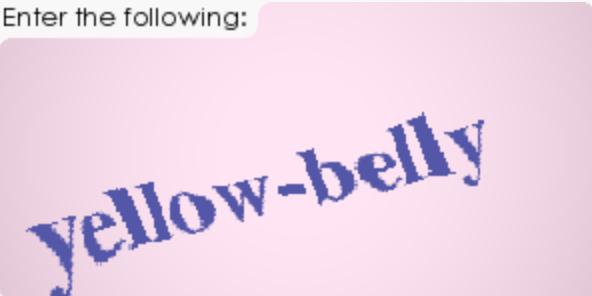
  • Visits the captcha page (only loads when JS is disabled)
    QSqZUqb3SVKCAWrVSdyEAA.png

  • Takes a screenshot
  • Crops the image
  • Saves the image
Code:
from selenium import webdriver
from selenium.webdriver.chrome.options import Options
from bs4 import BeautifulSoup
import urllib.request
import re
from PIL import Image

scrape = urllib.request.urlopen('https://pingler.com').read()
soup = BeautifulSoup(scrape, 'html.parser')

for elem in soup.find_all('iframe', src=re.compile('https://api-secure\.solvemedia\.com')):
    nav = (elem['src'])

chrome_options = Options()
chrome_options.add_experimental_option( "prefs",{'profile.managed_default_content_settings.javascript': 2})
nojs_driver = webdriver.Chrome("C:\\Program Files (X86)\\Google\\chromedriver.exe",chrome_options=chrome_options)
nojs_driver.get(nav)
nojs_driver.implicitly_wait(10)
nojs_driver.get_screenshot_as_file('1.png')

img = Image.open("1.png")
img2 = img.crop((0, 0, 350, 200))
img2.save("2.png")

The problem is the bot is supposed to be solving captchas on website pages.

Take Pingler for example:

eAnBem_2RGWmlSXXaHTxvQ.png

I would need to pull that image directly off the page without doing the whole process I did above because when I visit the scraped URL it reloads a new captcha.

Code looks like this, they're hiding the image location:

dk4hzpbfROikfY92m8_3CQ.png


What would you experienced guys do to solve this problem?
 
@ExtremeRandom : @Grimasaur : @MaxiPads123 : @Cititechno

Any of you know a solution?

The only thing I can think of is to load pingler in selenium with JS disabled, then screenshot the captcha and crop it. It's not ideal since I want to leave JS enabled when submitting registrations. A lot of sites will check for that right?
 
Last edited:
Let me SpoonFeed you @apex1 as I always love rescuing peoples who're completely baffled up when they're doing something interesting.

The following code crops the captcha and saves it as screenshotnew.png

Code:
from selenium import webdriver
from PIL import Image

SpoonFeeder = webdriver.Chrome()
SpoonFeeder.get('http://pingler.com/')
element = SpoonFeeder.find_element_by_id('adcopy-puzzle-image')
SpoonFeeder.execute_script("return arguments[0].scrollIntoView();", element)
SpoonFeeder.save_screenshot('screenshot.png')
SpoonFeeder.quit()
Spoon = Image.open('screenshot.png')
left = 230
top = 0
right = 822
bottom = 296
Spoon = Spoon.crop((left, top, right, bottom))
Spoon.save('screenshotnew.png')

Initial page screenshot :

UrUiWhS


After cropping :

IIFx7Ed


If you don't want the "Enter the following:" text, so it looks like this :

sjpckWR


Code:
Replace

top = 0

with

top = 43

As for how to implement it, you don't have to disable js or anything.

Use my code as a function and write another function below it to send the screenshotnew.png to the 2captcha api and save the solved answer to a global variable and use that variable to fill the captcha form.
 
I'd need a couple of sites using solvemedia captchas to come up with a suggestion but the idea would be to run through each site's captcha field and save it's location in a dictionary and match it with the site while solving.
 
I'd need a couple of sites using solvemedia captchas to come up with a suggestion but the idea would be to run through each site's captcha field and save it's location in a dictionary and match it with the site while solving.

AWWHELLNAW! Apex's idea of going straight to the image is better - you don't run the risk of stupid HTML ruining your hardcoded x/y positions (javascript popups, ads changing size, etc.)
 
I can't figure out how to PM... lol. Apex; what do you use to solve SolveMedia captchas?
 
AWWHELLNAW! Apex's idea of going straight to the image is better - you don't run the risk of stupid HTML ruining your hardcoded x/y positions (javascript popups, ads changing size, etc.)

So what solution do we have for OP? Can you please post your code for directly fetching the image from the source?

I can't figure out how to PM... lol. Apex; what do you use to solve SolveMedia captchas?

It's clearly written 2captcha in the thread title.
 
So what solution do we have for OP? Can you please post your code for directly fetching the image from the source?
I've done something similar to this, but it is in PHP and was for ReCaptcha v1 not SolveMedia. Code at the bottom.

It's clearly written 2captcha in the thread title.
Thanks. Sorry, I'm not familiar with these services, so I wouldn't recognize it on sight.


I understand this thread is Python, and the code below is PHP. And the thread is about SolveMedia and the code below is recaptcha... but hopefully you find the concept useful.

Code:
   $curlHandle->sendRequest( "OMITTED", $resp );
 
   if( !preg_match( '/name="token" value="(.*?)"/', $resp, $match ) ){
       echo "FAIL " . __LINE__ . "\n";
       continue;
   }
   $token = $match[1];
 
   if( !preg_match( '/challenge\?k=(.*?)"/', $resp, $match ) ){
       echo "FAIL " . __LINE__ . "\n";
       continue;
   }
   $challengeKey = $match[1];
 
   $curlHandle->setReferer( "OMITTED" );
   $curlHandle->sendRequest( "http://www.google.com/recaptcha/api/challenge?k=" . urlencode( $challengeKey ), $resp );
 
   if( !preg_match( '/challenge : \'(.*?)\',/', $resp, $match ) ){
       echo "FAIL " . __LINE__ . "\n";
       continue;
   }
   $challenge = $match[1];
 
   if( !preg_match( '/server : \'(.*?)\',/', $resp, $match ) ){
       echo "FAIL " . __LINE__ . "\n";
       continue;
   }
   $server = $match[1];
 
   $curlHandle->sendRequest(
             "http://www.google.com/recaptcha/api/reload"
           . "?c=" . urlencode( $challenge )
           . "&k=" . urlencode( $challengeKey )
           . "&lang=en"
           . "&reason=i"
           . "&type=image"
       ,
       $resp
   );
 
   if( !preg_match( '/Recaptcha.finish_reload\(\'(.*?)\',/', $resp, $match ) ){
       echo "FAIL " . __LINE__ . "\n";
       continue;
   }
   $challenge2 = $match[1];
 
   $curlHandle->sendRequest( "http://www.google.com/recaptcha/api/image?c=" . urlencode( $challenge2 ), $resp );
 
   file_put_contents( "cap.jpg", $resp );
 
   echo "\x07";
   echo "captcha:    ";
 
   $inputCap = trim( stream_get_line( STDIN, 1024, PHP_EOL ) );
 
   echo "got:       \"" . $inputCap . "\"\n\n";
 
   $curlHandle->setPOSTFields(
         "recaptcha_challenge_field=" . urlencode( $challenge2 )
       . "&username=" . urlencode( $OMITTED )
       . "&recaptcha_response_field=" . urlencode( $inputCap )
       . "&token=" . urlencode( $token )
       . "&type=1"
   );
   $curlHandle->sendRequest( "OMITTED", $resp );
 
   if( strpos( $resp, "The requested command has been performed successfully" ) !== false ){
       echo "successful \n";
   }
 
Code:
   $curlHandle->sendRequest( "OMITTED", $resp );
...
   $curlHandle->setReferer( "OMITTED" );
...
   $curlHandle->setPOSTFields(
         "recaptcha_challenge_field=" . urlencode( $challenge2 )
       . "&username=" . urlencode( $OMITTED )
       . "&recaptcha_response_field=" . urlencode( $inputCap )
       . "&token=" . urlencode( $token )
       . "&type=1"
   );
...
   $curlHandle->sendRequest( "OMITTED", $resp );
 
   if( strpos( $resp, "The requested command has been performed successfully" ) !== false ){
       echo "successful \n";
   }

I just realized I didn't explain some important stuff and I can't edit my previous post.

1. sendRequest's first parameter takes the URL, the second takes a variable (by reference) that has the response. I use $resp the entire time.
2. the "OMITTED" stuff:
The first and second are the URL where the form is. In your case Pingler. The third is part of the form I was submitting to, yours will be different (and looks like it will have more variables). The the fourth is the "action" part of the <form> you are submitting.
3. The string checked for success ("The requested .... successfully") is specific to the site I'm posting to, not ReCaptcha.

Other than that the code should be reusable.
 
Here you go (Similar to @SpoonFeeder 's code but without hardcoding the positions):
Code:
# https://stackoverflow.com/questions/15018372/how-to-take-partial-screenshot-with-selenium-webdriver-in-python
from selenium import webdriver
from PIL import Image

fox = webdriver.Firefox()
fox.get('http://stackoverflow.com/')

# now that we have the preliminary stuff out of the way time to get that image :D
element = fox.find_element_by_id('hlogo') # find part of the page you want image of
location = element.location
size = element.size
fox.save_screenshot('screenshot.png') # saves screenshot of entire page
fox.quit()

im = Image.open('screenshot.png') # uses PIL library to open image in memory

left = location['x']
top = location['y']
right = location['x'] + size['width']
bottom = location['y'] + size['height']


im = im.crop((left, top, right, bottom)) # defines crop points
im.save('screenshot.png') # saves new cropped image
 
I hate how Python doesn't require you to state the types of variables you're working with. It's confusing as hell to read it.
 
I hate how Python doesn't require you to state the types of variables you're working with. It's confusing as hell to read it.

Perhaps you'd prefer something like Java where you gotta write 10 lines defining a class just to print out a "Hello world", haha?
I'm not saying your point is invalid but I simply have very little experience with statically typed languages so it's the quite other way around for me. I have trouble reading unnecessarily verbose (subjectively speaking) code.
But in the end "a tool for every job and a job for every tool", yes? When writing a piece of software with million+ lines and hundred+ coders, Java would shine. But for a quick scraping script written by newbs like us, it can be done in python quicker I guess.
Although after building my app in Node.JS I really wish Javascript had C++ type memory management instead of the garbage collector. Oh well, can't have it all, can we?

Peace
 
Perhaps you'd prefer something like Java where you gotta write 10 lines defining a class just to print out a "Hello world", haha?
I'm not saying your point is invalid but I simply have very little experience with statically typed languages so it's the quite other way around for me. I have trouble reading unnecessarily verbose (subjectively speaking) code.
But in the end "a tool for every job and a job for every tool", yes? When writing a piece of software with million+ lines and hundred+ coders, Java would shine. But for a quick scraping script written by newbs like us, it can be done in python quicker I guess.
Although after building my app in Node.JS I really wish Javascript had C++ type memory management instead of the garbage collector. Oh well, can't have it all, can we?

Peace
I can respect that. After all, even when coding in C++/C#/Rust, I'm still naming like strName, intAge, dblAverage/decAverage, etc..
 
Back
Top