

- Nov 2, 2008
- 59,310
- 25,809
this was given to me yrs ago for helping a proxy forum with promotions .
a payed/unloocked proxy port scanner that port scan proxies from ip ranges ..
included in this download will be the port scanner - some ip ranges/port for
getting fresh proxies - please remember ip ranges die over time so you
will need to make new ones when they do.
this works best on xp - win7 i have no idea about win 10.
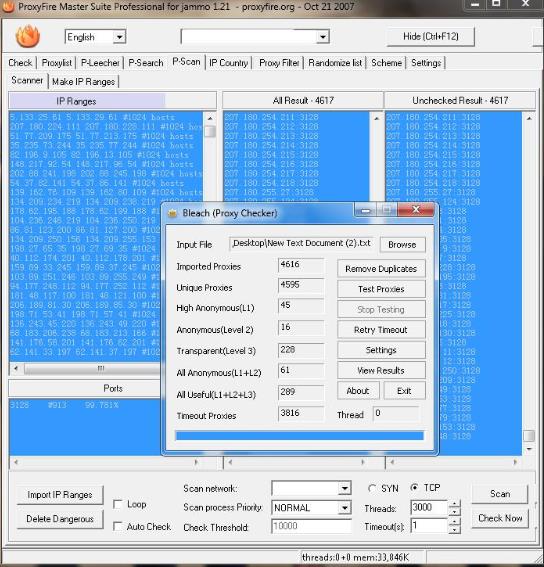
fist goto the scanner tab and import 1 of the lists of ip ranges
into the ip ranges box - then add the port underneath in the port
box , this tells the scanner what port to scan the ranges on.
the options SYN - TCP - select TCP. remember folks some isp's
can be funny about port scanning . i always use time out 1
now thread count can cripple your cpu , so stick to around 3000
and hit scan, also if you have a fire wall you have to turn it off
the proxies you have scanned will appear in the ALL results list
just save them to a txt file then test them in your usuall
proxy tester.
i have enclosed 4 txt files for some ip range lists on port
80 / 3128 / 8080 / 53281 / and the port number to go in the port
box is the title of each txt file. this tool will scan for http/socks
provided you have the ip / port list set correctly
download link
https://www.mediafire.com/file/af1w865apl87vzy/proxyfire_and_ip.rar/file
VT link
https://www.virustotal.com/gui/file...2f4110621f0684ccfe1f0e5145db134b870/detection
ive used this 10 yrs no issues anything
from VT is a false positive.
a payed/unloocked proxy port scanner that port scan proxies from ip ranges ..
included in this download will be the port scanner - some ip ranges/port for
getting fresh proxies - please remember ip ranges die over time so you
will need to make new ones when they do.
this works best on xp - win7 i have no idea about win 10.
fist goto the scanner tab and import 1 of the lists of ip ranges
into the ip ranges box - then add the port underneath in the port
box , this tells the scanner what port to scan the ranges on.
the options SYN - TCP - select TCP. remember folks some isp's
can be funny about port scanning . i always use time out 1
now thread count can cripple your cpu , so stick to around 3000
and hit scan, also if you have a fire wall you have to turn it off
the proxies you have scanned will appear in the ALL results list
just save them to a txt file then test them in your usuall
proxy tester.
i have enclosed 4 txt files for some ip range lists on port
80 / 3128 / 8080 / 53281 / and the port number to go in the port
box is the title of each txt file. this tool will scan for http/socks
provided you have the ip / port list set correctly
download link
https://www.mediafire.com/file/af1w865apl87vzy/proxyfire_and_ip.rar/file
VT link
https://www.virustotal.com/gui/file...2f4110621f0684ccfe1f0e5145db134b870/detection
ive used this 10 yrs no issues anything
from VT is a false positive.


 and really satisfied. Planning to scan more from the latest proxy list in the forum.
