Proxifier - Configuring Rules To Target Specific Firefox Profile

noellarkin

Senior Member
Joined
Mar 14, 2021
Messages
1,006
Reaction score
1,492
As far as I know, the rules in Proxifier allow me to target applications (firefox.exe) as well as IPs/addresses or ports. But can I set Proxifier rules that are specific to a Firefox profile? For example, a rule for firefox.exe -p ProfileName1 and a separate one for firefox.exe -p ProfileName2?
 
I already have a workflow that heavily utilizes proxifier with multiple proxy chains set up for specific websites and all that, I'm just a little reluctant to have to do that all over again across multiple firefox profiles :)
 
Can you not set different ports on both proxifier and firefox on different profiles? Did not use it a while...
 
1650109681910.png

This is what I wanted to do, however it isn't accepting arguments, only "firefox.exe".
 
Well what you can do is a quick workaround. If its accepting .batch just make multiple haha. Or quick visual basic .exe!

Did you try including the " ?
 
Well what you can do is a quick workaround. If its accepting .batch just make multiple haha. Or quick visual basic .exe!

Did you try including the " ?
Yep I tried using double quotes, didn't work.
So you're saying wrap a .bat file around each of my profiles? Worth trying, lemme give this a shot, thanks!
 
Yep I tried using double quotes, didn't work.
So you're saying wrap a .bat file around each of my profiles? Worth trying, lemme give this a shot, thanks!
Yeah just use either a batch file or a .exe as middleman for starting firefox profile.
 
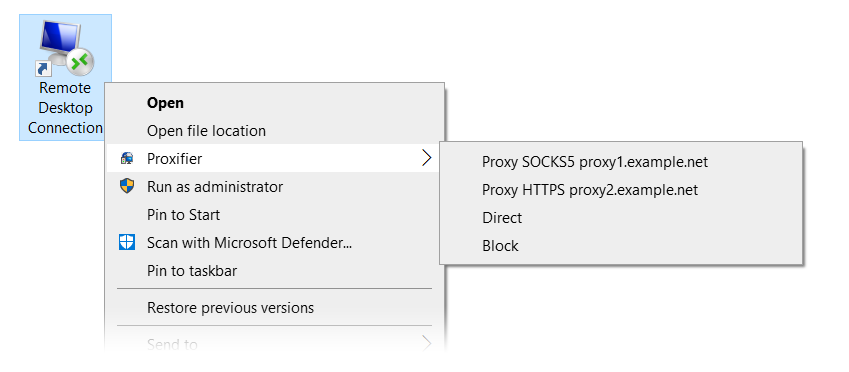
I suppose, you have .lnk shortcuts to start the FF profiles. If yes, good, if not, create them. :) Right clicking on those brings up the context menu, where you can start the desired profile through the desired proxy using the feature called "manual proxification": https://www.proxifier.com/docs/win-v4/manual.html

ManualProxification.png


It's something, what needs to be done with each start though, unless you can create rules for .lnk files the regular way too.

You can also try FreeCap instead of Proxifier, that might support arguments:

image014.jpg


Yeah just use either a batch file or a .exe as middleman for starting firefox profile.
Worth a shot, but i think in that case the middleman/launcher will be proxified only and FF won't.
 
Well I'm actually using command line arguments, since I'm starting everything programmatically.
That's why I'm using Proxifier since it allows me to do:
Code:
Local $RunProxifier = Run(@ComSpec & " /c start Proxifier.exe " & "C:\Users\" & @UserName &"\AppData\Roaming\Proxifier4\Profiles\" & $provider & "_" & $type & "_" & $location & ".ppx silent-load")

Does FreeCap have cmd support?
The .bat thing didn't seem to work, I think it's because Proxifier uses PID to identify whether something is running, and the PID of the bat file isn't the same as the PID of the browser instance
 
I suppose I might as well bake the proxy setup into the FF profiles using FoxyProxy...
 
Make some shortcut of firefox profiles and then try running that shortcuts in proxifier
 
Why don't you use extensions in FireFox. For instance, Proxy-Omega? You can achieve targeting profiles by using Proxy Switch Omega.
 
Back
Top