Proxies leaking?

Scorpion Ghost

Elite Member
Executive VIP
Jr. VIP
Joined
Mar 22, 2013
Messages
9,145
Reaction score
10,489
I'm trying to use public proxies to do something. And when I input the (free) proxy in Firefox, and I go to check my IP on sites like these:

https://whatismyipaddress.com/
https://www.whatismyip.com/

They're still showing my real IP address.

Do I need to use specific proxies, or take an extra step to force Firefox to access the internet strictly behind the proxy?

I'm looking into this now, Googling and searching the forum. But if anyone can give me some advice I'd appreciate it.

Thanks
 
I think possibly it needs to be an anonymous proxy? Have you tried something like Zenmate? They offer a free VPN service and I know they will not show your real IP.
 
I think possibly it needs to be an anonymous proxy? Have you tried something like Zenmate? They offer a free VPN service and I know they will not show your real IP.

I'd like to do it by using public proxy lists, and just pick any from the list and use it.

Funny thing, the sites I mentioned in the OP show my real IP, but these two actually show the proxy:

http://www.whatsmyip.org/
http://whatismyip.host/
 
Unless maybe its a caching issue? Have you tried adding the proxy to Firefox, then clearing the browser cache, then trying those IP sites again?
 
You must be using transparent proxies, as david355 suggested, try anonymous or elite ones. Wherever you get them, usually they're grouped by anonymity or it's stated somewhere.

Unless maybe its a caching issue? Have you tried adding the proxy to Firefox, then clearing the browser cache, then trying those IP sites again?

I've tried Anonymous and Elite Proxies from here - https://free-proxy-list.net/anonymous-proxy.html

I tried clearing cache between changing proxies, but every time the sites in the original post show my real IP.
 
Web rtc could be leaking your ip. If you're using ublock origin (as you should be) then enable "Prevent WebRTC from leaking local IP addresses" in settings.
 
Web rtc could be leaking your ip. If you're using ublock origin (as you should be) then enable "Prevent WebRTC from leaking local IP addresses" in settings.

I use ublock, but not on this Firefox. I created this Firefox only to create some accounts i need. Let me try this. Will report back.
 
I've tried Anonymous and Elite Proxies from here - https://free-proxy-list.net/anonymous-proxy.html

I tried clearing cache between changing proxies, but every time the sites in the original post show my real IP.
It can be an interference with an addon too, but i guess that would affect every site. I remember, when Hola was installed, even though it was disabled, Foxyproxy didn't work, it seemed to be working, but it didn't actually changed the ip.
 
It can be an interference with an addon too, but i guess that would affect every site. I remember, when Hola was installed, even though it was disabled, Foxyproxy didn't work, it seemed to be working, but it didn't actually changed the ip.

It seems to me what I'm trying isn't gonna work. I'll try a few firefox extensions and see if that does it.
 
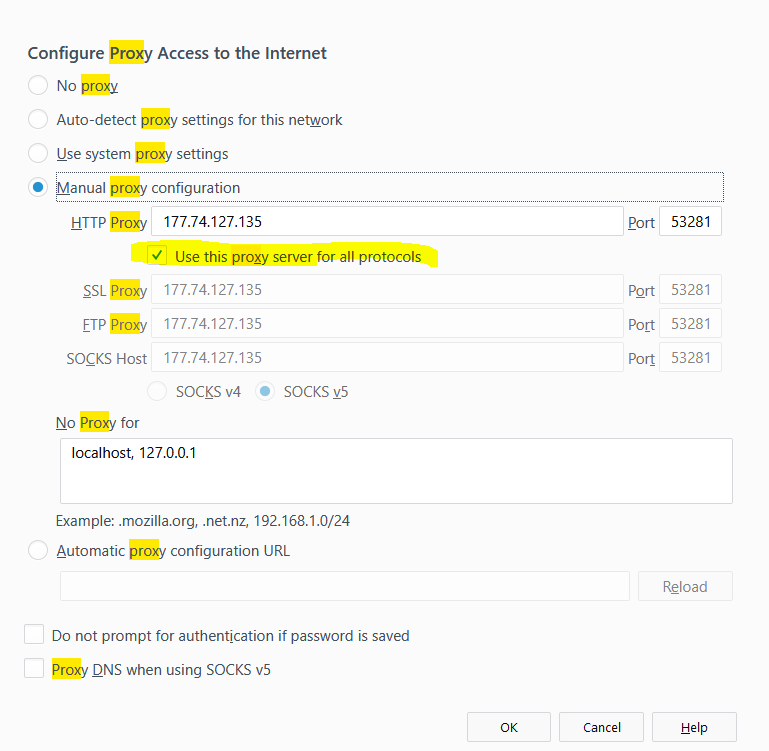
I just got it working by ticking this box in Firefox network proxy settings - Use this proxy server for all protocols
I think the issue is that in firefox it only uses the proxy for HTTP traffic by default and not for HTTPS traffic - which whatismyip.com uses.
Once I ticked that box, I saw the correct IP on that site - see screenshots below.

jv03PTA

4Qdx45X
 
Slightly related, I've found that so-called anonymous proxies often suddenly switch from being anonymous to leaking IPs, mid-use. I wouldn't trust them for any situation where your real IP absolutely cannot be known.
 
I just got it working by ticking this box in Firefox network proxy settings - Use this proxy server for all protocols
I think the issue is that in firefox it only uses the proxy for HTTP traffic by default and not for HTTPS traffic - which whatismyip.com uses.
Once I ticked that box, I saw the correct IP on that site - see screenshots below.

jv03PTA

4Qdx45X

This actually did it! You're the BOSS!

Now it's just a matter of finding decent free proxies.

Thank you! :)

Youre-the-boss.jpg
 
So let me just say, I'm using this to switch IPs because I'm creating Soundcloud accounts.

I'm using proxies from this site - http://free-proxy.cz/en/proxylist/main/3

I'm using only the proxies marked "High anonymity"

For some reason, only proxies with Port 8080 work. I'm going through the list from top to bottom, page to page, and only when I hit a 8080 address does it work and I can access webpages. No idea why.
 
You can use http://bit.do/linkforbhw1 for proxy management @Scorpion Ghost . EPS can test proxies (elite or leaking one) and also can change that for you.
Just do a simple google search about proxy lists and save URLs, Go https://proxydb.net/leecher and scrape proxies; test them in EPS and use/change ELITE WORKING proxies in a CLICK.

Edit : TRY https://addons.mozilla.org/en-US/firefox/addon/best-proxy-switcher sir @Scorpion Ghost to make process FASTER.
So let me just say, I'm using this to switch IPs because I'm creating Soundcloud accounts.

I'm using proxies from this site - http://free-proxy.cz/en/proxylist/main/3

I'm using only the proxies marked "High anonymity"

For some reason, only proxies with Port 8080 work. I'm going through the list from top to bottom, page to page, and only when I hit a 8080 address does it work and I can access webpages. No idea why.
 
Last edited:
You can use Elite Proxy Switcher for proxy management @Scorpion Ghost . EPS can test proxies (elite or leaking one) and also can change that for you.

Thanks. But I'm just doing this one time to create 60 soundcloud accounts (too cheap to go buy them :p )

I'll be testing the proxies manually to take care of this. I'm already on account number 6.

Damn, long way to go... :D
 
https://www.bestvpn.com/guides/dns-leak-protection/

DNS leaks are common, usually from the providers end.
 
Back
Top