
You are using an out of date browser. It may not display this or other websites correctly.
You should upgrade or use an alternative browser.
You should upgrade or use an alternative browser.
Permanently Closed Marketplace Sales Thread
- Thread starter ningning
- Start date
- Status
- Not open for further replies.


crack_dhat
Power Member
- Oct 4, 2009
- 600
- 277
hi ningning. what is required to view the tutorials? the videos does not seem to play at my end


ningning
Supreme Member
- Mar 22, 2010
- 1,262
- 309
hi ningning. what is required to view the tutorials? the videos does not seem to play at my end
View attachment 67640
Sorry for not getting back to you sooner. I missed your post.
We have just launched a new version of the website. Please check the tutorial section. Videos are now embedded in the written manual.
ningning
Supreme Member
- Mar 22, 2010
- 1,262
- 309
New version of Autofill Magic
New version of Autofill Magic Trainer
and a new website
Changes in Autofill Magic 2.1
Changes to the Sitelist
Changes in Autofill Magic Trainer 1.1
New website
New version of Autofill Magic Trainer
and a new website
Changes in Autofill Magic 2.1
- New default storage folder keep all you project, images and videos in this folder and they can be backed up along with profiles.
- More options for birth year
- New tutorial: My first 5 sites
- Predefined profile for My first 5 sites
- Predefined site list preset for My first 5 sites
- Recheck and re-filtereing of all mail
- New modern saving logic to prevent unintentional loss of data
- Undo/redo for profile and project values
- New mail presets for inbox.com, zoho.com, yandex.com, mail.com
- Bug with detectable proxies for https sites fixed
- Custom fields can now be renamed to your needs
- Collect links from all open tabs
- New shortcut to open options window
Changes to the Sitelist
- Help tooltips added
- Overall visual improvements
- New settings: Display help tooltips and Define number of tabs to open for bulk actions
- Language filter added
- Filter for selected sites added
- Save site list settings with your own custom presets
Changes in Autofill Magic Trainer 1.1
- Import and export rules and notes (share or sell lists)
- More language options
- More platform options
- New rules are now always added to the bottom of the list
- Highlighting of the matching field when editing
New website
- Many overall improvements
- Better documentation - a new written manual is added
- New tutorial: My first 5 sites
- Option to stay logged in
- Easy access to updating password and subscription info
ningning
Supreme Member
- Mar 22, 2010
- 1,262
- 309
New sites added.
After releasing the new version the focus is now on adding more new sites to the collection.
Today we added 5 new sites. You can find them in the site list.
the sites are:
Several more new sites and platforms will be added soon.
After releasing the new version the focus is now on adding more new sites to the collection.
Today we added 5 new sites. You can find them in the site list.
the sites are:
- Tribe.com
- Eklablog.com
- Pusha.se
- Blox.pl
- blog.hr
Several more new sites and platforms will be added soon.
ningning
Supreme Member
- Mar 22, 2010
- 1,262
- 309
More New sites added.
After releasing the new version the focus is now on adding more new sites to the collection.
Today we added 5 new sites. You can find them in the site list.
the sites are:
We will continue to add more sites in the following weeks
After releasing the new version the focus is now on adding more new sites to the collection.
Today we added 5 new sites. You can find them in the site list.
the sites are:
- cabanova.com
- miarroba.com
- mozello.com
- all4webs.com
- magnoto.com
We will continue to add more sites in the following weeks
After clicking on verifying my emails button following the first 5 websites. My email got blocked.
Dear GMX member, our system has detected irregular activity related to your account. As a precautionary measure, we have blocked your account. To regain access, please contact our Customer Support.
Dear GMX member, our system has detected irregular activity related to your account. As a precautionary measure, we have blocked your account. To regain access, please contact our Customer Support.
ningning
Supreme Member
- Mar 22, 2010
- 1,262
- 309
Can I post different post and image automatically to different web2.0?
Thanks!
Autofill Magic is not a 100% automated tool. The hole idea is that you are in control so you can insure high quality links that will stick.
Take a look at the sales page and the 'proof video' at http://autofillmagic.com/ . It is not just sales bull**** but explains why I created Autofill Magic and why it has many advantages over 100% automation tools.
ningning
Supreme Member
- Mar 22, 2010
- 1,262
- 309
After clicking on verifying my emails button following the first 5 websites. My email got blocked.
Dear GMX member, our system has detected irregular activity related to your account. As a precautionary measure, we have blocked your account. To regain access, please contact our Customer Support.
I have tried this a few times too. I am not sure exactly what the trigger is, but if you created several accounts from the same IP and and browser, then this can happen.
If you just created this one account, then I am not sure why. One option could be to use a different email provider.
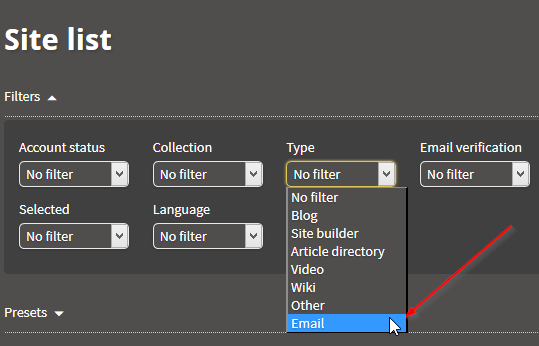
You can see all the options that Autofill Magic offers by setting the Type filter to Email.
ningning
Supreme Member
- Mar 22, 2010
- 1,262
- 309
Are urls with crated links stored on computer or on your server?
They are stored locally on your machine.
But if you want to sync everything you can install a portable version of Firefox and store it on Google Drive or Dropbox. That allows you to access your Autofill Magic installation from any PC.

online28
Supreme Member
- Feb 24, 2011
- 1,464
- 237
They are stored locally on your machine.
But if you want to sync everything you can install a portable version of Firefox and store it on Google Drive or Dropbox. That allows you to access your Autofill Magic installation from any PC.
Hi,
I have saw your video.
Your video is using same article for 5 blog.
so my question is can I set different article & image to different web 2.0?
or I need to change article manually after I login to web2.0?
For example, if I have 100 articles, could I post it to each web2.0 separately in your software?
that mean 1 article for 1 web2.0. No repeat.
Besides, how many site will it support now?
Sorry for my poor English
ningning
Supreme Member
- Mar 22, 2010
- 1,262
- 309
Hi,
I have saw your video.
Your video is using same article for 5 blog.
so my question is can I set different article & image to different web 2.0?
or I need to change article manually after I login to web2.0?
For example, if I have 100 articles, could I post it to each web2.0 separately in your software?
that mean 1 article for 1 web2.0. No repeat.
Besides, how many site will it support now?
Sorry for my poor English
Ah, I see. Sure you can put all your articles in a folder and then let Autofill Magic fetch a new article for each new web 2.0 site.
Just chose the folder at set how many times each article can be used.

ningning
Supreme Member
- Mar 22, 2010
- 1,262
- 309
Besides, how many site will it support now?
Sorry for my poor English
There are 114 sites in the collection right now, but this number will grow past 150 within the next two weeks.
Also keep in mind that Autofill Magic can post to any site. Also sites that are not in the collection. It will still keep track of your username and is very good at filling forms that are unknown to Autofill Magic. And if you need to tweak a form you can use the Autofill Magic Trainer plugin to teach Autofill Magic how to fill the form.
Some questions...
1. Can I use an email to create all the accounts? Will this create a footprint? If it creates footprint, then how many unique emails should I create for a profile?
2. I find it more convenient if I am able to set custom shortcuts for all the "customs" fields < where we can fill in any spintax. So I can just set eg.Shift-E to fill in a specific custom spintax.
3. I found out that I need to insert 2 <br/> to make a line break for all the paragraph in my article. For example I spin an article in The Best Spinner and paste it on Autofill Magic, it turns out the article is all stick together in 1 paragraph without any spacing. Which I need to insert <br/><br/> after each paragraph.
4. How many authority links should we create per article? Should we just scrape URLs on scrapebox, check for page authority more than 60, and spin them into spintax and insert to the article?
5. For Tier 2/3, GSA SER and Scrapebox still works?
Other than that, it is really a perfect tool to build any tier 1 links! I totally like this plugin, it not only helps me in my SEO but also in other stuffs such as logining in Facebook, other forums. It saves all the login and password in that tool.
1. Can I use an email to create all the accounts? Will this create a footprint? If it creates footprint, then how many unique emails should I create for a profile?
2. I find it more convenient if I am able to set custom shortcuts for all the "customs" fields < where we can fill in any spintax. So I can just set eg.Shift-E to fill in a specific custom spintax.
3. I found out that I need to insert 2 <br/> to make a line break for all the paragraph in my article. For example I spin an article in The Best Spinner and paste it on Autofill Magic, it turns out the article is all stick together in 1 paragraph without any spacing. Which I need to insert <br/><br/> after each paragraph.
4. How many authority links should we create per article? Should we just scrape URLs on scrapebox, check for page authority more than 60, and spin them into spintax and insert to the article?
5. For Tier 2/3, GSA SER and Scrapebox still works?
Other than that, it is really a perfect tool to build any tier 1 links! I totally like this plugin, it not only helps me in my SEO but also in other stuffs such as logining in Facebook, other forums. It saves all the login and password in that tool.
Last edited:
ningning
Supreme Member
- Mar 22, 2010
- 1,262
- 309
Some questions...
1. Can I use an email to create all the accounts? Will this create a footprint? If it creates footprint, then how many unique emails should I create for a profile?
I often create a Yandex, AOL and GMX account. If a site will not accept one provider, they will accept one of the others. To create even more diversity you can use email aliases. Both GMX and Yandex support this. For GMX you have to create them your self. For Yandex you can use this snippet:
Code:
xxxxxxxx{@yandex.com|@yandex.ru|@narod.ru|@yandex.ua|@yandex.by|@yandex.kz|@ya.ru|@yandex.com}That will give you many emails with just one account.
2. I find it more convenient if I am able to set custom shortcuts for all the "customs" fields < where we can fill in any spintax. So I can just set eg.Shift-E to fill in a specific custom spintax.
Sorry, shortcuts for individual fields are not supported, but check out this section on how to fill individual fields:
http://autofillmagic.com/tutorials/manual/#filling-individual-form-fields
3. I found out that I need to insert 2 <br/> to make a line break for all the paragraph in my article. For example I spin an article in The Best Spinner and paste it on Autofill Magic, it turns out the article is all stick together in 1 paragraph without any spacing. Which I need to insert <br/><br/> after each paragraph.
Yes, Autofill Magic expect some html markup for the article. We might change this, so each paragraph is wrapped in the correct paragraph tag or at least make it an option.
4. How many authority links should we create per article? Should we just scrape URLs on scrapebox, check for page authority more than 60, and spin them into spintax and insert to the article?
Putting authority links in your article is supposed to give your article more authority. But this is not really related to Autofill Magic, but is a more general SEO question. I do it once in a while but not always. If all you posts have one or two authority links and a link to a money site, then it will look as if it is made just for SEO and it might get deleted at some point. My own personal opinion is to add authority links when it is natural, but I don't always do it.
5. For Tier 2/3, GSA SER and Scrapebox still works?
Again, there are many opinions on this. I have had great success with GSA SER (tier 2) -> Autofill Magic (tier 1). But it all depends on how you set up your projects.
Other than that, it is really a perfect tool to build any tier 1 links! I totally like this plugin, it not only helps me in my SEO but also in other stuffs such as logining in Facebook, other forums. It saves all the login and password in that tool.
Thanks. I use Autofill Magic for all kinds of things too

ningning
Supreme Member
- Mar 22, 2010
- 1,262
- 309
New sites added.
We are serious about adding new sites
We just added another 5 new sites. You can find them in the site list.
the sites are:
 justpaste.it
 textsave.org
 centerblog.net
 deviantart.com
 simple-different.com
The first two are a part of a new 'Type' that we call 'Simple'. This type of site are often online clipboards, simple one-page platforms and code sharing sites.
We are serious about adding new sites
We just added another 5 new sites. You can find them in the site list.
the sites are:
The first two are a part of a new 'Type' that we call 'Simple'. This type of site are often online clipboards, simple one-page platforms and code sharing sites.
Something that are very important, I hope for a update for these things as it really took me a lot of time.
>> I need to put <br/><br/> for the article on autofill magic if not all the paragraphs will stick together. When using autofill magic to fill in the article I need to remove all the <br/><br/> manually sometimes on some sites.
1. Some websites like wikidot.com, pen.io after I registered for an account, the account does not change to green color, it still show that I don't have an account on that website.
2. On Wikidot, the hyperlink is not <a href=" "></a> it is like [http://www.youtube.com/watch?v=fqg0FaEL-xg more courses], I need to manual edit all the hyperlinks.
3. On webnode.com I unable to autofill the content after pressing on the shortcut key or autofill magic button.
4. When filling in custom tags, it is very unclear, as I got a lot of custom tags I always clicked on the wrong custom tag to fill in content, I hope the custom tag can be renamed. So I can identify the tag. For example, "Custom tag 1" can rename to "Contact Us title" then I can just click on that it can autofilled.
Because of some of the reasons above, I spend like 1-2 hours to make all the article properly in 5 sites. For the first 5 sites in the preset template, it can be easy to build, but when building other sites such as Wikidot, a big problem come, editing hyperlinks, editing the video to embed it, removing all the <br/><br/>.
I find that I really spend a lot of time to fix these things, I seriously need a fix to make the work easier.
>> I need to put <br/><br/> for the article on autofill magic if not all the paragraphs will stick together. When using autofill magic to fill in the article I need to remove all the <br/><br/> manually sometimes on some sites.
1. Some websites like wikidot.com, pen.io after I registered for an account, the account does not change to green color, it still show that I don't have an account on that website.
2. On Wikidot, the hyperlink is not <a href=" "></a> it is like [http://www.youtube.com/watch?v=fqg0FaEL-xg more courses], I need to manual edit all the hyperlinks.
3. On webnode.com I unable to autofill the content after pressing on the shortcut key or autofill magic button.
4. When filling in custom tags, it is very unclear, as I got a lot of custom tags I always clicked on the wrong custom tag to fill in content, I hope the custom tag can be renamed. So I can identify the tag. For example, "Custom tag 1" can rename to "Contact Us title" then I can just click on that it can autofilled.
Because of some of the reasons above, I spend like 1-2 hours to make all the article properly in 5 sites. For the first 5 sites in the preset template, it can be easy to build, but when building other sites such as Wikidot, a big problem come, editing hyperlinks, editing the video to embed it, removing all the <br/><br/>.
I find that I really spend a lot of time to fix these things, I seriously need a fix to make the work easier.
Last edited:
ningning
Supreme Member
- Mar 22, 2010
- 1,262
- 309
Something that are very important, I hope for a update for these things as it really took me a lot of time.
>> I need to put <br/><br/> for the article on autofill magic if not all the paragraphs will stick together. When using autofill magic to fill in the article I need to remove all the <br/><br/> manually sometimes on some sites.
This one is a bit tricky. The reason is that if you do not include any HTML markup like adding breaks (<br/><br/>) after each paragraph, then you will get even more articles that are just one long paragraph. But you are right, for some sites that are not accepting HTML markup you will need to do a bit of cleaning (When this is the case it is mentioned in the site note). But if you did not include the breaks you would need to add line breaks after each paragraph manually for even more sites.
We have a fix on the way that will remove HTML markup for sites that do not accept it.
1. Some websites like wikidot.com, pen.io after I registered for an account, the account does not change to green color, it still show that I don't have an account on that website.
I can understand why you are confused. Have you seen the video in the manual that explains how account management works? If not the please see here: http://autofillmagic.com/tutorials/manual/#account-management (That will explain a lot)
Autofill Magic only auto-verifies accounts when an email verification link is clicked. This is a clear indication that the account was successfully created. For sites with no email verification or manual verification Autofill Magic has no way of knowing that an account was created. But you do... That is why you can just click the account status icon when you have created an account for these sites. It is just one additional click.

Look for the email verification method to know if an action is required from you.

That said. We do have a feature planned that will toggle the account status when a welcome email is received. That will trigger the correct account status for accounts with manual verification. Still there will always be sites where there is no indication or any email sent and then it is very hard for any tool to guess what the account status is. Just filling the sign up form is a weak indicator, since there is no way of knowing if the form was submitted successfully. And some sites don't even have a sign up form...
I hope you can see that it is not a simple task to detect and set the right account status. That is why Autofill Magic leave it to you for sites with no email verification. You are the only one who know for sure and again: It is just one mouse click to insure 100% correct setting of the account status.
2. On Wikidot, the hyperlink is not <a href=" "></a> it is like [http://www.youtube.com/watch?v=fqg0FaEL-xg more courses], I need to manual edit all the hyperlinks.
Some sites use a different syntax than HTML. Always take a look at the site note if something is out of the ordinary. In this case you actually have all the infomation you need to solve the problem in the site note. You just need to wrap your article text in special wiki-html tags and all link will work:
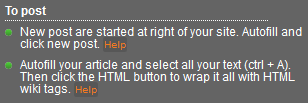
You even have a screenshots to guide you (When you press Help in the note).
3. On webnode.com I unable to autofill the content after pressing on the shortcut key or autofill magic button.
Again. You have all the info you need in the note. If you see something like To post in the note, then there is someting that you have to be aware of.

4. When filling in custom tags, it is very unclear, as I got a lot of custom tags I always clicked on the wrong custom tag to fill in content, I hope the custom tag can be renamed. So I can identify the tag. For example, "Custom tag 1" can rename to "Contact Us title" then I can just click on that it can autofilled.
You can easily set your own titles. See here:

Because of some of the reasons above, I spend like 1-2 hours to make all the article properly in 5 sites. For the first 5 sites in the preset template, it can be easy to build, but when building other sites such as Wikidot, a big problem come, editing hyperlinks, editing the video to embed it, removing all the <br/><br/>.
I find that I really spend a lot of time to fix these things, I seriously need a fix to make the work easier.
Not all sites are easy to automate. And some sites will require some manual work. Still if you take a look at the site notes there is a lot of info there that could have saved you a lot of time. Other tools will simply exclude these sites or even worse just post wrongly formatted content. With Autofill Magic you actually have a chance to take control and do it right. Make it a habit to check the site notes and you will get a lot of important info that will speed up the workflow and answer questions.
You can use the 'Ease of use' indicator in the Site note to see if there is something to be extra aware of.
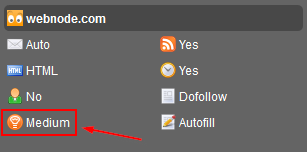
There are three levels:
- Easy (nothing to worry about)
- Medium (some things might be out of the ordinary)
- Tricky (Really tricky sites, like flash sites where autofill do not work and lots of manual steps are needed)
Sure there is stuff that can be improved and trust me we are working on it. I hope that you can use these answers.
Do not hesitate to ask any other questions.
- Status
- Not open for further replies.