Permanently Closed Marketplace Sales Thread

Status
Not open for further replies.
OOOoh I've been using this on some other tasks I have and it works like a charm - might upgrade to get the full thing though.
 
Got few pre-sale questions:

1. If I purchase Pro version $397, and stop subscription after 6-month free updates period.
Then at one point I want to subscribe again to the update, how much I need to pay for another 6-month period?

2. If I purchase Lite version $77, and stop subscription after 6-month free updates period.
Then at one point I want to update to higher version (Pro), how long free update subscription included?

3. Any bundle discount for ZennoPoster + CapMonster?

Thanks.
 
@anson666

1. Cost of updates is static and listed on page. No matter for how long you didnt buy updates - cost is same.
2. 6 months
3. Never saw such discount so i bet no.
 
I tried to download demo version and I got error msg from chrome saying that dangerous file. please check it.
 
buddy its a long thread so hopefully someone didn’t ask before, does the program sends any callbacks to an external server about user activity? whats your policy regarding privacy?
All user actions are confidential. The program sends only license status data to the server.
 
Hello,

I want to use the software again after how many years so I paid for an update, when chrome has finished downloading the software, it blocked it. Kindly see attached photo.
 

Attachments

  • zenno poster.jpg
    zenno poster.jpg
    22.9 KB · Views: 23


Hello,
I want to use the software again after how many years so I paid for an update, when chrome has finished downloading the software, it blocked it. Kindly see attached photo.
Chrome often blocks downloads from our website.
While we are chatting with their “super quick” support, just follow this instruction:
1) You can see this message when trying to download a file.
2) To download a file, click Show All in Downloads, or just press Ctrl+J.
3) You will see the browser settings. Click "Keep dangerous file" and then Continue Anyway.
 
Last edited by a moderator:
Hi I want to know a few things please.
1: Is the next version 7 will be for free or we have to pay for it sepretaly ?
2: If I got the pro version and didn't renew. Can I still use the software normally or not ?
The thing is I really love the software and I'm getting started and just got my VPS, and I'm taking it easy. So I want just to fiddle with the software and learn more about it before starting to make some money with it.
 
1: Is the next version 7 will be for free or we have to pay for it sepretaly ?
ZennoPoster 7 is available as part of the updates. When you purchase the ZennoPoster program, you get 6 months of free updates as a bonus.

2: If I got the pro version and didn't renew. Can I still use the software normally or not ?
The thing is I really love the software and I'm getting started and just got my VPS, and I'm taking it easy. So I want just to fiddle with the software and learn more about it before starting to make some money with it.
If you do not renew the update, you can continue to use the program.

 
Hello, I have just bought the pro zennoposter version, but when I downloaded and installed, the program is in russian, I don't speak russian, I want the english version, I have opened a ticket already but didn't receive a response yet, what should I do, can you please check out my ticket and help me out, I want to start experimenting with the software.
 
Hello, I have just bought the pro zennoposter version, but when I downloaded and installed, the program is in russian, I don't speak russian, I want the english version, I have opened a ticket already but didn't receive a response yet, what should I do, can you please check out my ticket and help me out, I want to start experimenting with the software.
Done!
Replaced the license for the English version.
 
No it is no replaced yet, I first paid 150$ and I got russian version, then you told me that english version costs more so I paid the difference around 45$, but then I got no response yet, now that I saw your response here that it was changed I went to my dashboard and it is still russian, so the license has not changed yet, please change and tell me what to do to get it thanks
 
FbjoNy.jpg


New ProjectMaker Themes

You participate in our beta testing and help ZennoPoser 7 keep growing!
We appreciate your detailed reviews and suggestions and focus on improving the existing functions and introducing new features.
So far, we have already received a ton of feedback on improving the project editor. In this very release, we have tried to consider all of it to make the user experience even cozier.

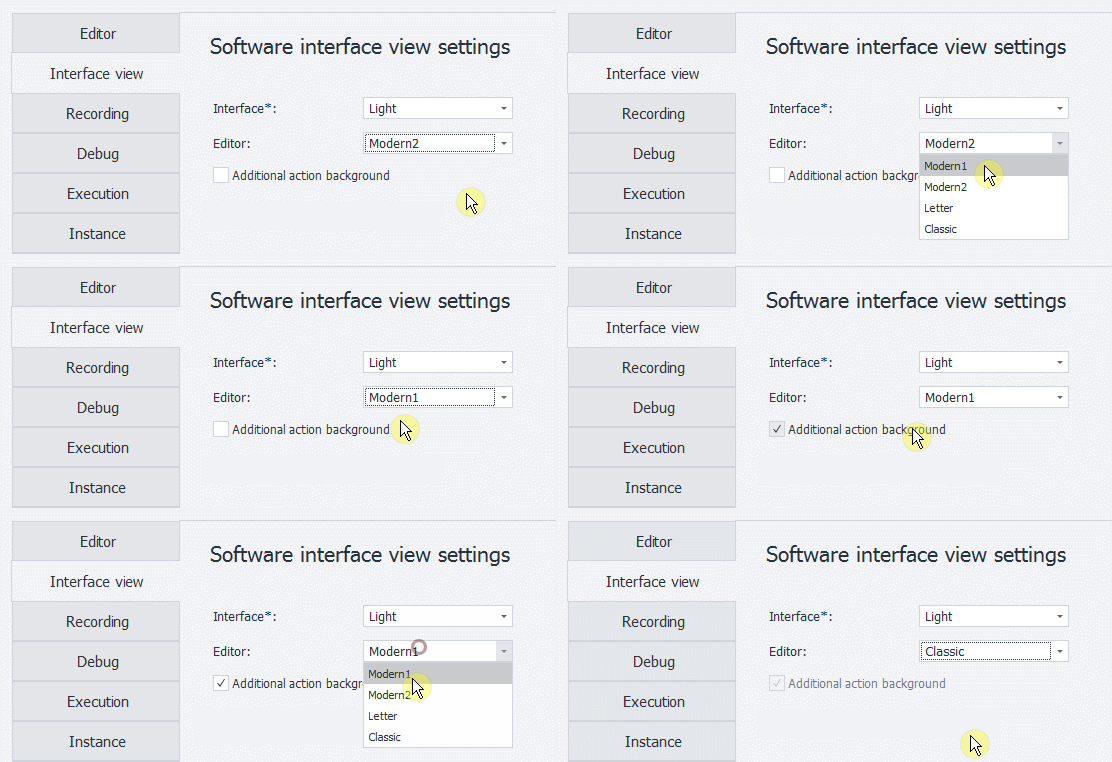
We proudly present 8 new ProjectMaker themes — 4 light and 4 dark — designed to transform the project editing process into something handy, exciting, and time-efficient.
Beside extra features, now you can enjoy 14 appearance patterns. Tailor your ProjectMaker to your specific taste!

dmvX9H.gif


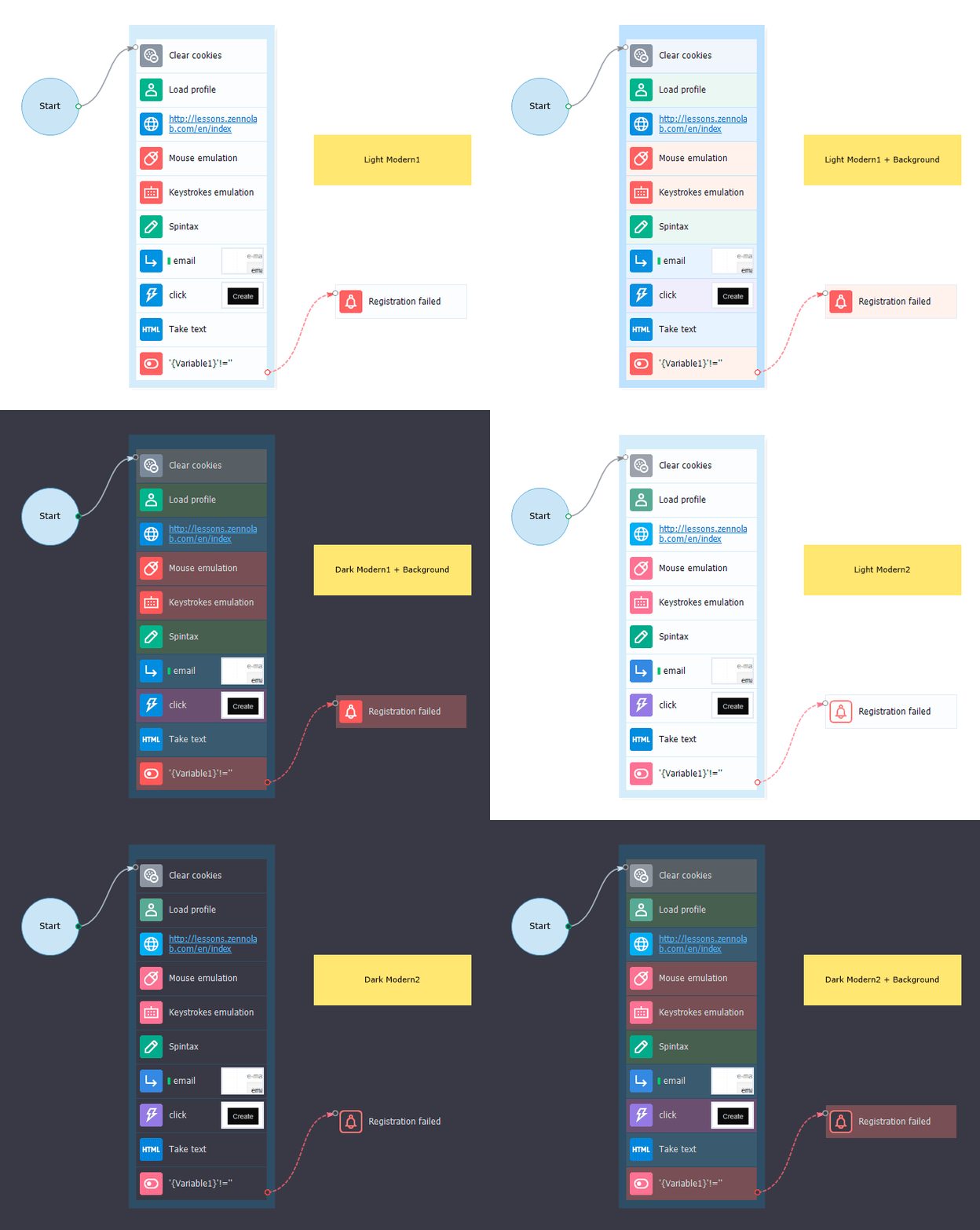
Modern1 и Modern2

Main theme is now called Modern. By the way, we have overhauled it to a high standard:
  1. Icons are now larger, clearer, and diversified.
  2. Every icon has its own color (Modern2).
  3. New action background color added.
What differs Modern1 from Modern2 is that the former doesn’t have a multitude of action background icon colors.

WfwVqL.gif


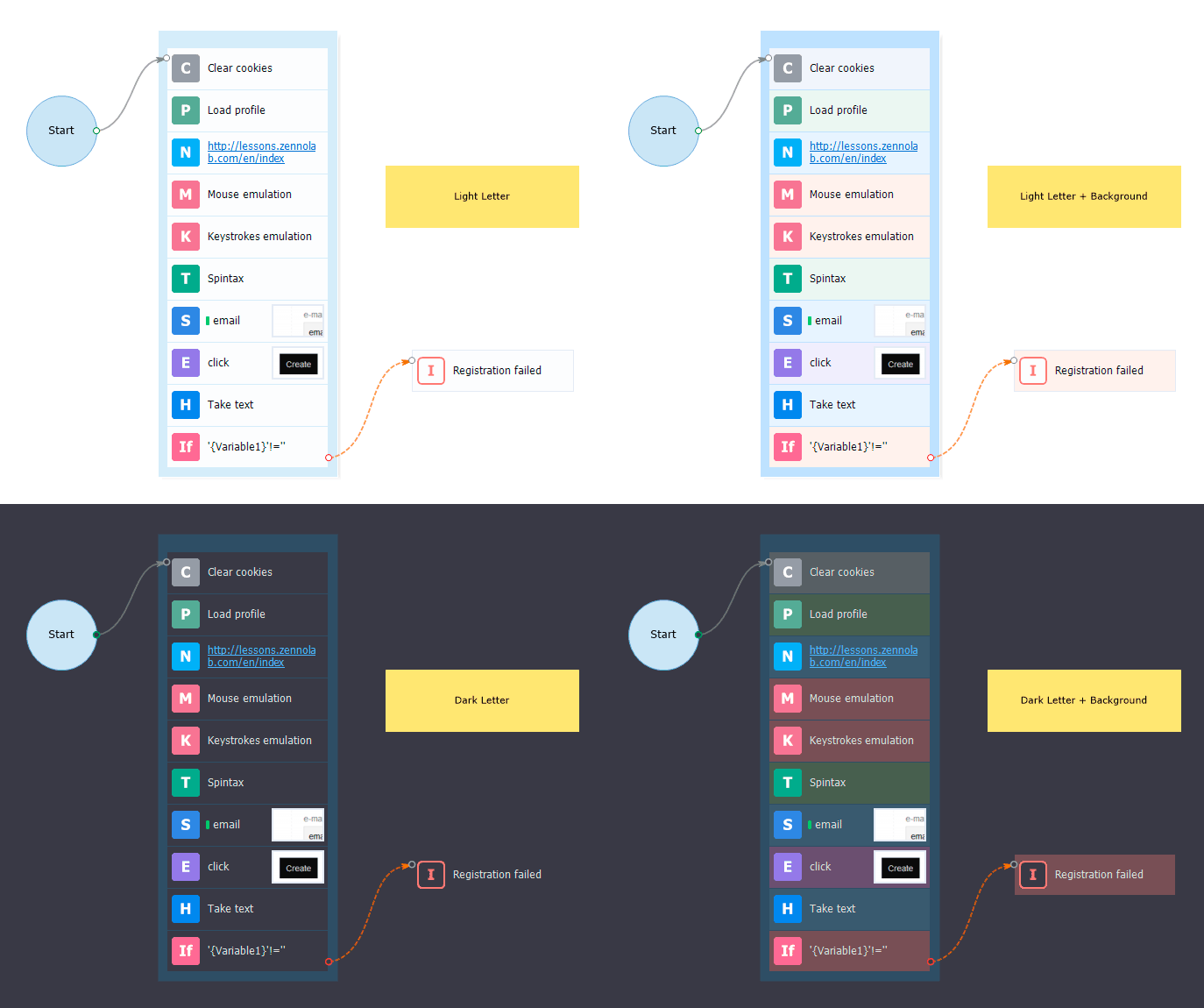
Letter

Should you feel uncomfortable with visual markers, enable brand-new Letter theme!
It replaces conventional icons with a Latin index. This way, you will see M for Mouse Emulation, C for Cookies, etc.
Also, this theme supports an extra action background.

zHZsEZ.gif


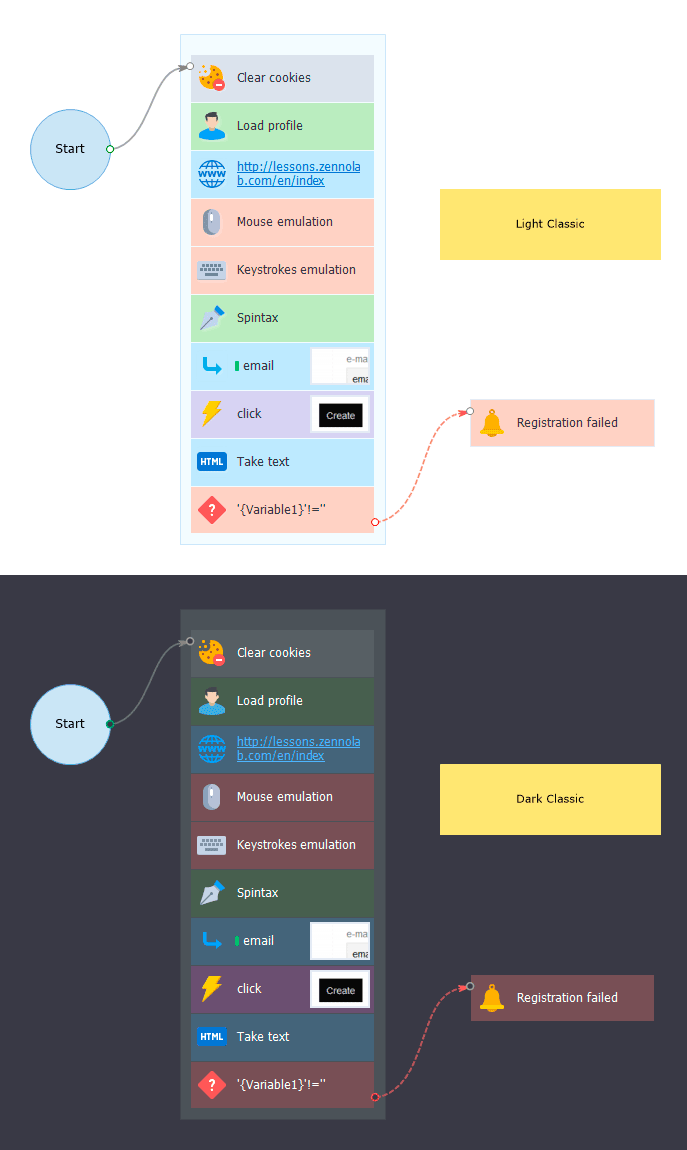
Classic

ZennoPoster 5’s design had been a 7-years-long pattern and set a classic standard.
Eye-catching block-highlight icons are now back, freshly-faced and revised!


CMckzX.gif


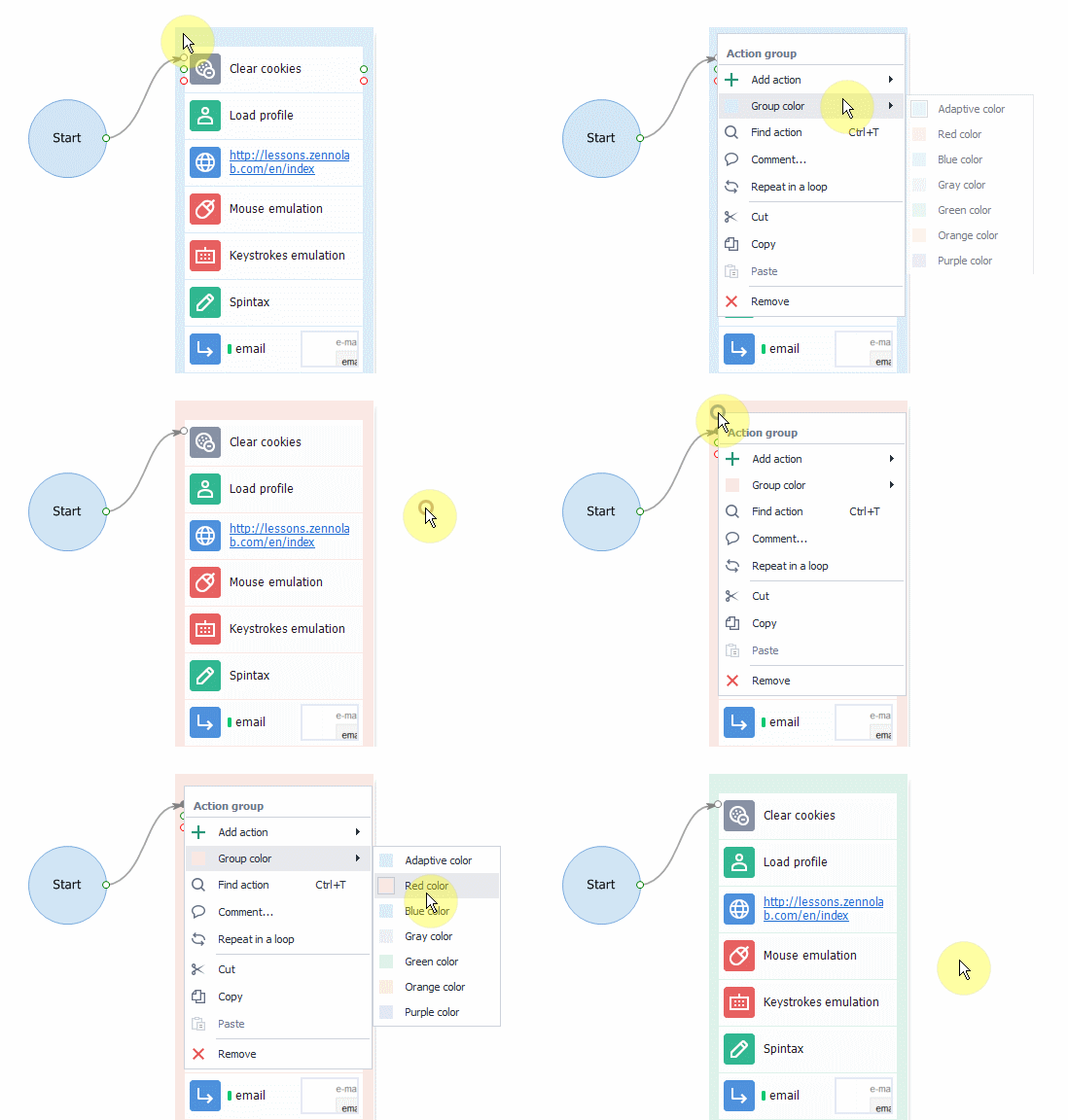
Selecting Action Group Color

To ensure better navigation across a large project, we have made it possible to configure action group colors.
This function lets you mark groups logically—by color.

Example:
Settings unit is gray, login box is orange, signup block is red, etc.
With that, adaptive coloring still works and gives a group the color of prevailing actions.

52Mu1Y.gif


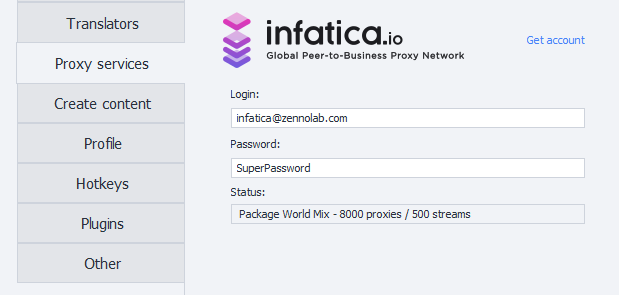
Infatica.io Integration

We have integrated Infatica.io, a superior-quality proxy service that grants access to resident, server, and mobile proxies at space speeds.


Those proxies are perfect for parsing, mailouts, large-scale signups, and other tasks you can perform with ZennoPoster.
To enable the service and test-drive a free 3-day proxy, go to Settings → Proxy → Get Account.

tvLQLU.png


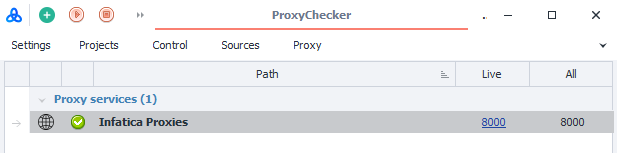
After specifying your credentials you will see a proxy list in the built-in proxy checker.

jJXc9b.png


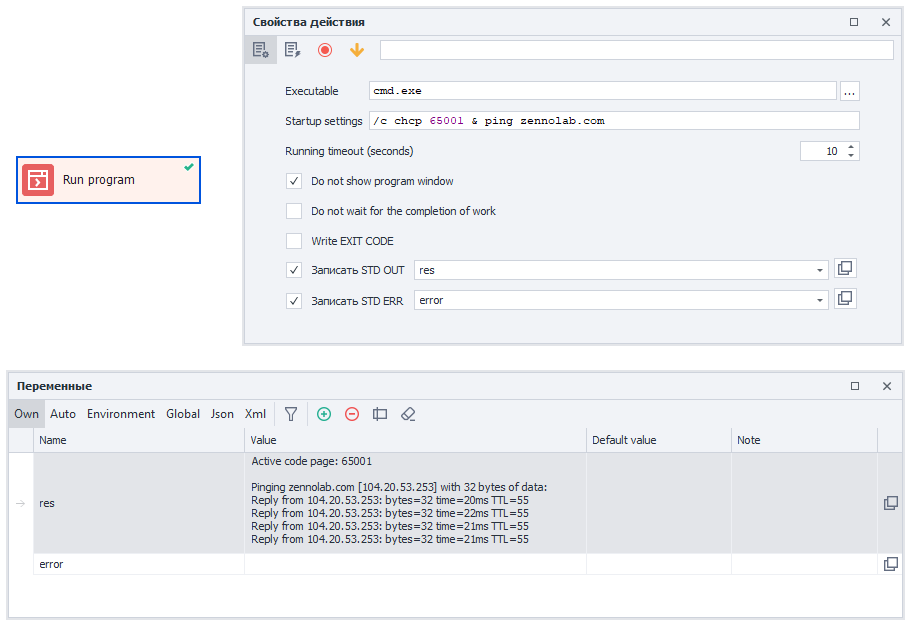
Saving Program Results

In «Run Program» you now can save program results to variables.
  • STDOUT - Displays results.
  • STRERR - Displays errors.
Drwu7g.png


What’s New in 7.0.2.0

Added:

All changes of 5.31.0.0 included. Meet new fixes:

+ Enjoy different project editor themes
+ Create action backgrounds
+ Contemporary-looking theme enhanced and renamed into Modern1
+ New Modern2 theme that brings lots of icons
+ New Letters theme
+ New Classic theme (a tribute to ZennoPoster 5)
+ Change group backgrounds in the context menu (Modern1, Modern2, Letter)
+ Overlap the loading window with other windows


Fixed:

All changes of 5.31.0.0 included. Meet new fixes:

Fixed: users had to click twice to edit action properties
Fixed: panels wouldn’t reset after clicking Reset Panels
Enhanced: Email Editor’s dark-theme appearance
Enhanced: Code Editor’s dark-theme appearance
Enhanced: Regular Expressions Designer’s dark-theme appearance
Enhanced: JS Tester’s dark-theme appearance
Fixed: the variables window disappeared from the tab
Fixed: Receive Emails settings appearance

Read more about other changes: Overview
 
QPXsp9.png


Full mouse emulation

Enables mouse emulation on the project level.
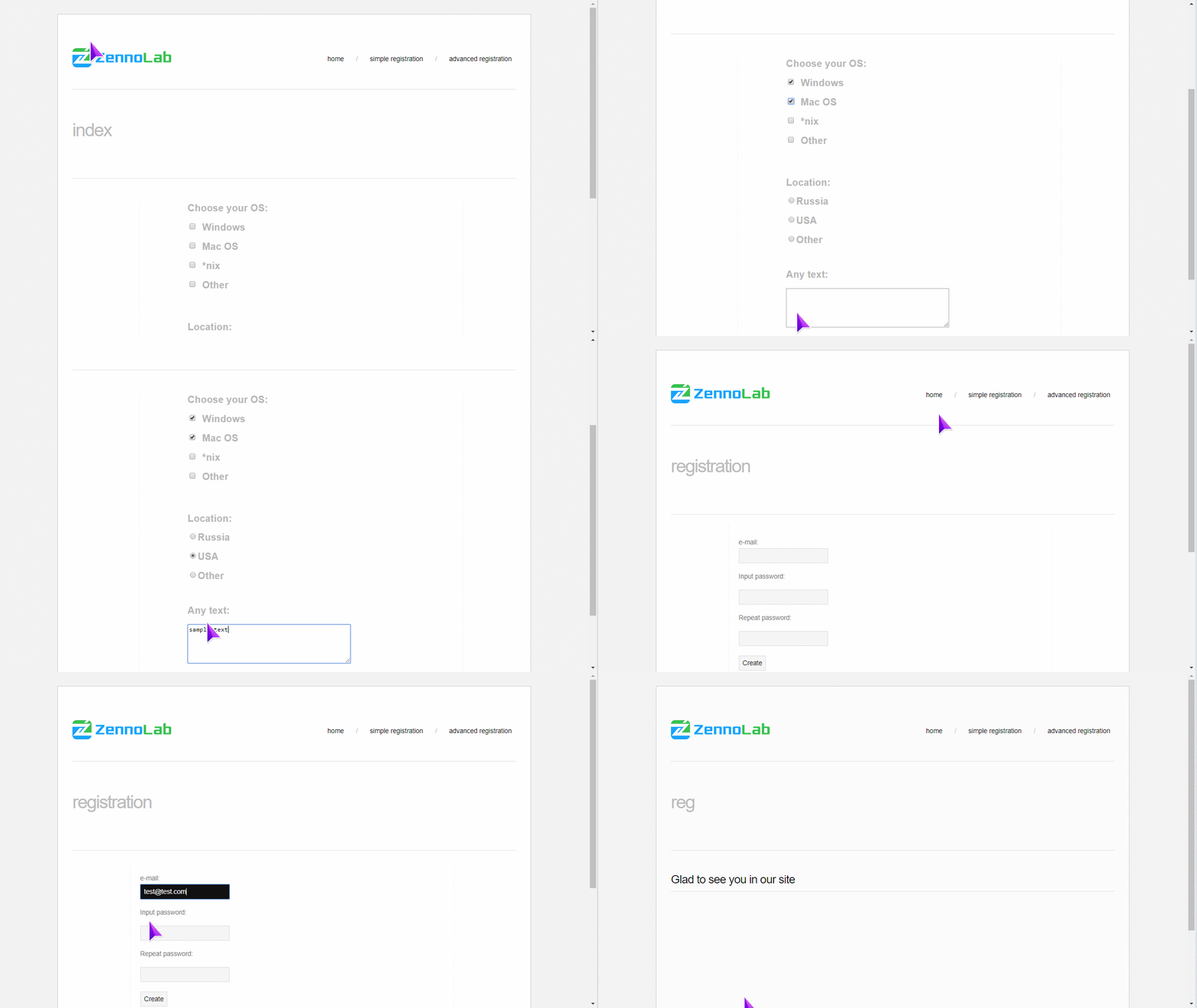
This means that, during executing actions Set and Rise, mouse emulation—from the current cursor to an HTML element specified in the action — will be automatically activated.

Add mouse emulation to your template in one click!
That's all you need.

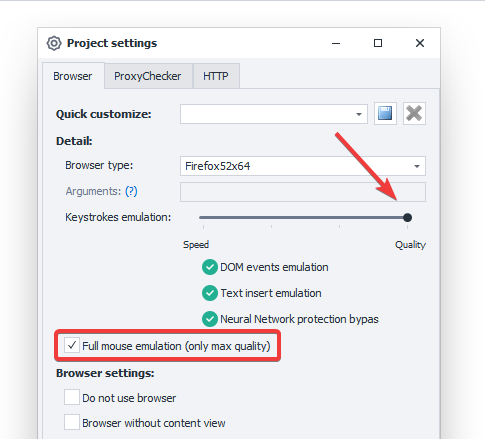
You can enable full mouse emulation in project settings, provided that input emulation is set for the maximum quality.

U4zKwg.png


Demo

8iqxab.gif

Download the template used in the example


ProjectMaker menu customization

Personalize your ProjectMaker menu!
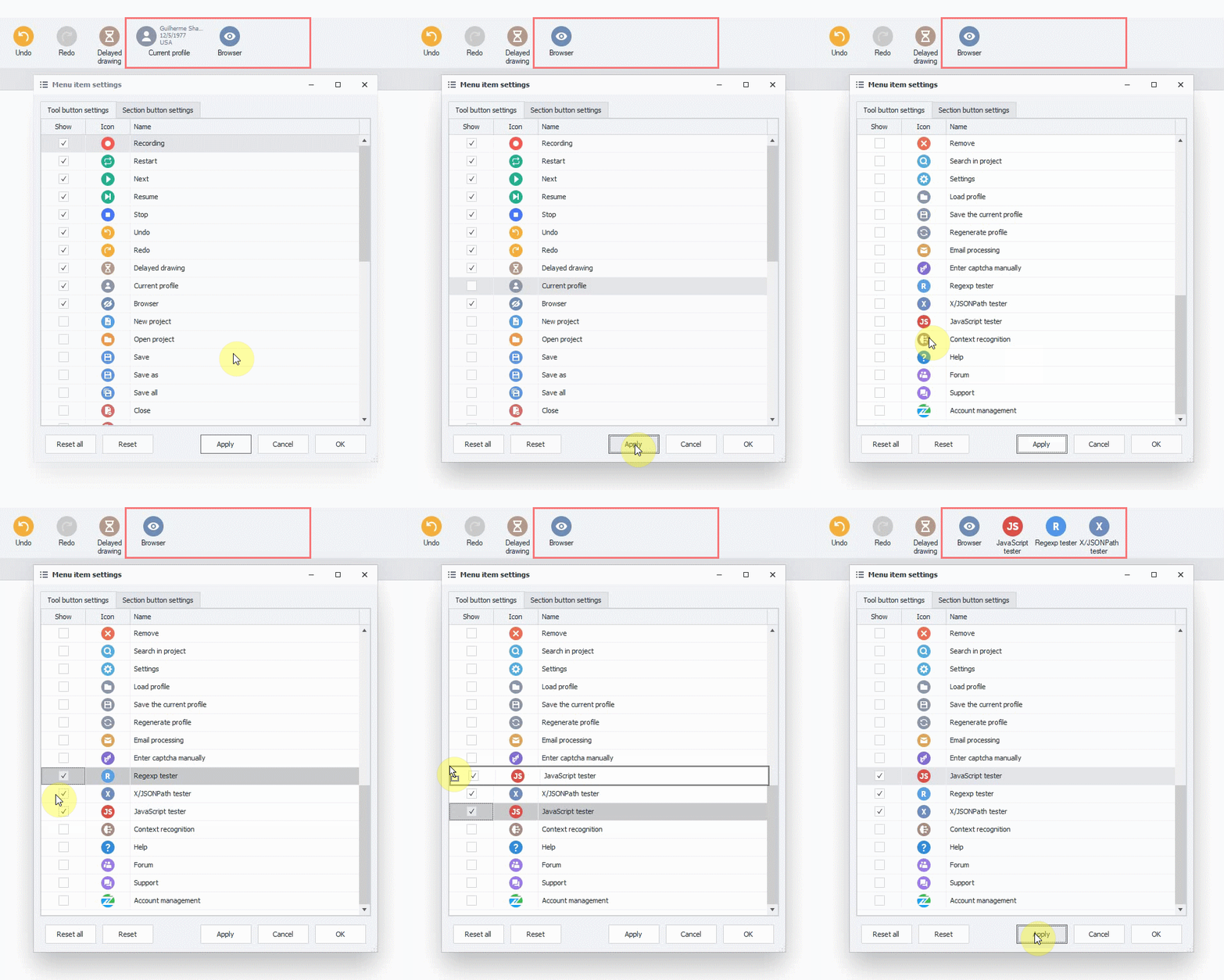
You can add, remove any upper-bar menu items or change the way they are arranged.

To create your custom menu, go to WindowMenu AppearanceConfigure Menu.
Or, RMB-click on the menu bar and select the appropriate item.

axcvRY.gif


Improved project interaction in ProjectMaker

Navigating across a template is an integral part of project design.
To make your experience even cozier and smoother, we have enhanced a series of functions. What we actually improved:

  • Display of project names in tabs was refined.
  • Mouse-wheel zooming is now faster.
  • When you zoom, you will see an indicator of the current zoom in the bottom-right corner. By clicking on it, you will reset the default zoom (100%).
  • Navigate through the project when moving an action to the sheet edge.
New hot keys:
  • Ctrl + Plus to zoom in;
  • Ctrl + Minus to zoom out;
  • Ctrl + 0 to reset zoom (100%);
  • LMB + Space to scroll the project;
  • Now you can scroll with the MMB with Ctrl held Ctrl

HZ6A67.gif


What’s New in 7.0.3.0

Added:

All changes of 5.32.0.0 included. Meet new fixes:

+ Full mouse emulation on the project level which is automatically activated for actions SET and/or RISE.
+ Customize ProjectMaker upper menu. To personalize, go to Window → Menu Appearance → Configure Menue, or RMB-click on the menu bar.
+ Mouse-wheel zooming is now faster.
+ Scroll the project with the MMB with Space held.
+ Hotkey for zooming in Ctrl + Plus
+ Hotkey for zooming out Ctrl + Minus
+ Hotkey for zoom reset to initial view Ctrl + 0
+ When you zoom, you will see an indicator of the current zoom in the bottom-right corner. By clicking on it, you will reset the default zoom (100%).
+ Navigate through the project when moving an action to the sheet edge.
+ Scroll the project with the MMB with Ctrl held.
+ Display of project names in tabs was refined.
+ Compact menu icons are now larger and they look finer.


Fixed:

All changes of 5.32.0.0 included. Meet new fixes:

Action Designer font was enhanced
Project scrolling was improved.

Read more about other changes: Overview
 
PdyoSC.jpg


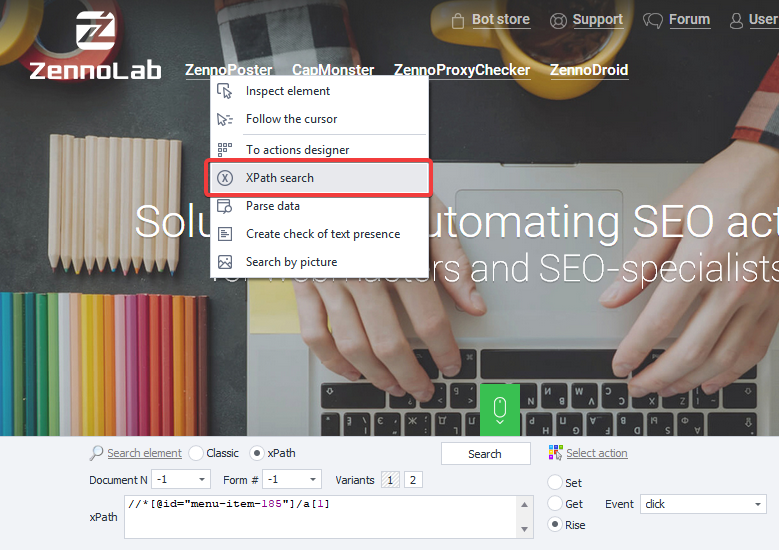
Searching Elements by xPath in Action Designer

Take any actions (SET, GET, RISE) with elements with the cutting-edge XML/HTML-handling language xPath!
Syntax structures offered by xPath will enable you to implement a data processing algorithm that will be more versatile and tolerant to website layout changes than regular expressions.

Select a preferable search mode in Action Designer. After that, ZennoPoster will automatically generate several appropriate expressions.
If you need any adjustments to be made, you can edit the request at any stage.

FzjJrx.png


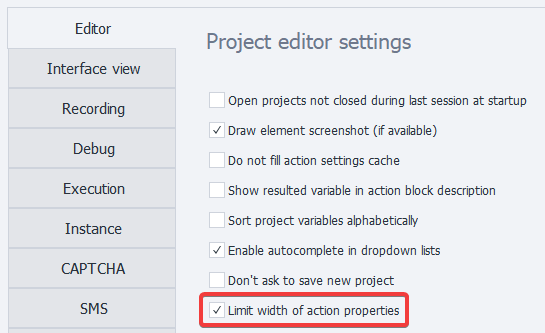
Action Properties Window Layout Settings

Manage the Action Properties window grid by making it fixed or flexible (content fits to the window width).
By default, the width is set to ensure the best possible viewing experience.
But you can change it at any time. Go to EditSettingsEditor.


mDFZ9m.png


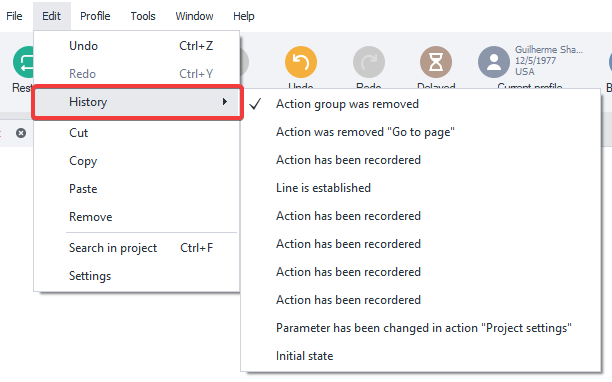
Action History

Available in Version 5, Action History is now back and located in EditHistory.

jr95fe.png


Change Note Font Size and Color


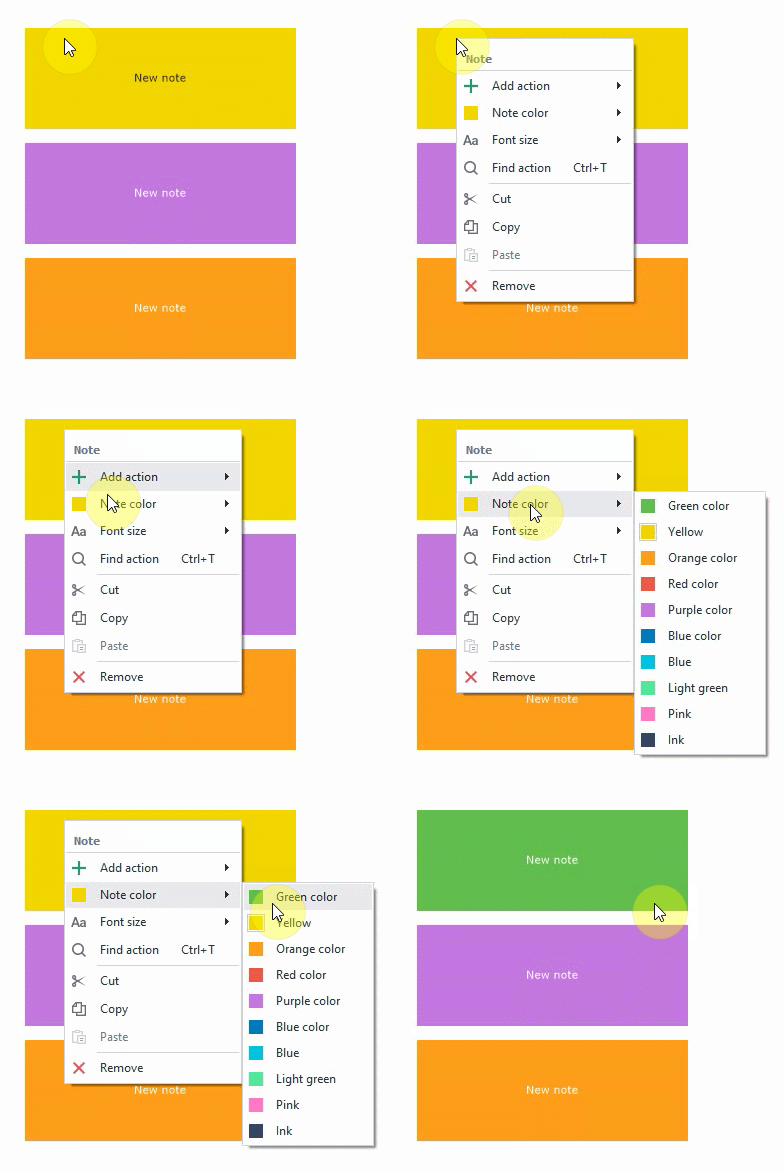
Now you can change colors of action groups and notes.
To do so, RMB-click on a note and pick a preferable color from the color box.

Also, you can adjust the font size for better readability.

Df4vmY.gif


What’s New in 7.0.4.0

Added:

All changes of 5.33.0.0 included. Meet new fixes:

+ XPath-powered search in Action Designer in SET, GET, and RISE.
+ Improved emulation of special symbol typing in Chrome.
+ In the default browser profile, Chrome now has optimal settings for Windows emulation.
+ Tooltips for BotUI.
+ New option "Respect the group order during classic element search". You can find it here: Edit → Settings → Execution.
+ Change note colors in the project.
+ New option "Fit properties to the window width".
+ Project step-by-step debugging now looks better thanks to improved visual response to Next button clicking.
+ Enlarged URL bars in several actions.
+ Longer names of opened projects in headers.
+ Pin Project option is now hidden in Editor's context menu.
+ Improved tool window headers.
+ In Using Directives and Common Code, Common Code now goes firts.

Fixed:

All changes of 5.33.0.0 included. Meet new fixes:

Operation of referer in some websites (Chrome).
Occasional logouts during working with ZennoPoster were fixed.
Using proxy by the instance when launching the instance from a off-browser project was improved.
Copying of related lists/tables when copying list/table actions to another projects was fixed.
File selection button was added in Common Code.
Group size errors when pasting/removing actions were fixed.
Menu button display error that led to incorrect placement of checks was fixed.
ProjectMaker freezing when adding a comment to an action was fixed.
A bug was fixed that led to occasional project sheet scrolling underneath opened action properties.
A bug was fixed that led to a failure to transfer variables of actions when copying actions to another project.
Variables icon in Modern1 and Modern2 was fixed.
Occasional non-display of action properties was fixed.

Read more about other changes: Overview
 
Status
Not open for further replies.
Back
Top