Need help with Googles change of address tool

Hawkster

Elite Member
Joined
Jun 22, 2013
Messages
3,668
Reaction score
4,124
So ive spent 2 days copying/pasting articles and making sure the new site has the exact same url structure as the old site blah blah.

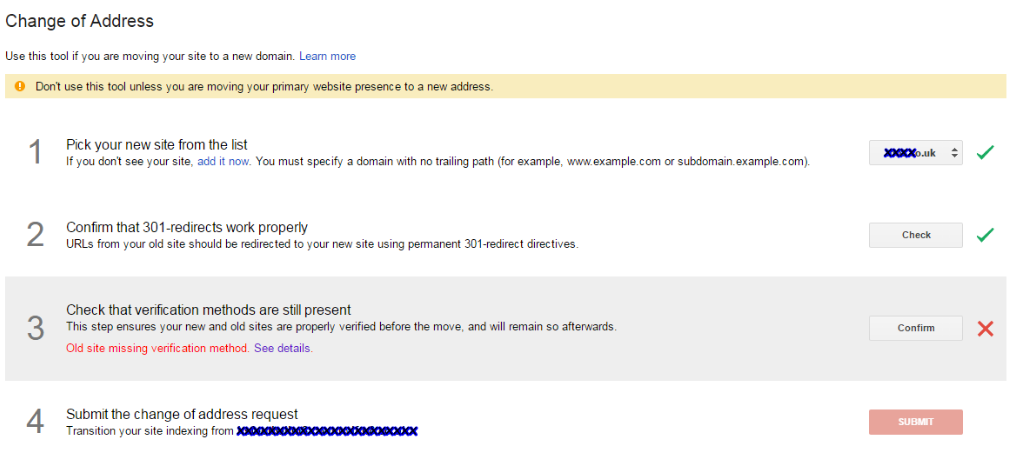
Today im making a request to google for a change of address however i have this silly issue.
6b306b5500977a10b4fcbeecf1f5cc21.png


As you can see i cant proceed because they cant check the old site for verification, and the obvious reason they cant is because i have redirected the old site. If i remove the redirects the verification can be done but then the redirects are no longer there so i still cant proceed.

Keep in mind im shattered and my brain is fried so im probably missing the obvious here, if so tell me what it is lol.


Cheers
 
Just don't redirect verification file on old site. That should do the trick.
 
Dunno how to do that but the penny dropped anyway.

Instead of using a meta tag to verify it im using a dns record on my host.

Just don't redirect verification file on old site. That should do the trick.
 
Dunno how to do that but the penny dropped anyway.

Instead of using a meta tag to verify it im using a dns record on my host.

I was talking about about html verification file you'd be prompted to upload. Just force .htaccess not to redirect that one file.
DNS record is even better. Less fuss.

G makes the rules. But it is kinda stupid if you ask me.
 
I was talking about about html verification file you'd be prompted to upload. Just force .htaccess not to redirect that one file.
DNS record is even better. Less fuss.

G makes the rules. But it is kinda stupid if you ask me.

Dont suppose you could tell me how thats done? Forcing .htaccess not to redirect the file
 
Sorry for waiting mate.

Here is everything you need inside your .htaccess (talking about old site):

RewriteEngine on
RewriteRule ^/file\.html$ - [L]
RewriteRule (.*) http://www.newdomain.com/$1 [R=301,L]

Replace file with name of file you want excluded (and extension if it's not html). Also newdomain.com obviously.
Everything from old site will be redirected to new one with exact URL requested (old.com/url -> new.com/url) with the exception of "file.html"

Make a backup of .htaccess just in case (always good idea).
 
The other stuff in there

RewriteCond %{REQUEST_FILENAME} !-f
RewriteCond %{REQUEST_FILENAME} !-d
RewriteRule . /index.php [L]


Do i remove that?


Sorry for waiting mate.

Here is everything you need inside your .htaccess (talking about old site):

RewriteEngine on
RewriteRule ^/file\.html$ - [L]
RewriteRule (.*) http://www.newdomain.com/$1 [R=301,L]

Replace file with name of file you want excluded (and extension if it's not html). Also newdomain.com obviously.
Everything from old site will be redirected to new one with exact URL requested (old.com/url -> new.com/url) with the exception of "file.html"

Make a backup of .htaccess just in case (always good idea).
 
The other stuff in there

RewriteCond %{REQUEST_FILENAME} !-f
RewriteCond %{REQUEST_FILENAME} !-d
RewriteRule . /index.php [L]


Do i remove that?

Yeah. I can send you a working example of it if you want.
Don't forget to make a backup.
 
Back
Top