

- Oct 30, 2020
- 191
- 63
Hello guys! I want to share with you a few solutions I've been using consistently for many years in CPA affiliate marketing. I hope you find some of these tools useful 
Here's the free stack I actually open every day, by category, with a concrete example of what each one did for me, and honest notes on where free runs out.
Concrete use: studying a skincare offer, I searched the Ad Library and found one advertiser running the same ad for four months straight. Four months means it's profitable, nobody burns money that long. The angle wasn't the product, it was a "your dermatologist won't tell you this" curiosity hook. Three other advertisers were running variations of the same hook. That convergence told me the angle was the winner, not any one creative, so I built my own version around it. Cost: nothing. The only catch with the library is it shows live ads but no spend numbers, so you read what's running, not how well it's doing.
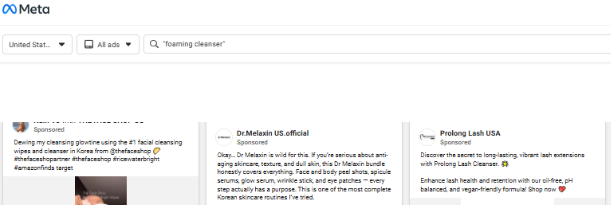
Remember: The FB ad library gives you the ability to use the API completely free of charge. You can filter and, in the extended version, display hundreds of creatives based on specific keywords and countries.
Example:
The valid values for ad_type are predefined by Meta. For example:
TikTok Creative Center is the same idea for short video, free, with top ads and trends filterable by region. Google Ads Transparency Center covers what advertisers run across Google. BigSpy has a free tier that scans across platforms, limited but fine for a first look.
Note: free spying is thin for native and push specifically. If that's your world you'll eventually pay for Anstrex or AdPlexity. For Facebook, TikTok and Google, the free libraries genuinely do the job.
Concrete use: I needed to localise a creative for a different geo, just swap the headline text on an existing PSD. Opened it in Photopea, changed the line, exported, done. No Photoshop licence, two minutes.
Canva's free tier is great for banging out simple banners fast with templates. GIMP and Figma's free plan cover heavier editing. For the landers themselves, plain static HTML costs nothing, and Carrd is a few bucks for simple no-code pages. Free lander templates float around the forums, but read the code before using, I've seen ones with broken tracking baked in and the odd sketchy script attached.


Concrete use, and this is the one that made me a believer: a lander's CR felt low and I couldn't work out why. I watched about 30 session recordings in Clarity. Same thing over and over, people reached CTA (button to cpa offer) field on the form, paused, and left. The field was asking for a CTA too early and spooking them. I moved it to a second step. CR went from about 6% to just over 9% on the exact same traffic. That fix cost half an hour of watching recordings and zero dollars.
Google Analytics plus Tag Manager is the standard free pairing for the wider picture. Less exciting than Clarity but worth having set up.
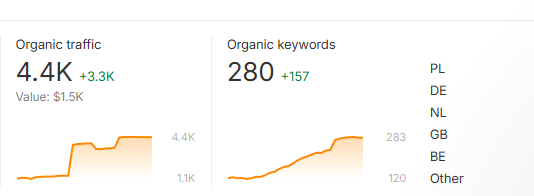
For me, the best solution for keyword research is still Ahrefs. You can buy it for $29 and it will be one of the best decisions you'll make. You can use Google Trends or Ubbersuggest KW Research, but you won't find as many CPA niche suggestions as Ahrefs.
Notion or Trello, free on their basic plans, keep your campaigns and swipe files organised so you're not hunting through random screenshots later. And Reddit plus the niche forums are free audience research people underuse, reading how real people describe a problem hands you angle ideas and the exact words to put in your copy, the kind you'd never invent sitting alone.
I'm not pretending free lasts forever. Pay when you need proper native or push spy coverage, when your tracking volume outgrows a free tier, or when you want premium lander hosting at scale. Those are real spends, once you've got data saying they'll pay for themselves.
The mistake isn't using free tools, it's buying a stack of paid ones before making a dollar and then wondering where the traffic budget went. And the opposite trap is just as real: tools don't make money, decisions do. I've watched people with the most expensive spy and tracking setup going still lose, because the software was never the bottleneck, their judgement was. A free stack with you paying attention beats a premium stack on autopilot every time.
Start here, put the real money into traffic, upgrade a tool only when a specific limit is actively blocking you. That's my stack. Always looking to add to it, so drop any free tool that earns its place on your screen.
Here's the free stack I actually open every day, by category, with a concrete example of what each one did for me, and honest notes on where free runs out.
Spying and competitive research
Facebook Ad Library is the big free one. Every ad currently live on Meta, searchable by keyword or competitor page.Concrete use: studying a skincare offer, I searched the Ad Library and found one advertiser running the same ad for four months straight. Four months means it's profitable, nobody burns money that long. The angle wasn't the product, it was a "your dermatologist won't tell you this" curiosity hook. Three other advertisers were running variations of the same hook. That convergence told me the angle was the winner, not any one creative, so I built my own version around it. Cost: nothing. The only catch with the library is it shows live ads but no spend numbers, so you read what's running, not how well it's doing.
Remember: The FB ad library gives you the ability to use the API completely free of charge. You can filter and, in the extended version, display hundreds of creatives based on specific keywords and countries.
Code:
curl -G \
-d "search_terms='skincare'" \
-d "ad_type=ALL" \
-d "ad_reached_countries=['US']" \
-d "access_token=<ACCESS_TOKEN>" \
"https://graph.facebook.com/v23.0/ads_archive"
Example:
The valid values for ad_type are predefined by Meta. For example:
- ad_type=ALL → returns all ads that are available through the Ads Library endpoint (including ordinary commercial ads and, depending on region and availability, special-category ads).
- ad_type=CREDIT_ADS → only ads related to credit, loans, mortgages, financing, etc.
- ad_type=HOUSING_ADS → only housing/real-estate related ads.
- ad_type=EMPLOYMENT_ADS → only job and recruitment ads.
- ad_type=POLITICAL_AND_ISSUE_ADS → only political/social issue ads.
TikTok Creative Center is the same idea for short video, free, with top ads and trends filterable by region. Google Ads Transparency Center covers what advertisers run across Google. BigSpy has a free tier that scans across platforms, limited but fine for a first look.
Note: free spying is thin for native and push specifically. If that's your world you'll eventually pay for Anstrex or AdPlexity. For Facebook, TikTok and Google, the free libraries genuinely do the job.
Landers and creatives
AI ex. Gemini, GPT, Photopea is a full Photoshop clone in your browser, free, opens PSD files.Concrete use: I needed to localise a creative for a different geo, just swap the headline text on an existing PSD. Opened it in Photopea, changed the line, exported, done. No Photoshop licence, two minutes.
Canva's free tier is great for banging out simple banners fast with templates. GIMP and Figma's free plan cover heavier editing. For the landers themselves, plain static HTML costs nothing, and Carrd is a few bucks for simple no-code pages. Free lander templates float around the forums, but read the code before using, I've seen ones with broken tracking baked in and the odd sketchy script attached.
Analytics and behaviour stack
Microsoft Clarity is the most underrated free tool in this whole post. Free heatmaps and free session recordings, no real limits, and you get to watch real people use your lander.
Concrete use, and this is the one that made me a believer: a lander's CR felt low and I couldn't work out why. I watched about 30 session recordings in Clarity. Same thing over and over, people reached CTA (button to cpa offer) field on the form, paused, and left. The field was asking for a CTA too early and spooking them. I moved it to a second step. CR went from about 6% to just over 9% on the exact same traffic. That fix cost half an hour of watching recordings and zero dollars.
Google Analytics plus Tag Manager is the standard free pairing for the wider picture. Less exciting than Clarity but worth having set up.
Tracking CPA offers
Bemob and redtrack has still a free tier(1month / 14 days), so you can run a real, proper tracker for nothing while you learn. No excuse to run blind. Google Sheets does the rest, your P&L, split test logs, offer comparisons, all of it, and it stays good enough for a very long time. I still run my P&L in a sheet.For me, the best solution for keyword research is still Ahrefs. You can buy it for $29 and it will be one of the best decisions you'll make. You can use Google Trends or Ubbersuggest KW Research, but you won't find as many CPA niche suggestions as Ahrefs.
Notion or Trello, free on their basic plans, keep your campaigns and swipe files organised so you're not hunting through random screenshots later. And Reddit plus the niche forums are free audience research people underuse, reading how real people describe a problem hands you angle ideas and the exact words to put in your copy, the kind you'd never invent sitting alone.
Where free stops...
I'm not pretending free lasts forever. Pay when you need proper native or push spy coverage, when your tracking volume outgrows a free tier, or when you want premium lander hosting at scale. Those are real spends, once you've got data saying they'll pay for themselves.
The mistake isn't using free tools, it's buying a stack of paid ones before making a dollar and then wondering where the traffic budget went. And the opposite trap is just as real: tools don't make money, decisions do. I've watched people with the most expensive spy and tracking setup going still lose, because the software was never the bottleneck, their judgement was. A free stack with you paying attention beats a premium stack on autopilot every time.
Start here, put the real money into traffic, upgrade a tool only when a specific limit is actively blocking you. That's my stack. Always looking to add to it, so drop any free tool that earns its place on your screen.
