

instahut
Regular Member
- Mar 20, 2019
- 223
- 77
Greetings from the house.
As many of you are having issues with software-based bots, I think it will be useful for you to have a backup automation option. This method exploits the free trial period of the Growbot Chrome Extension, allowing you to use it indefinitely. If you like the software, please purchase a subscription and support the creators.
Growbot Chrome Extension is a simple follow/like/unfollow automation tool and is easily learnable, so I won't be putting how to use the extension here, only how to exploit the free trial. By no means is this a scalable method, and involves a lot of manual targeting work when doing this on multiple browsers. The upside is that you can run a portion of your accounts on your residential internet and see results in real time. It's also hard to ban because it's a browser based extension.
Step 1: Download the extension from https://chrome.google.com/webstore/...or-ins/abhcgokmndbiegmmbjffdlpihgdmeejf?hl=en (must be on chrome browser)

Step 2: Use the extension until the 7 Day trial is up and this message appears

Step 3: Delete system files regarding the extension
For Mac OS users,
-Go to Finder
-Click Go to Folder
-Input your Application Support directory ( ~/Library/Application Support/ )
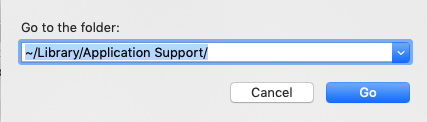
-Navigate to Google > Chrome > Default (or your profile name, can be Profile 1) > Extensions
-Delete folder called abhcgokmndbiegmmbjffdlpihgdmeejf
-Go back to the previous folder and navigate to Local Extension Settings
-Delete folder called abhcgokmndbiegmmbjffdlpihgdmeejf
-Close Google Chrome completely
-Reopen Google Chrome, Plugin icon should look a puzzle piece like this:

-Right click and select Remove from Chrome...
-Repeat Steps 1, 2 & 3 indefinitely
For Windows users,
-Open Explorer window
-Type %localappdata% into directory:

-Navigate to Google > Chrome > User Data > Default > Extensions
-Delete folder called abhcgokmndbiegmmbjffdlpihgdmeejf
-Delete folder called abhcgokmndbiegmmbjffdlpihgdmeejf
-Close Google Chrome completely
-Reopen Google Chrome, Plugin icon should look a puzzle piece like this:
It may not appear at all, in this case just go to Extensions and remove it manually, or remove it when you try to reinstall the extension:

-Repeat Steps 1, 2 & 3 indefinitely
BONUS Step 4: Multiple browsers running 1 account each
-Download following chrome-based browsers:
UC Browser (windows) https://www.ucweb.com/
Chromium https://download-chromium.appspot.com/
Vivaldi https://vivaldi.com/
Yandex https://browser.yandex.com/
Opera https://www.opera.com/download
Portable Apps offers a separate individual copy of Opera and Chrome Portable Browsers
-One computer can run 7 different Chrome-based browsers at once
-You can also use Virtual Machines to 7 more browsers if you computer is strong enough.
Enjoy!
As many of you are having issues with software-based bots, I think it will be useful for you to have a backup automation option. This method exploits the free trial period of the Growbot Chrome Extension, allowing you to use it indefinitely. If you like the software, please purchase a subscription and support the creators.
Growbot Chrome Extension is a simple follow/like/unfollow automation tool and is easily learnable, so I won't be putting how to use the extension here, only how to exploit the free trial. By no means is this a scalable method, and involves a lot of manual targeting work when doing this on multiple browsers. The upside is that you can run a portion of your accounts on your residential internet and see results in real time. It's also hard to ban because it's a browser based extension.
Step 1: Download the extension from https://chrome.google.com/webstore/...or-ins/abhcgokmndbiegmmbjffdlpihgdmeejf?hl=en (must be on chrome browser)
Step 2: Use the extension until the 7 Day trial is up and this message appears
Step 3: Delete system files regarding the extension
For Mac OS users,
-Go to Finder
-Click Go to Folder
-Input your Application Support directory ( ~/Library/Application Support/ )
-Navigate to Google > Chrome > Default (or your profile name, can be Profile 1) > Extensions
-Delete folder called abhcgokmndbiegmmbjffdlpihgdmeejf
-Go back to the previous folder and navigate to Local Extension Settings
-Delete folder called abhcgokmndbiegmmbjffdlpihgdmeejf
-Close Google Chrome completely
-Reopen Google Chrome, Plugin icon should look a puzzle piece like this:
-Right click and select Remove from Chrome...
-Repeat Steps 1, 2 & 3 indefinitely
For Windows users,
-Open Explorer window
-Type %localappdata% into directory:
-Navigate to Google > Chrome > User Data > Default > Extensions
-Delete folder called abhcgokmndbiegmmbjffdlpihgdmeejf
-Delete folder called abhcgokmndbiegmmbjffdlpihgdmeejf
-Close Google Chrome completely
-Reopen Google Chrome, Plugin icon should look a puzzle piece like this:
-Repeat Steps 1, 2 & 3 indefinitely
BONUS Step 4: Multiple browsers running 1 account each
-Download following chrome-based browsers:
UC Browser (windows) https://www.ucweb.com/
Chromium https://download-chromium.appspot.com/
Vivaldi https://vivaldi.com/
Yandex https://browser.yandex.com/
Opera https://www.opera.com/download
Portable Apps offers a separate individual copy of Opera and Chrome Portable Browsers
-One computer can run 7 different Chrome-based browsers at once
-You can also use Virtual Machines to 7 more browsers if you computer is strong enough.
Enjoy!


