Lesson learned, I lost my all sites today

If you are not sure online backup has also risks (Not trust them too much or paranoid) download a "website extractor" and run it on a daily basis or once in a few days from PC. Backup will be in your PC.
Yes that's why I am using 2 offsite storage system, I dont think if same accident happen again then it will happen on all 3 at a time (1 backup in server, 1 in hetzner storage box located in Germany, and another on wasabi USA).
 
I am using Hetzner as my server provider from many years. Server model is AX41-NVME, its have 6 cores (12 threads) Amd ryzen CPU, 64GB Ram and 2 512GB NVME M2 disk. I hosted around 12-13 live sites here and performance was very good. But today this disaster happened.
Don't they have a file manager in their control panel? If so, all the pages should be in there.
 
In IT Infrastructure may it is a cloud hosting or dedicated DC setup or even a Home hosting setup, the thumb rule is to prepare an environment with redundancy. Redundancy setup is useless most times but during these occasions without having redundancy can ruin your entire lifeline.

Also while setting up, plan-wise what data should save where and which ones should go archived.
 
Not haveing backups and running everything on a single drive is one of the dumbest things you can do
 
There is still a chance of recovering all of your sites back with the help of Google Cache if they are indexed.
 
Not haveing backups and running everything on a single drive is one of the dumbest things you can do
Exactly.

There is still a chance of recovering all of your sites back with the help of Google Cache if they are indexed.
I did few of them but not able to do other sites like automated and PAA sites. I have keywords list so I started generating posts again. Because URL remain same so I am hopping maybe I will get all traffic some day again.
 
It's a really bad situation, I feel sorry for you. We all experience such losses from time to time. Don't be so hard on yourself.
 
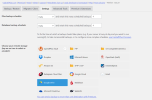
That's very sad to hear. Always take your backup on different servers. I use UpdraftPlus to take backup and store it on my Google Drive account. This way the whole site backup is sent to Google Drive every day automatically. And since Google servers are trustable, you can rely on them. In UpdraftPlus there are other options available too.

You can use https://archive.org/web/ to recover some of your pages on the site.

Here are the settings I use and UpdraftPlus takes the backup of my site everyday and sends it to my Google Drive.

1668488960540.png1668488936412.png
 
Lesson learned the hard way .. Always backup on a different provider in a different location and replicate the backup with another provider and different location.
 
This has happen to me many years ago. Today I pay for 2 backup servers + have daily Google Drive backup. Don't be cheap about this, it could save you hundreds of hours of work + keep you calm at night.
 
Back
Top