
You are using an out of date browser. It may not display this or other websites correctly.
You should upgrade or use an alternative browser.
You should upgrade or use an alternative browser.
Is it normal while working on your WP takes sometimes to load?
- Thread starter YujinTan
- Start date


Shinichi Izumi
Senior Member
- Jul 5, 2019
- 956
- 443
ping and upload also hosting provider where from you are connected distance all these matters
try editing MTU parameter on your router it helps too
try editing MTU parameter on your router it helps too
Flea Market SEO
Registered Member
- Dec 6, 2018
- 82
- 20
Are you using a third party "visual editor"? For me, Cornerstone was almost unbearably slow...I always end up using the default WP post editor unless there is a specific template/layout within my theme I want to use.

YujinTan
BANNED
- Jan 7, 2018
- 4,971
- 971
Nope, what I read around etc ,Are you using a third party "visual editor"? For me, Cornerstone was almost unbearably slow...I always end up using the default WP post editor unless there is a specific template/layout within my theme I want to use.
some claim don't install too much plugin, etc settings of some plugin might affect
is kinda too complex .
Morris M Nichols
Power Member
- Feb 26, 2019
- 501
- 210
How much time to load are you talking about?
YujinTan
BANNED
- Jan 7, 2018
- 4,971
- 971
How much time to load are you talking about?
take like more than 5 , 10 second or so like that of course not over 1 min
Morris M Nichols
Power Member
- Feb 26, 2019
- 501
- 210
Well it should be like 4-7 seconds. I have multiple wp sites working on same server with more than 20+ plugins and good themes on each and none of them take more than this.take like more than 5 , 10 second or so like that of course not over 1 min


likhonahmed
Regular Member
- Jan 7, 2020
- 444
- 66
Thank you very much to share it with us


RebeccaThomas
Junior Member
- Jun 18, 2019
- 147
- 142
It's all going to be about the hosting really. If it's a shared hosting service and you're in there with 100,000,000 other sites then you're going to have issues.

GoldenTouch
Regular Member
- Feb 10, 2020
- 306
- 290
Probably hosting, in my experience one website works great on one hosting account and on other it works terrible.

Index Sites
Regular Member
- Mar 27, 2019
- 266
- 125
Couple of things you can do. One of the first is to use the inspect element tool on chrome to see what is taking forever to load. Just right-click "inspect element" go to the Network tab make sure all is selected then reload the page and see what is taking up all the time.like add new post, edit etc on your wordpress
is like take awhle to load

Another thing you could do is install query monitor on your site. Just another way to check what's taking forever to load.
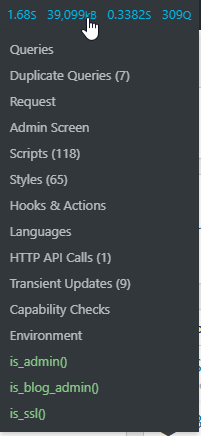
Another thing it could be is fragment, database, and object caching. What caching solutions are you using? From my experience using any of these will help your front-end load better, but make the dashboard unbearable. If you don't find an issue with any of these it could be your host= or a another plugin you have installed. It'll basically be trial and error to find the cause.
YujinTan
BANNED
- Jan 7, 2018
- 4,971
- 971
Couple of things you can do. One of the first is to use the inspect element tool on chrome to see what is taking forever to load. Just right-click "inspect element" go to the Network tab make sure all is selected then reload the page and see what is taking up all the time.
Another thing you could do is install query monitor on your site. Just another way to check what's taking forever to load.
Another thing it could be is fragment, database, and object caching. What caching solutions are you using? From my experience using any of these will help your front-end load better, but make the dashboard unbearable. If you don't find an issue with any of these it could be your host= or a another plugin you have installed. It'll basically be trial and error to find the cause.
actually what I curious and ask is it normal to take like some seconds to load , update while u edit , post content , media stuffs like that while working inside WP .

Athanasios
Regular Member
- Jul 11, 2019
- 327
- 239
It can be bloody cache, especially in Firefox!