Http vs https , how to be ?

Divingdeep

BANNED
Joined
Sep 11, 2018
Messages
326
Reaction score
46
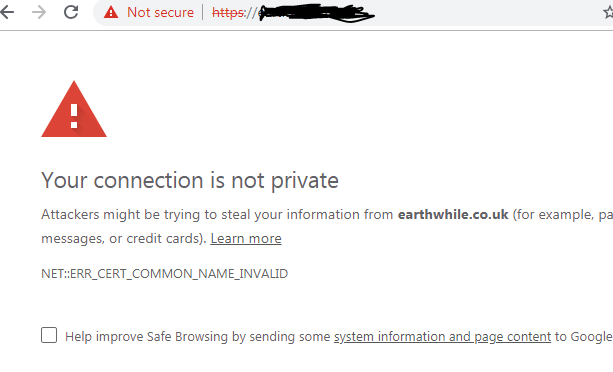
Hello people... I have launched my new website (it was an expired domain ) , and it has some good domain authority and trust flow, the thing is , the most of the backlinks are for the http version (without SSL) , thats why I still do not want to install it, cause I think it can lose rankings. Most of the https websites are opening quite good on my PC (no any error ) the page loads , though there is some "not secure" note before the domain name in browser... I have recently changed the DNS and built some pages, but when I open my website form my PC and smartphone , it gives an error

FOEB9oO

AwFxLmV

Will this error persist for long, and all of the visitors will get it???
Why it happens.? cause other websites without SSL, (which are still http) are opening quite good (I dont see this error)
 
Last edited by a moderator:
This error will persist forever if you do not fix it.
The most likely problem is an expired domain certificate which needs to be renewed, or you don't have a certificate at all.

Edit: I just looked at your domain, it seems like you pointed your DNS to a new web host. You should either install a certificate with your web host, or use plain HTTP.

Edit2: you hid the URL in the URL bar, but forgot to do the same in the error message.
 
Not a tech guy. But like what alain12 has mentioned, install a new certificate.

Instructions:

If you still receive errors, scan your website with this tool and fix the errors: https://www.whynopadlock.com/
 
A webiste with domain .co.uk will get this error message if you don't have a SSL certificate. All of your users will get the same error Msg. Using Cloudflare or SSL certificate can solve this problem.
 
Best solution would be cloudflard. You get free certificate there and the setup is easy, all you need to do it just move few buttons there and there and thats it.

You can choose to have flexible cerfiticate, so your http backlinks will still count. and you will be able to use your site with http and https.
 
Nope. You messed somewhere along the way. Unless you fix the problem, this error will stay. BTW do you have a SSL or you just decided to use the https? Cloudflare also offers free ssl and for that, you don't need to install anything.
 
Can't see the error, but if your domain uses https and you have images/media linked using non secure http, browsers will show a "not secure" message.
 
Back
Top