You know how when you set up a wordpress it gives you a default 'Home' tab which is not listed in pages, it features the custom carousal which came with the theme. I have posts on this supposed page that does not exist under pages and want to make it static, how can i do this seeing as i have no pages set up yet

You are using an out of date browser. It may not display this or other websites correctly.
You should upgrade or use an alternative browser.
You should upgrade or use an alternative browser.
How to you make your default homepage on wordpress static?
- Thread starter diizzle
- Start date
SEOtheWorld
Newbie
- Nov 7, 2011
- 49
- 14
Create your static page under "Pages", then go to Settings > Reading, and choose Static Page radio button, and select the page you created.

Create your static page under "Pages", then go to Settings > Reading, and choose Static Page radio button, and select the page you created.
Ye i can do that but how do i get the content on my old home page onto the newly created one, how do i direct the posts to go there?

terrycody
Elite Member
- Sep 29, 2012
- 6,423
- 3,324
i have same problem, i just realized that if i run a photoblog or just 1 column blog, then i just need 1 page, that is the home page! but i do not need the tag, because it is not anysense to use it at this circumstance, and how can i delete the "home" tag and then my website just look like the "pinterest" no breadcrumbs would be nice
any help would be appreciated it!
any help would be appreciated it!
damncoldnight
Junior Member
- Dec 2, 2012
- 144
- 99
Settings>Reading> then you can see an option there. You will get a qucik answer if you google it before you post. =)
 Nice to help you. it is very easy. I understand your question.
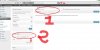
1. Creat a New MENU
2. Creat a Link ( thirst ROW) with your link of your site (yourdomain)
3. See image here (bcz I can not attach) : img525.imageshack.us/img525/2521/12119743.png
See at imagize ^^