

ACHF
Junior Member
- Mar 20, 2021
- 112
- 70
Hello.
So I just finished my little project in Python. I'm learning PySimpleGUI and I'm coding little examples to learn it better. I want to keep all my projects on my Github, but I don't know which files should go and which files should stay. Do I just upload autoPassGen.py or is there any more magic tricks?
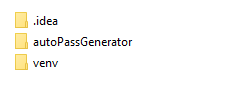
This is the project folder.
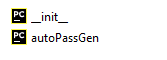
And this is the inside of autoPAssGenerator folder:
So which files should I upload to my Github repo?
Thanks.
So I just finished my little project in Python. I'm learning PySimpleGUI and I'm coding little examples to learn it better. I want to keep all my projects on my Github, but I don't know which files should go and which files should stay. Do I just upload autoPassGen.py or is there any more magic tricks?
This is the project folder.
And this is the inside of autoPAssGenerator folder:
So which files should I upload to my Github repo?
Thanks.


