
MIRANTHA
Elite Member
- Aug 6, 2019
- 1,526
- 633


will try this.Thank youlooks like you have some plugin that runs a heavy or broken js code most likely,
Also, consider moving your website to a VPS as you'll get much better speed with approx the same price
- install amp plugin
- install a caching plugin (wp rocket)
- disable your plugins 1 by 1 and test to find which one causing the problem


Cheers!!
- Select a robust and fast hosting provider - Cloudways
- Caching - WP Fastest Cache
- Select a lightweight and fast loading theme - GeneratePress
- Avoid Page Builders - Use Oxygen instead
- Keep plugins to a minimum - List of plugins to avoid
- Optimize Images - Shortpixel
- Host fonts locally - OMGF
- Delay external scripts - Flying Scripts
- CSS and JS Delivery - Asset Cleanup
- Media - WP YouTube Lyte
Good to hear!Thanks for the tips, my site just got a better speed with a small portion of work.
Good to hear!
When auditing sites I found the most common issues affecting its loading speed/performance are...
IMAGES
The two more important image optimization tasks you can perform besides...
Are...
- Compress
- Lazy Load
- Serve them through a CDN
- Resize or Mobile Optimization - It´s not enough to properly resize images taking into account desktop and mobile users but to make sure to serve the appropriate image based on the device.
- Convert to Webp - All major browsers support it and on the next WP update they will support it as well.
EXTERNAL SCRIPTS
This is also a common thing I notice in almost ALL the sites I work on. Some really overdo it and it has a deep impact on a site´s performance.
Thankfully, there´s Flying Scripts, an amazing free plugin that gets the job done.
The way I do it is to run the site´s URL through WebPageTest and go to the Domain tab and scroll down, if you have any external connections you should see it there and if you want the full list, head over the Domain tab. You should see the full list there.
Other issues are site-wide plugins, hosting fonts locally, etc.
Cheers!!
There are several ways to determining what scripts to delay...Thanks a lot for the useful info you shared. About Flying Script plugin, you need to spot and choose the scripts manually right ?
How you can spot them, should I use the Google speed suggestions ?
Any alternative hosting provider?Cheers!!
- Select a robust and fast hosting provider - https://www.cloudways.com/en/
- Caching - https://wordpress.org/plugins/wp-fastest-cache/
- Select a lightweight and fast loading theme - https://generatepress.com/
- Avoid Page Builders - Use https://oxygenbuilder.com/ instead
- Keep plugins to a minimum - https://onlinemediamasters.com/slow-wordpress-plugins/
- Optimize Images - https://shortpixel.com/
- Host fonts locally - https://wordpress.org/plugins/host-webfonts-local/
- Delay external scripts - https://wordpress.org/plugins/flying-scripts/
- CSS and JS Delivery - https://wordpress.org/plugins/wp-asset-clean-up/
- Media - https://wordpress.org/plugins/wp-youtube-lyte/
Thanks a lot! I had this problem terminated which scripts to delay but now I am ready for some testing.There are several ways to determining what scripts to delay...
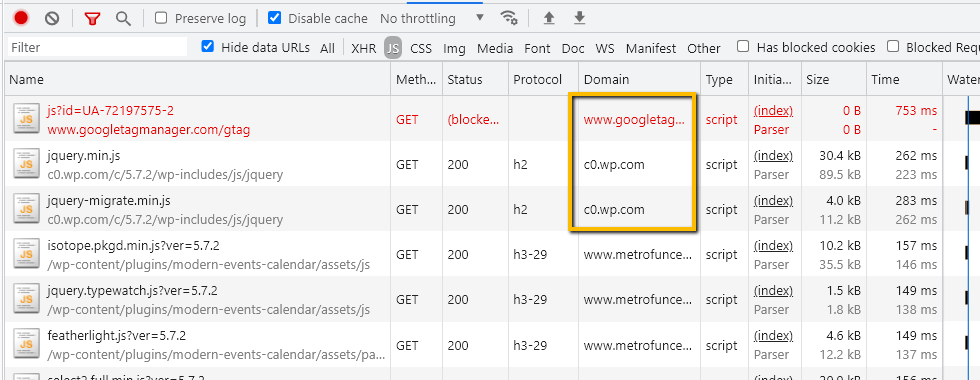
When upon loading the Chrome dev tools and heading over the JS tab at the top you can browse for all the resources that originated on an external domain.
- Chrome dev tools
Like the ones, I highlighted here...
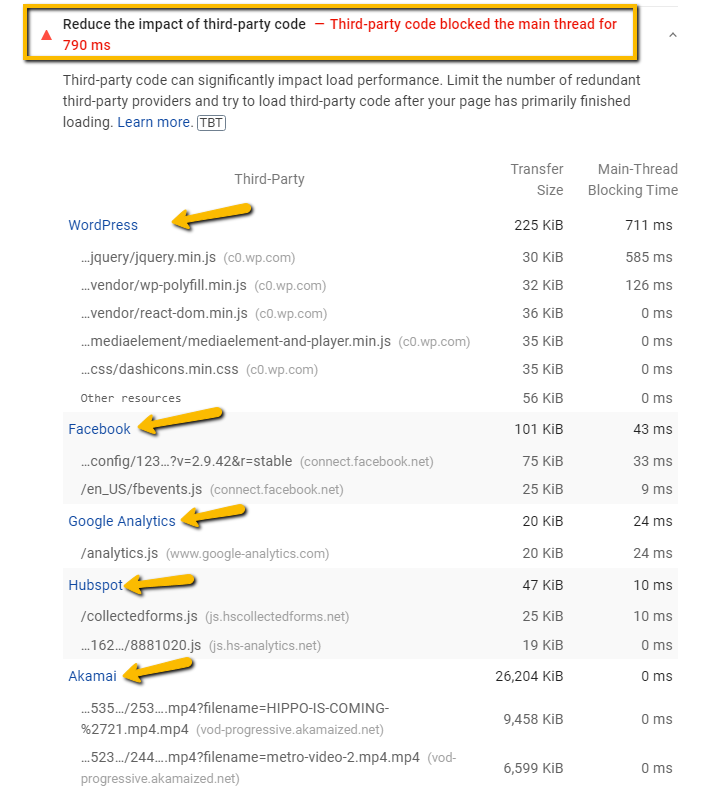
On the Diagnostics section and insight the "Reduce the impact of third party code", you should be able to see a pretty good list of all the scripts downloaded and executed on that page coming from external domains...
- Google PageSpeed Insights
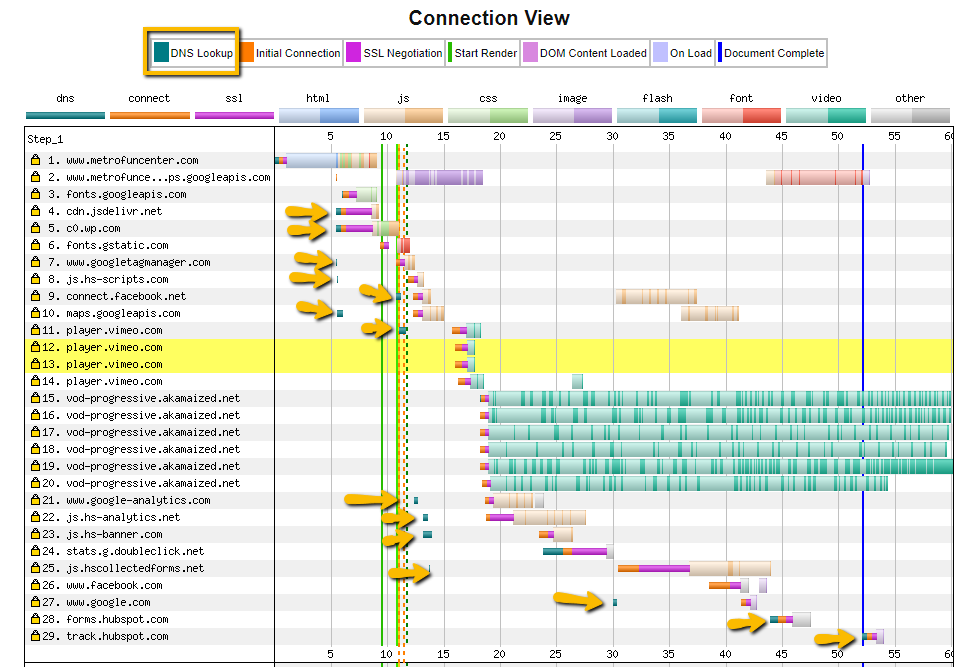
And perhaps my favorite tool to run this analysis. When you run a test using WebPageTest you can head over the "Content" tab at the top and, if you scroll down you should be able to see the "Connection View" chart which, will graphically show you all the DNS lookup connections your site has to make to all different external domains in order to download and execute those resources...
- WebPageTest
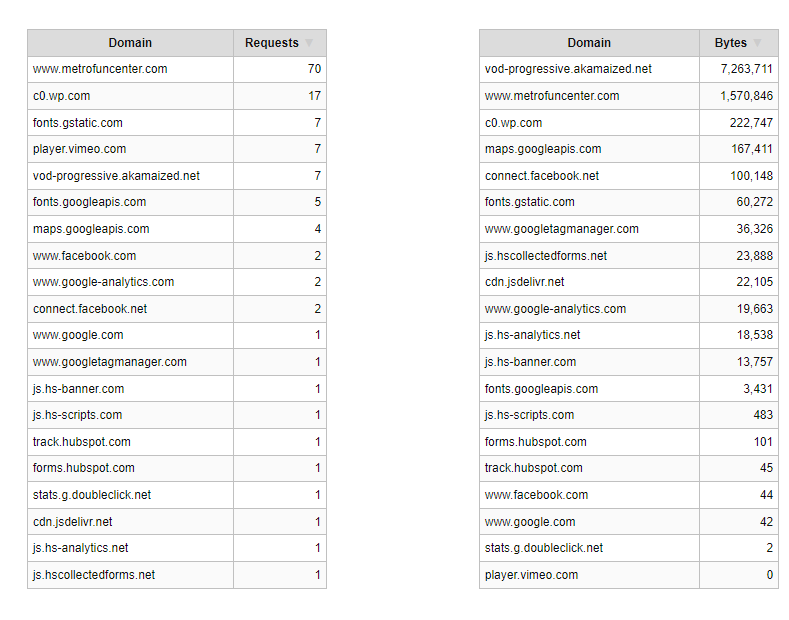
And, all you want is a list, then head over to the "Domain" tab and scroll a bit down you should be able to see a couple of tables summarizing the most important external scripts loading on your site based on their number of HTTP requests (some domain load and execute more than one script) and the number of bytes during the transfer process...
You can just pick the domains from the right table as a base-ground to determining what scripts you want to delay on your site.
Make sure to exclude the fonts (since we´re going to host them locally) and any other script your site needs to fully render its content for visitors. Other than that, this list is pretty good!
If you have the budget you can´t go wrong with either Kinsta or WPX HostingAny alternative hosting provider?
Not a problemThanks a lot! I had this problem terminated which scripts to delay but now I am ready for some testing.


The site which takes more time to load will have a higher bouncing rate.My website mobile score is 17 in google page speed insight means very bad..
how to improve this guys..
i have no coding or web developing skills..
website using newspaper theme and hosted on namecheap..
Thank you


