

Icey Dan
Power Member
- Nov 24, 2014
- 559
- 628
Hey BHW! I haven't been very active on here lately as I've had a lot going on in my life, so I figured it was time to share some more useful information that can hopefully help some of you out and save you some money.
In this post I will show step-by-step how to get any premium vector icon or graphic from fontawesome.com - without paying anything. Fontawesome is one of the best places to find just about any icon or graphic you could possibly need for your website. Most of the best icons are premium however, so normally you would have to pay money to download the scale-able SGV versions of them. But I recently found out there is an easy way to bypass that and grab the SVG for any icon on their site for free in just 4 easy steps.
Step 1. Go to fontawesome.com and search for a premium vector icon you want to use. For this example, I will use this marketing related icon I found.
Step 2. Right click the smaller icon on the right and inspect the element with your browser's developer tools. I am using Chrome in this example.

Step 3. In the developer tools pane that comes up, right click the SVG element and click "edit as HTML". The wording may be slightly different depending on which browser you use but they should all have this functionality.
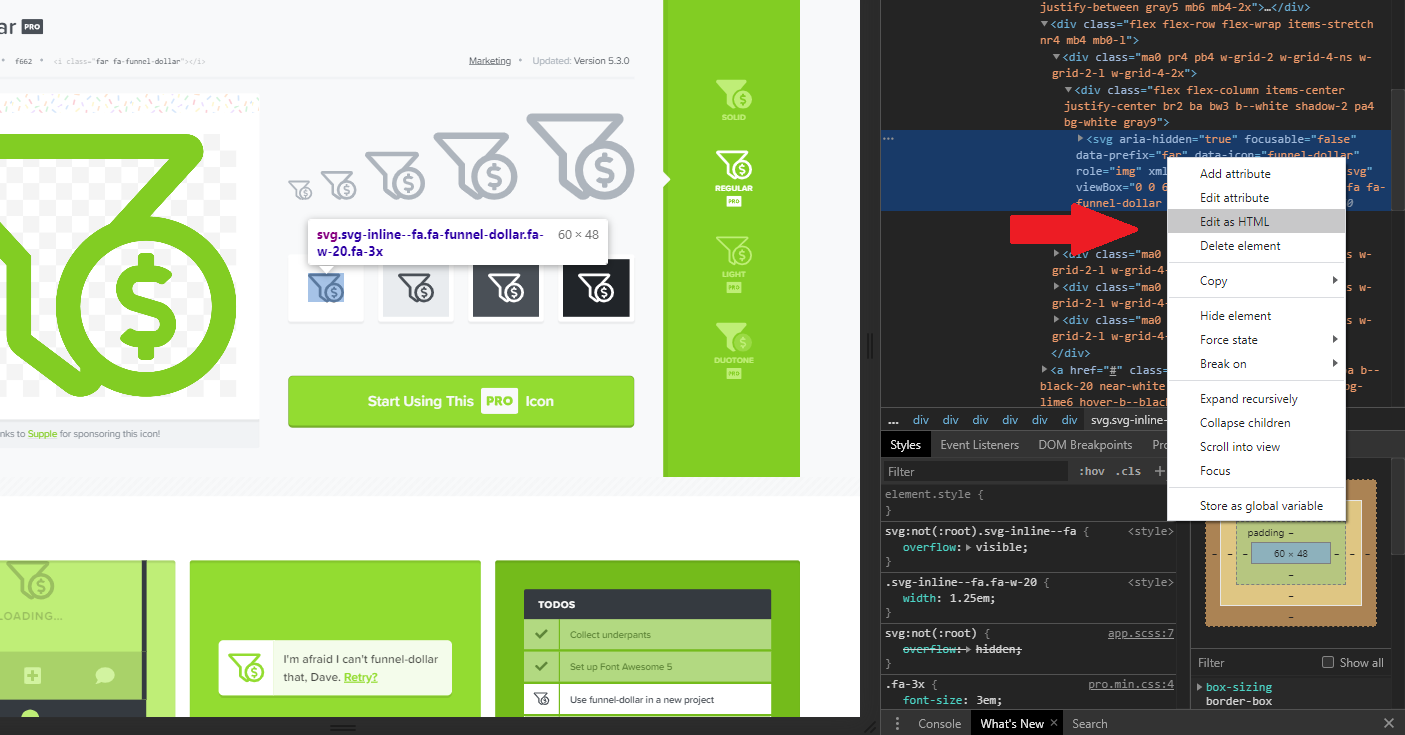
Step 4. Copy the code. Then create a new text document, paste the code in and save the file as whatever.svg. It is important to include the SVG file extension.
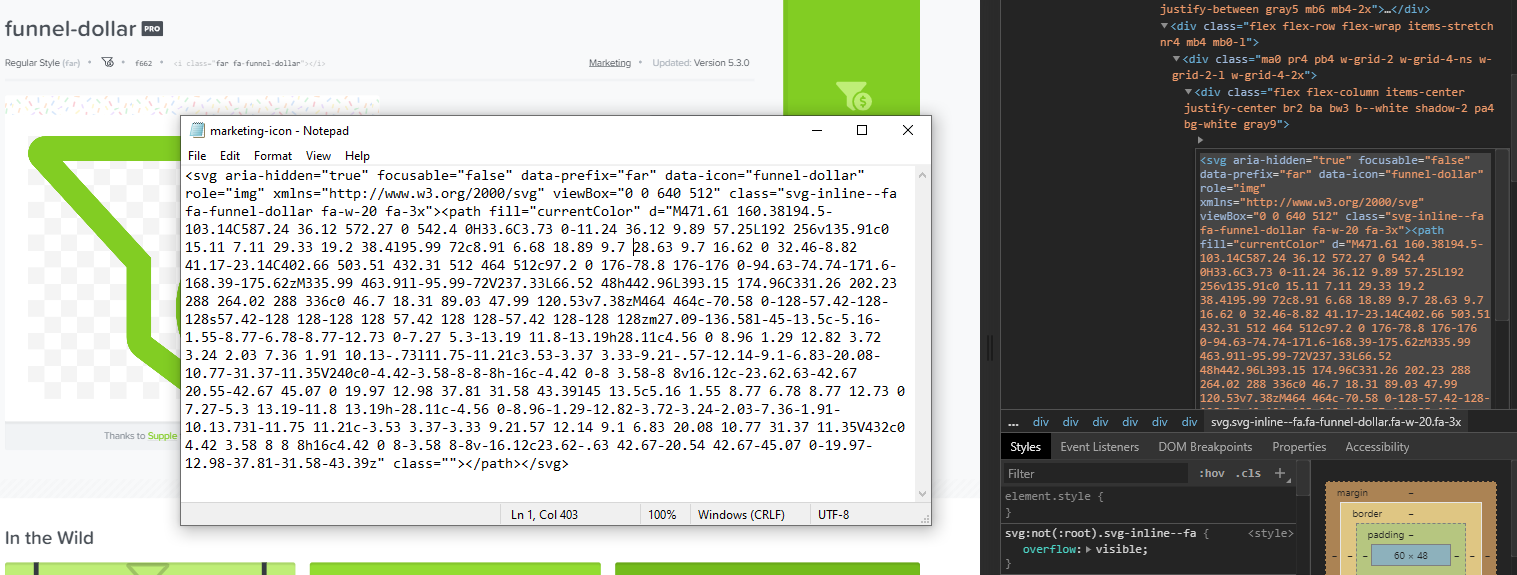
Voila! That's all there is to it. You can now use that image file on your website however you please. If you want to change the color of the vector, just find where it says fill="currentColor" in the code and replace "currentColor" with the HEX code for whatever color you would like it to be. For example - if I wanted to change it to a red, I would change it to be fill="#fc0303". Google's color picker tool is great for quickly grabbing these HEX codes.
I hope you found this post useful. If you plan on doing this I would suggest you take advantage sooner than later before too many people abuse this and they catch on.
Cheers!
In this post I will show step-by-step how to get any premium vector icon or graphic from fontawesome.com - without paying anything. Fontawesome is one of the best places to find just about any icon or graphic you could possibly need for your website. Most of the best icons are premium however, so normally you would have to pay money to download the scale-able SGV versions of them. But I recently found out there is an easy way to bypass that and grab the SVG for any icon on their site for free in just 4 easy steps.
Step 1. Go to fontawesome.com and search for a premium vector icon you want to use. For this example, I will use this marketing related icon I found.
Step 2. Right click the smaller icon on the right and inspect the element with your browser's developer tools. I am using Chrome in this example.
Step 3. In the developer tools pane that comes up, right click the SVG element and click "edit as HTML". The wording may be slightly different depending on which browser you use but they should all have this functionality.
Step 4. Copy the code. Then create a new text document, paste the code in and save the file as whatever.svg. It is important to include the SVG file extension.
Voila! That's all there is to it. You can now use that image file on your website however you please. If you want to change the color of the vector, just find where it says fill="currentColor" in the code and replace "currentColor" with the HEX code for whatever color you would like it to be. For example - if I wanted to change it to a red, I would change it to be fill="#fc0303". Google's color picker tool is great for quickly grabbing these HEX codes.
I hope you found this post useful. If you plan on doing this I would suggest you take advantage sooner than later before too many people abuse this and they catch on.
Cheers!
