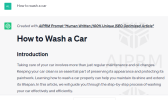
I suggest installing
AIPRM for chatgpt
Anyone in content creation should have this chrome extension for Chatgpt, and you'll be blown away how it will enhance your chatgpt experience.
If you are not using AIPRM GPT, Use prompts like
I want you to write a blog post using markup for headers and other tags do not generate it in a code box style it in the chatbox
Dm me to learn more about prompt engineering for Articles
You should be using the playground and priming the model, you will get better results IMHO
Guidelines on How to Write (Public) Prompt Templates for AIPRM
Written by: Corvox AI
Creating public Prompt Templates in AIPRM means exposing them to 100,000s of users. This is a guide on how to write them.
Goals for Public AIPRM Prompt Templates
A public prompt template you provide to the Community
MUST BE:
- Reusable – variable data entered by the user must be inserted into the Prompt using the [PROMPT] placeholder.
- Multi-lingual – ChatGPT must be instructed to produce output in the target language using the [TARGETLANGUAGE] placeholder.
- English described – Title, Teaser, Prompt Hint must all be in 100% correctly spelled, correctly capitalized English. The prompt itself could be coded in another language, but the description to the AIPRM user must be English.
Any other user in any other language should be able to use your prompt Template if you set it to public.
Problems encountered with early Public AIPRM Prompt Templates
After a few days of the Community Mode Version of AIPRM being live, we found a lot of low-quality prompt templates released to the public.
We already got complaints and support requests for poorly designed Prompt Templates that needed to meet the quality criteria of the original AIPRM Prompts.
Examples of problems found in our reviews:
- Not Reusable Prompt Templates
- Not Multi-Lingual Prompt Templates
- Prompts written for one specific language (“Write only in Italian”)
- Prompts written for only 1 topic (“Write about GSCE exam”)
What we saw were normal prompts that were just copied over and saved as Prompt Templates, for 10000s of users.
That’s not it.
Prompt Templates are a lot more than one single prompt.
So how to do it right? How to change a trivial prompt that works for you to an AIPRM Prompt Template that works for 10000s of users?
Writing Reusable Prompt Templates
A prompt restricted to a specific topic, even a particular keyword like “GCSE exams,” may make a lot of sense for you to keep, but 99% of the AIPRM users won’t need it.
Suppose you provide a template to the Community. In that case, you need to ensure that the relevant keywords, topics, and reference points are passed as “variables” into the Prompt Template for the placeholder [PROMPT] in the text.
Example phrases to use:
- the keywords to use in the analysis are [PROMPT]
- please use the keywords [PROMPT] and...
Writing Multi-Lingual Prompt Templates
A prompt restricted to a specific language does not make sense for our international Community and therefore is not allowed as a public Prompt in AIPRM.
If you provide a template to the Community, then you need to make sure that the output language is controlled and used reliably by the ChatGPT model. In your Prompt Template, you need to use the placeholder [TARGETLANGUAGE] in the text.
Example phrases to use:
- want you to act as a blog post title writer that speaks and writes fluent [TARGETLANGUAGE]
- you will reply with blog post titles in [TARGETLANGUAGE]
- write all output in [TARGETLANGUAGE]
Goals for all AIPRM Prompt Templates
A prompt template should help you be faster in your work.
This is only possible if you spend the effort when creating it.
Sample prompts to use when making prompts for AIRMP
you are an article writer, write an article with heading and subheadings explain how to make chatgpt write with headings and subheadings using prompts, make sure to use markup formatting.
Specifically, the fields:
Are essential for you and others to find the prompt again next week and still understand what it does.
You need to ensure these are well-written,
clear, and descriptive. Here are some guidelines for each field:
Title
The title should succinctly describe the purpose or topic of the Prompt Template. It should be specific enough to provide a clear idea of what the prompt is about. Avoid vague or generic titles that could be easily confused with other templates. Use proper capitalization and avoid spelling errors.
Example of a good title: "Generate Creative Blog Post Titles"
Teaser
The teaser is a short description that provides additional context or a brief summary of what the prompt template is designed to accomplish. It should entice users to select the template and give them a clear idea of what they can expect from it. Keep it concise, engaging, and free from grammar or spelling mistakes.
Example of a good teaser: "Get inspired with catchy and attention-grabbing blog post titles for any topic. Boost your content marketing efforts with our AI-powered title generator."
Prompt Hint
The prompt hint is a crucial part of the prompt template. It should clearly instruct the user on what input is expected from them and how they should interact with the AI model. Provide specific guidelines, instructions, or examples to help users understand what kind of information they should input. Make sure the prompt hint is written in proper English and is easy to understand.
Example of a good prompt hint: "Enter a keyword or topic related to your blog post, and our AI model will generate compelling titles for you. For best results, provide additional context or specify the desired tone (e.g., informative, humorous, persuasive)."
Additional Considerations
- Formatting: When creating prompt templates, ensure that the formatting is consistent and easy to read. Use appropriate line breaks, bullet points, or numbering to organize the information effectively.
- Avoid personalization: Prompt templates should be general and applicable to a wide range of users. Avoid using personal pronouns or references that make the template specific to a particular individual or situation.
- Provide examples: If appropriate, consider including example inputs or outputs to illustrate how the prompt template should be used and what kind of results can be expected.
- Review and revise: Before making a prompt template public, proofread and review it for any errors, inconsistencies, or confusing instructions. Make sure the template meets all the requirements and guidelines mentioned above.
By following these guidelines, you can create high-quality, reusable, and multi-lingual prompt templates that are valuable to the AIPRM community. Remember to think from the perspective of a user who may not have prior knowledge of the specific topic or context. Your goal is to create templates that can be easily understood and utilized by a diverse user base.
Example for prompt for AIRPM
you are an article writer, write an article with heading and subheadings explain how to make chatgpt write with headings and subheadings using prompts, make sure to use markup formatting

Full Article it Produced.
How to Make ChatGPT Write with Headings and Subheadings Using Prompts
Introduction
ChatGPT, powered by OpenAI's advanced language model, is a powerful tool for generating human-like text. With the right approach, you can harness its capabilities to create content with well-structured headings and subheadings. In this article, we'll explore effective techniques to make ChatGPT produce text organized into clear sections. Let's dive in!
Understanding Prompts
Before we delve into writing with headings and subheadings, let's recap the concept of prompts. Prompts serve as instructions or input provided to ChatGPT to generate desired text output. By crafting prompts strategically, we can guide the model to produce content in a structured format.
Formatting Headings
Headings play a crucial role in organizing information and enhancing readability. Although ChatGPT doesn't inherently recognize headings, we can employ markup formatting to signal the desired structure. Here's how you can format headings using HTML tags:
Level 1 Heading
To create a level 1 heading, use the <h1> tag. This represents the main heading of your content.
Level 2 Heading
For subheadings within the main sections, employ the <h2> tag. It helps distinguish important subsections.
Level 3 Heading
To further categorize content within subheadings, utilize the <h3> tag. This adds another level of hierarchy to your structure.
Indicating Subheadings within Prompts
To instruct ChatGPT to generate text under specific headings and subheadings, we can embed them within the prompts. By utilizing placeholders, we can define where the headings and subheadings should appear. Here's an example:
[Prompt]
<h2>Section 1: Introduction</h2>
Please provide a brief overview of the topic.
<h3>Subsection 1.1: Importance</h3>
Explain why this topic is significant.
<h2>Section 2: Methods</h2>
Describe the methodology used for the research.
By including the HTML tags within the prompt, we guide ChatGPT to generate content under the corresponding headings and subheadings.
Fine-tuning Model Behavior
To enhance the effectiveness of headings and subheadings, it's crucial to fine-tune the model's behavior. By giving explicit instructions, you can guide ChatGPT to adhere to specific formatting and provide detailed responses. For instance:
[Prompt]
<h2>Section 3: Results</h2>
Please outline the key findings of the research conducted.
<h3>Subsection 3.1: Statistical Analysis</h3>
Ensure statistical data is included to support the results.
<h3>Subsection 3.2: Graphical Representation</h3>
Generate visualizations to enhance the presentation of results.
By explicitly specifying the desired content and format within the prompts, you can shape ChatGPT's output to align with your requirements.
Testing and Iteration
As with any AI-based system, testing and iteration are essential for achieving optimal results. Experiment with different prompts, headings, and subheadings to refine the output. Continuously evaluate the generated content to ensure it aligns with your intended structure and desired level of detail.
Conclusion
Harnessing the power of ChatGPT to write with headings and subheadings can greatly enhance the organization and structure of your content. By leveraging markup formatting and providing clear instructions within prompts, you can guide the model to generate text that adheres to your desired hierarchy. Remember to iterate and refine your approach to achieve the best results. Happy writing!
Sorry not at home on my main rig with my AIRPM loaded up with my own public prompts to give better examples relying on my remote systems to generate content thats helpful for you on the go.