
You are using an out of date browser. It may not display this or other websites correctly.
You should upgrade or use an alternative browser.
You should upgrade or use an alternative browser.
How to fix telegram frozen
- Thread starter bapngotne
- Start date
CiaraCleopatra
Newbie
- Apr 24, 2025
- 4
- 2
Go to the official Telegram bot: @spambotI have an important account that was just frozen, can anyone give me a method to open it?
Click “Start”
The bot will tell you:
Are you restricted
The time the restriction ends (if any)
The reason for the restriction
And sometimes there is an “Appeal” button
Anna Hubber
Newbie
- Oct 16, 2025
- 23
- 2
I have an important account that was just frozen, can anyone give me a method to open it?
I did it through spam bot of Telegram but it didn't work, you say I do it through my email??Steps to Recover a Frozen Account
1. Go to the official recovery page – use the platform’s official “Account
Recovery” or “Appeal” form.
2. Check your email (and spam) – look for messages explaining why it was frozen.
3. Prepare proof of ownership – ID, recovery email, recent activity, or payment receipts.
4. Use verified recovery options – your backup email, phone, or authenticator (avoid temp numbers).
5. Submit a short, clear appeal – explain the issue, include your account info, and attach proof.
6. Follow up politely – wait 48–72 hours before sending a brief follow-up if no response.
7. Never use third-party unlockers – they risk scams or permanent loss.
Quick Appeal Example:
> Hello Support, my account ([username/email]) was frozen on [date]. I believe this is an error and request review. Proof of ownership attached. Please restore access. Thank you

- Nov 23, 2020
- 3,102
- 814
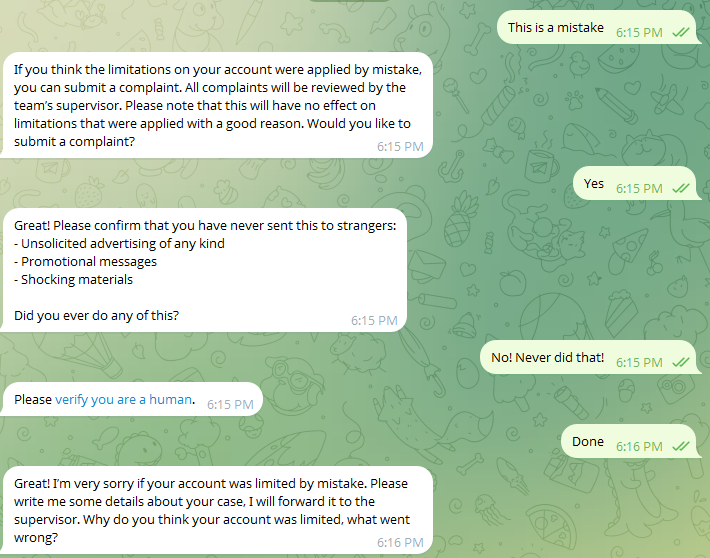
There is nothing you can do except ask them to check your case by a real human. You can try these steps and wait for the response


- Jan 8, 2025
- 1,179
- 124
Send a message to https://telegram.org/support or send an appeal to the @spambot user.
- If you have genuinely violated a rule, your account will not be reactivated. Telegram is quite strict on this matter.
- If you have genuinely violated a rule, your account will not be reactivated. Telegram is quite strict on this matter.