

- Jun 1, 2018
- 518
- 2,948
Thanks to @INCC for raising this question recently. This is a feature we've had for a while now, but we haven't explained exactly how to use it. So here we go.
Let's say you've were chatting to someone in the past and you want to pick up where you left off. Rather than scrolling through your entire inbox, you can use the filters to find exactly what you're looking for.
To start off, you'll need to be in your inbox, so double click on the envelope icon in the top left menu or use this URL: https://www.blackhatworld.com/direct-messages/
You will see the Filters button just above your list of direct messages, on the right hand side.

Click this button and a drop-down menu will appear:

Select either 'Started by...' or 'Received by...' (or both, if you can't remember), and a type field will appear:
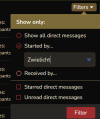
Type the username of the member you want to find and click 'Filter'. You will be taken straight to all of the direct messages you've had with that person.
Support guide: https://support.blackhatworld.com/s...118-how-to-find-direct-messages-in-your-inbox
Let's say you've were chatting to someone in the past and you want to pick up where you left off. Rather than scrolling through your entire inbox, you can use the filters to find exactly what you're looking for.
To start off, you'll need to be in your inbox, so double click on the envelope icon in the top left menu or use this URL: https://www.blackhatworld.com/direct-messages/
You will see the Filters button just above your list of direct messages, on the right hand side.
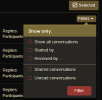
Click this button and a drop-down menu will appear:
Select either 'Started by...' or 'Received by...' (or both, if you can't remember), and a type field will appear:
Type the username of the member you want to find and click 'Filter'. You will be taken straight to all of the direct messages you've had with that person.
Support guide: https://support.blackhatworld.com/s...118-how-to-find-direct-messages-in-your-inbox
Attachments


Last edited by a moderator:
