Sorry but it still is AI generated in https://trykeywordspy.com/aicontentdetectorI will show you how to create human like, undetectable and unique articles using Chat-GPT.
If you don't know yet, there are tools to detect Chat-GPT content and they are really accurate.
Here are 2 tools that are really good to detect Chat-GPT text.
https://contentatscale.ai/ai-content-detector/
https://www.zerogpt.com/
What is this method?
Chat-GPT generated text that is too professional. We have to keep everyone in mind when we post articles online. It's too hard for a non-native English speaker or kids to understand chat-gpt generated articles. Because it spits out a lot of high grade English words. It's uncommon for a human writer to use such an advanced level of English unless they are publishing some kind of research-paper or scientific journal.
I will show you the example of detection.
My generated text using Chat-GPT
I have colored the texts that are the problem with ai written text.
Prompt:
Write a youtube description for the video title "How To Make Money Online"
These few words ruin the entire text. Just changing those words don't work.
Results:
Contentscale
View attachment 254273
ZeroGPT
View attachment 254274
You might want to consider checking your articles if you directly copy them from Chat-GPT. You might be hurting your clients.
The Method
Step 1: Generate the text using any prompt. I have tried every single prompt. From this forum and the AIRPM extention too. Every generated text is detected.
My generated text is given above. It is detected as AI written.
Step 2: Copy it to https://hemingwayapp.com/.
View attachment 254277
Check out the readability errors. We have to fix them using our own words! But worry not, we will take help from chat-Gpt.
Step 3: Using the following prompt to re-write the text. We will use it as a ref to re-write the article in our own words.
Prompt:
Generated Text
Step 4: Paste this text into the hemmingway app and start re-writing the article using your own words.
View attachment 254278
Step 5: Write the article in simple words. Take help from the expanded version we just created. Here's my text.
View attachment 254281
Step 6: Now paste this into the AI detector. Now the score of detection will be less. It's time to re-purify the article. You just need to edit text that are highlighted.
View attachment 254282
View attachment 254283
Step 7: Open https://quillbot.com/and paraphrase the highlighted text. Use fluency option and minimal settings. Re-write hard to read sentences too! Like the below example.
Hard to read
Easy to read
View attachment 254284
View attachment 254285

You are using an out of date browser. It may not display this or other websites correctly.
You should upgrade or use an alternative browser.
You should upgrade or use an alternative browser.
✅ How to create 100% unique and undetectable articles using Chat-GPT.
- Thread starter nirajjoshi
- Start date
shibboleth
Newbie
- Feb 21, 2023
- 6
- 4
I'm confused you have different apps linked at the top of this post. Completely different from the ones within the post.Good method!


V8200T5
Junior Member
- Apr 11, 2018
- 125
- 60
If you want to try an alternative to quillbot here is another rewriting app: https://rewriteashuman.com
To pass Originality AI test on GPT-3, use 'Originality(ai) tuned' combined with 'Pop Culture Ref'. Further adding 'Remove fluff' works too.
To pass Originality AI test on GPT-3, use 'Originality(ai) tuned' combined with 'Pop Culture Ref'. Further adding 'Remove fluff' works too.

CreativeDaddy
Elite Member
- Aug 24, 2019
- 1,547
- 1,360
Actually got 198-00% human with quillbot and some tweeks.I consistently get 70-80% human content with my scripts without paraphrase. The Quillbot method works, but imo that sort of reduces the overall output for the human eye. Am still trying to find a way to get 90% all the time without paraphrase.
The trick is to twist the code, to break the patterns.

- Jun 16, 2020
- 3,387
- 3,362
the quality/readability is low with Quillbot/paraphrased tbhActually got 198-00% human with quillbot and some tweeks.

Though it passes AI tests
CreativeDaddy
Elite Member
- Aug 24, 2019
- 1,547
- 1,360
It can be improved with the right tweeks on third-parties.the quality/readability is low with Quillbot/paraphrased tbh
Though it passes AI tests

WeFunAgency
BANNED
- Mar 2, 2023
- 212
- 54
Thank for share

Mahfooz Alam
Registered Member
- Feb 3, 2020
- 93
- 24
Great post.


nullbrainz
Newbie
- Jun 1, 2023
- 5
- 1
ChatGPT > grammarly > quillbot.
'nuff said.
'nuff said.

- Nov 6, 2016
- 656
- 647
There's no point in using ChatGPT to rewrite text and then editing it manually. You can simply use the original text and rewrite it in your own words. We have successfully rewritten over 40k articles in less than 15 days, and some of them have ranked well. Therefore, it appears that Google either doesn't care or cannot detect AI-generated content.
Btw if you think Google will penalize your site because of using AI-generated articles, firstly, many top news sites already use AI without any problems. Secondly, if you research this forum, you will find many native English language writers complaining about spam sites outranking them. With AI, you can work on multiple projects simultaneously, maximizing your productivity.
Btw if you think Google will penalize your site because of using AI-generated articles, firstly, many top news sites already use AI without any problems. Secondly, if you research this forum, you will find many native English language writers complaining about spam sites outranking them. With AI, you can work on multiple projects simultaneously, maximizing your productivity.

JMSSEOSERVICE
BANNED
- Jan 18, 2023
- 360
- 86
How you do it? Can share the prompts?only results using the right prompts.
No additional processing is required.


shikder006
Regular Member
- Jul 6, 2017
- 408
- 115
did you it try with any human written article??

5UZUKY
Newbie
- Jun 3, 2023
- 2
- 0
Nice bro!I will show you how to create human like, undetectable and unique articles using Chat-GPT.
If you don't know yet, there are tools to detect Chat-GPT content and they are really accurate.
Here are 2 tools that are really good to detect Chat-GPT text.
https://contentatscale.ai/ai-content-detector/
https://www.zerogpt.com/
What is this method?
Chat-GPT generated text that is too professional. We have to keep everyone in mind when we post articles online. It's too hard for a non-native English speaker or kids to understand chat-gpt generated articles. Because it spits out a lot of high grade English words. It's uncommon for a human writer to use such an advanced level of English unless they are publishing some kind of research-paper or scientific journal.
I will show you the example of detection.
My generated text using Chat-GPT
I have colored the texts that are the problem with ai written text.
Prompt:
Write a youtube description for the video title "How To Make Money Online"
These few words ruin the entire text. Just changing those words don't work.
Results:
Contentscale
View attachment 254273
ZeroGPT
View attachment 254274
You might want to consider checking your articles if you directly copy them from Chat-GPT. You might be hurting your clients.
The Method
Step 1: Generate the text using any prompt. I have tried every single prompt. From this forum and the AIRPM extention too. Every generated text is detected.
My generated text is given above. It is detected as AI written.
Step 2: Copy it to https://hemingwayapp.com/.
View attachment 254277
Check out the readability errors. We have to fix them using our own words! But worry not, we will take help from chat-Gpt.
Passo 3: Usando o seguinte prompt para reescrever o texto. Vamos usá-lo como referência para reescrever o artigo com nossas próprias palavras.
Incitar:
Texto Gerado
Etapa 4: cole este texto no aplicativo hemmingway e comece a reescrever o artigo usando suas próprias palavras.
View attachment 254278
Passo 5: Escreva o artigo em palavras simples. Obtenha ajuda da versão expandida que acabamos de criar. Aqui está o meu texto.
View attachment 254281
Passo 6: Agora cole isso no detector AI. Agora a pontuação de detecção será menor. É hora de purificar novamente o artigo. Você só precisa editar o texto destacado.
View attachment 254282
View attachment 254283
Passo 7: Abra https://quillbot.com/ e parafraseie o texto realçado. Use a opção de fluência e as configurações mínimas. Reescreva frases difíceis de ler também! Como o exemplo abaixo.
Difícil de ler
Fácil de ler
View attachment 254284
View attachment 254285
- May 1, 2010
- 2,442
- 470
What is this method?
Chat-GPT generated text that is too professional. We have to keep everyone in mind when we post articles online. It's too hard for a non-native English speaker or kids to understand chat-gpt generated articles. Because it spits out a lot of high grade English words. It's uncommon for a human writer to use such an advanced level of English unless they are publishing some kind of research-paper or scientific journal.
In a way it is quite different, GPT-3 and all language models use words that are very probable to occur. On the other hands, human writing is much more chaotic and random.
But anyways, ai content can be turned to human writing, even completely automatically.
I removed ai from your text via my tool (CleverSpinner). It does much better job than Quillbot, because it rewrites content in a way that lower probability to be seen as Ai generated text, while quillbot is optimized to just generate unique text.

One click rewrite in CleverSpinner generates this text, it takes 10-20 seconds. It looks human written in contentatscale

and zerogpt:

Not bad for 20 seconds of work.
ZeroGPT is contentatscale are indeed pretty good tools, i tried some human text and it is usually unique. On the other hand, for originality.ai for example, I tried a few articles from BBC and they are flaged to be AI generated.
This is text from Quilbot:

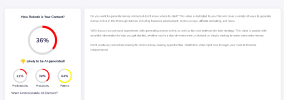
As you can see it did not help a lot.
Last edited:
JMSSEOSERVICE
BANNED
- Jan 18, 2023
- 360
- 86
Any way to achieve this using api? If I have a script that generates content at Scale via openai api, but I want all to pass gptzero test.In a way it is quite different, GPT-3 and all language models use words that are very probable to occur. On the other hands, human writing is much more chaotic and random.
But anyways, ai content can be turned to human writing, even completely automatically.
I removed ai from your text via my tool (CleverSpinner). It does much better job than Quillbot, because it rewrites content in a way that lower probability to be seen as Ai generated text, while quillbot is optimized to just generate unique text.
View attachment 261694
One click rewrite in CleverSpinner generates this text, it takes 10-20 seconds. It looks human written in contentatscale
View attachment 261696
and zerogpt:
View attachment 261697
Not bad for 20 seconds of work.