How to add { <meta name='title' } tag through Yoast?

rakesh2kumar

Compromised account
Joined
Nov 24, 2022
Messages
88
Reaction score
23
I am using Yoast Seo Plugin and found that my blog pages doesnt have <meta name='title' tag. So how can I add this tag.
 
It's basically easy to do. Yoast SEO plugin is user-friendly. Try searching on YouTube.
 
I am using Yoast Seo Plugin and found that my blog pages doesnt have <meta name='title' tag. So how can I add this tag.
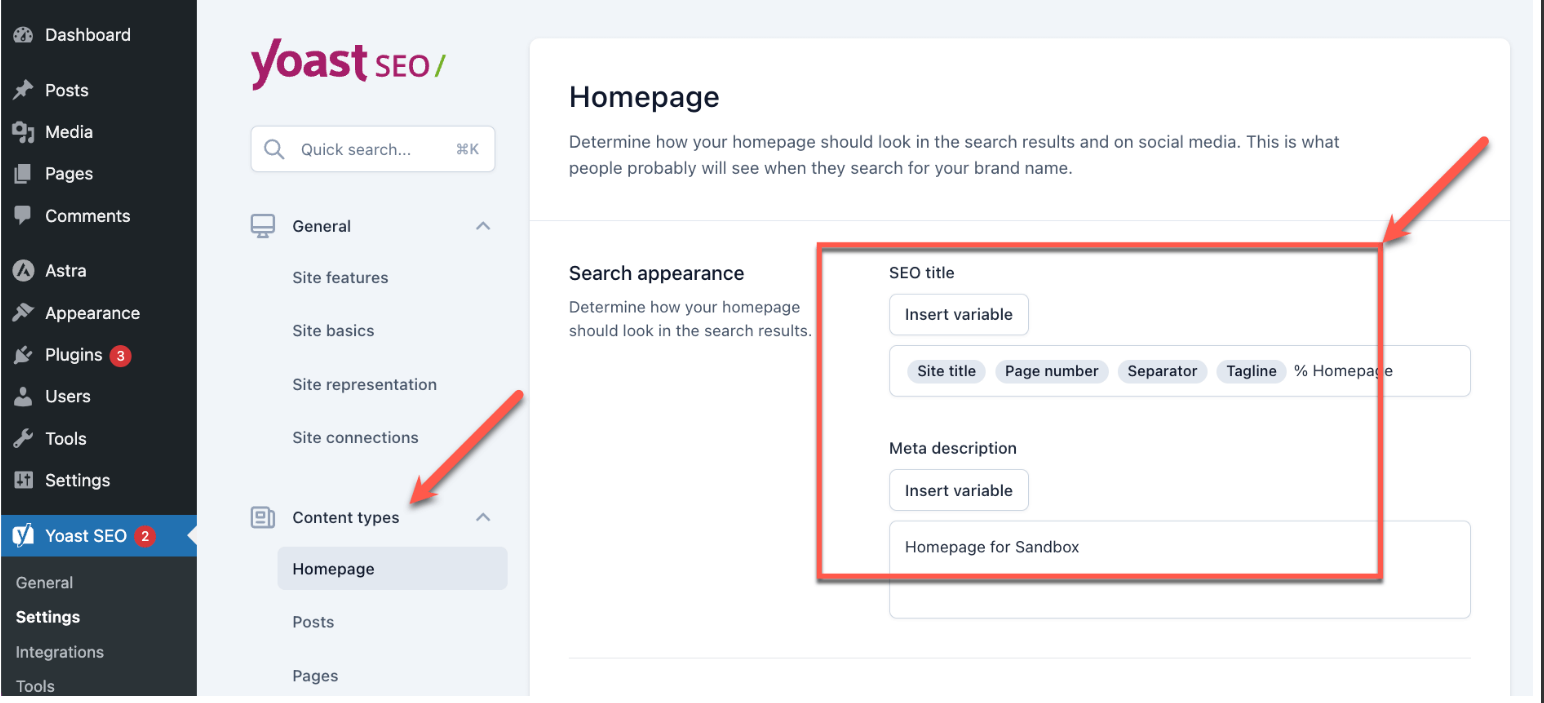
Go to Settings > Content Type and make sure you have set the rules for both the page title and meta description for all the required content types

08fa904218efaffd0d8b50a412c3f35c.png
 
Add a <meta name="title"> tag in Yoast SEO, go to SEO > Search Appearance in your WordPress dashboard and ensure the title template is set correctly under the relevant content type. Yoast typically handles the <title> tag, but if you need a specific <meta name="title"> tag, you might need to manually add it through custom code in your theme's functions.php file
 
Back
Top