

fredfred547
Power Member
- Oct 6, 2014
- 646
- 309
For those of you who are very involved with Twitter, you're probably familiar with Tweetdeck and Hootsuite. In many decks, there are 10, 20, and even 100+ accounts. This can be annoying and an absolute waste of time to click. Here is an app for Google Chrome that puts a "select all" button on the page where you click the people you want to retweet/favorite/etc off of. This has saved me tons of time. I am not affiliated with this app other than a user who has downloaded it.
Step 1: Install it on to Chrome from this link:
https://chrome.google.com/webstore/...all/dleejkmcjjocedkijmfieejigibnhcpf?hl=en-US
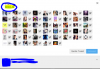
Step 2: Refresh your Tweetdeck page and it will appear when you retweet/favorite tweets as in the picture below.
I hope this was useful to some of you!
Step 1: Install it on to Chrome from this link:
https://chrome.google.com/webstore/...all/dleejkmcjjocedkijmfieejigibnhcpf?hl=en-US
Step 2: Refresh your Tweetdeck page and it will appear when you retweet/favorite tweets as in the picture below.
I hope this was useful to some of you!