How do you manage spam links?

jake110500

Regular Member
Joined
Aug 1, 2020
Messages
242
Reaction score
266
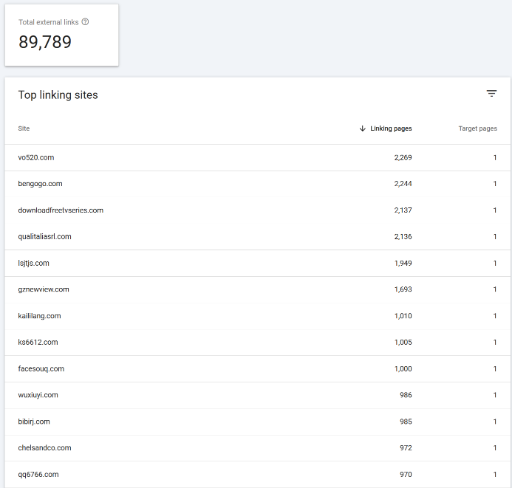
When I check on GSC, there are links like this
of course I did not create them and they are not related to my site.
Should I disavow them all? or just leave them?

1741053993228.png
 
I don’t. Google does that for you now. This isn’t 2013. They dont need panda and penguin to devalue content and backlinks. It works or it doesn’t. It’s that easy.

Disavow tool literally does nothing. It’s just a way to tell on yourself that you built links with the intent to manipulate search. Read the disclaimer from Google when submitting. They might even ban any future websites they attribute to you.

Don’t waste your time. AND don’t tell them you built links to manipulate search. Ever.
 
Last edited by a moderator:
In my experience, if your site’s rankings are stable and there’s no manual penalty in search console, you might not need to disavow. I’ve seen cases where overzealous disavowing accidentally hurt legit links, so tread carefully! If those spam links are massive or look like deliberate negative SEO, it’s safer to disavow.

Start by exporting the list from GSC, filter out the obvious junk, and submit a disavow file via Google’s tool. Tools like https://ahrefs.com/backlink-checker or https://search.google.com/search-console/disavow-links can help streamline this. Personally, I’d only target domains with blatant spam patterns (e.g., 2,000+ links from one site) to avoid overkill. Keep monitoring rankings, and if things dip, reassess. Sometimes, patience pays off more than action here.
 
Back
Top