How do I really speed up my website?

Alae63

Power Member
Joined
Apr 14, 2018
Messages
580
Reaction score
183
hi guys,

I've tried every possible method to speed up my wordpress website, but my results are still so trash

this is for desktop, its not that bad but still not good

des.png


but when it comes to mobile, its real trash
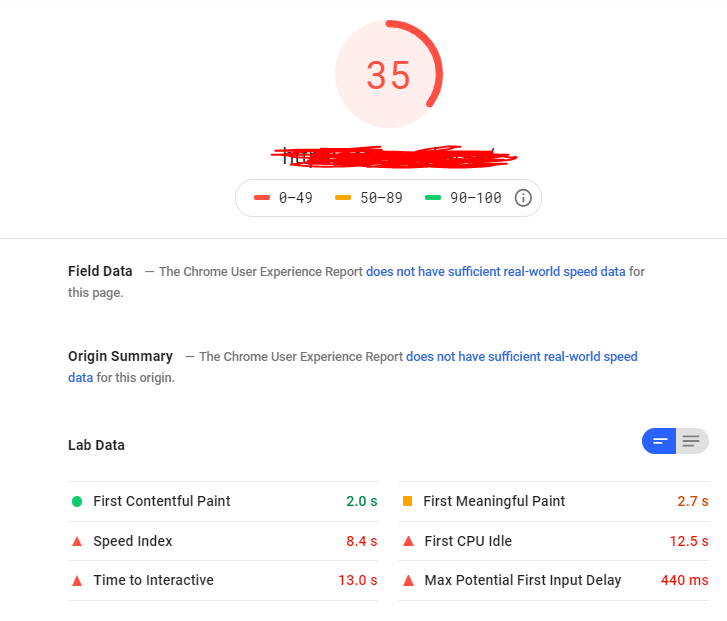
mobile.png


Is this related to the host service? or I can do something to speed it up? if its related to the host, what host do you recommend so I can have some really good results, thanks in advance
 
By the way, I'm working on Facebook paid traffic, and its 80% mobile users, so I really need that mobile speed to increase, help help help boys please :weep:
 
It depends on many factors including hosting. I have become very good at optimizing but without taking a look directly in GTmetrix can't say that much about it. You can pm the url and I can take a look if you want.

Site of one of my clients
b5sk7v.jpg
 
Some of my tips -- I have just written on a thread like that yesterday:

I advise you to test all the cache plugins because it really depends on the website. Some tricks:

— do not set custom favicon URL, just put the favicon.ico to the root directory
— check if there are any 4xx/3xx requests when you website loading and remove them
— defer google fonts scripts
— locally host GA js snippet
— remove unnecessary scripts on specific pages (a.k.a. Asset cleanup)
— disable all features if you don't use -like emojis, trackbacks, etc.
— stop heartbeat
— combine js and CSS files to decrease requests
— implement lazy loading (there are 3 plugins, test to find that works with your website)
— change Google maps with static image + link
— use lossy (0.50+) image optimization for background images
— try to decrease third-party requests by eliminating some of them (do you really need them?)
— do not use Instagram widget since Instagram requests are very slow

Ask anything if you need any help when implementing.
Just keep in mind all solutions should be customized for your website.
 
It depends on many factors including hosting. I have become very good at optimizing but without taking a look directly in GTmetrix can't say that much about it. You can pm the url and I can take a look if you want.

Site of one of my clients
b5sk7v.jpg
Wew, thats really good man, I'm dming you my website in a sec.
 
https://www.blackhatworld.com/seo/website-speed-for-wordpress.1131240/

Have you read this thread?
 
Do you tried any plugin to do the job?
Yep, tried smush , autoptimize and like two more, currently I have SG Optimizer , it helped me when it comes to render blocking, but my speed is still trash
 
maybe it's some kind of plugin that's doing
It seems to me that you do not need to use a lot of wp plugins
how many plugins do you use?
 
maybe it's some kind of plugin that's doing
It seems to me that you do not need to use a lot of wp plugins
how many plugins do you use?
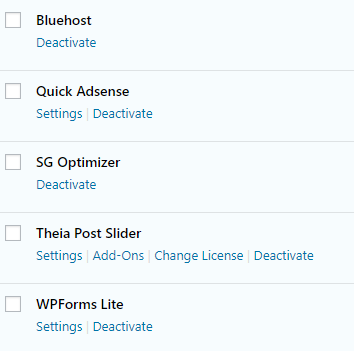
Here are the list of plugins that I'm using

Capture.png


not really that much, only important ones
 
Fastest and easiest way to go is WP ROCKET (nulled if you don't want to pay any penny) it work god damn well
 
w3 total cache, cloudflare and a decent host. Remember to DISABLE minify and let cloudflare handle it. Follow a guide on google and test, test, test.

Use the waterfall feature in gtmetrix to really see whats taking so long to load.

Async javascript and autooptimzie are also great plugins to use together
 
Imagify (Pay for it) + WP Rocket (Pay for it) + Siteground hosting (Highest shared plan, I think GoGeek?) + GeneratePress (Premium, pay for it).

Results on one of my sites without the CDN (only reason Yslow is not 100):

sKYkXie


That is for both mobile and desktop.

5ryTK9a


nGXJkzS


There is a good bit of content, links, and several large images on the home page.

Only plugins used: Classic Editor, GP Premium, Imagify, Rank Math SEO, WP Rocket. I'm using the Peak site for GeneratePress, modified extensively to fit my needs and minimize bloat even further.
 
Ok took a quick look.

Not a whole lot you can do really as you got 3rd party scripts running which you have no control over like analytics, google fonts(yo could disable those) and FB and they put extra server load and influence GTmetrix score.

There are a couple images that are getting resized. It states 1030x438 to 326x139. So make those the proper size and reup them. Disable gravatar which seems to put some descent load on your site.


Furthermore if you want some real speed, get rid of the shared hosting. There are approximately about 900 other sites on your IP.
 
Biggest factor is hosting. After switching to 1gbps (full duplex) dedicated server, my Wordpress movie site went from 3sec (average load) to under 1,3sec.

Good hosting + Cloudflare/bitmitigate = Fast speed
 
Here are the list of plugins that I'm using

Capture.png


not really that much, only important ones
It looks like you're on Bluehost which will be the biggest hindrance to you getting fast speed. I was on their Cloud Business hosting for years and the speends just became slower and slower...even slower than yours, until I moved to SiteGround which is when load times dropped dramatically, so I suggested chucking Bluehost for another host like SiteGround
 
Well first step you'd have to do is setup a good caching plugin and cdn. I recommend setting up cloudflare paired with WP rocket. Toy around with the settings then retest your speeds, but also check every function of your site after you've changed the settings to make sure the settings you chose aren't breaking any core functions of your site or theme. The second step would have to be optimizing your images as much as you can you can either :

1. Use a plugin to downsize image sizes as much as possible
2. Setup a plugin called wp-stateless and serve all your images from a google cloud bucket to save on space and loading times

The second step is identifying the actual problems that are tanking your mobile scores. 9 times out of 10 its advertisement codes placed on your site or popups. You really can't have both sometimes you can either optimize for profit or optimize for user experience. Optimizing your site to emphasize on ads to push leads and views etc will tank your scores esp via mobile devices. Seeing that your site has amazing scores via desktop devices it means that whatever you have on your site isn't optimized for mobile devices. Another option you have is using a plugin called theme switcher this will let you use a secondary theme only for mobile devices. You can use this to build up a second theme thats fully optimized for mobile users.
 
Back
Top