
You are using an out of date browser. It may not display this or other websites correctly.
You should upgrade or use an alternative browser.
You should upgrade or use an alternative browser.
How can i get core web vitals for mobile page?
- Thread starter Desert90
- Start date


AxelOfm
Registered Member
- Oct 5, 2024
- 99
- 46
If Google doesn’t show Core Web Vitals data for mobile but your PageSpeed Insights scores are high (90-99), it could be due to low mobile traffic, recently updated pages, or restrictions preventing data collection. Check the Core Web Vitals report in Google Search Console, ensure your site gets enough mobile visits, and enable Google Analytics to better track user experience. If everything is set up correctly, you may just need to wait for Google to collect more real-user data.


- Sep 8, 2015
- 5,603
- 5,431
This is your problem right here.Site is years old but i moved from wordpress to laravel, site is super blazing fast but since laravel i have a lot rankings and almost zero revenue
Lost rankings resulted in very little data to work with. And also possibly in some technical error.
I would check how the bots actually see the mobile version.

Desert90
Elite Member
- Sep 23, 2012
- 1,848
- 622
How do I check that ?This is your problem right here.
Lost rankings resulted in very little data to work with. And also possibly in some technical error.
I would check how the bots actually see the mobile version.
I have a feeling I have a lot technical issues but I don’t see anything I fixed a lot in the last weeks
- Sep 8, 2015
- 5,603
- 5,431
Search console should give some insight.How do I check that ?
I have a feeling I have a lot technical issues but I don’t see anything I fixed a lot in the last weeks
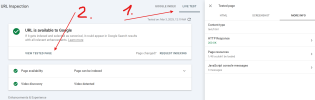
When inspecting URL, you can use Live Test and see further information by viewing tested page. They use mobile bot by default.
Desert90
Elite Member
- Sep 23, 2012
- 1,848
- 622
Search console should give some insight.
When inspecting URL, you can use Live Test and see further information by viewing tested page. They use mobile bot by default.
View attachment 426103

everything is fine so far lol
- Sep 8, 2015
- 5,603
- 5,431
Screenshot and HTML looking good too?View attachment 426108
everything is fine so far lol
Then it's possible it's really just a lack of data.
Although I would keep at it. I know ScreenmingFrog has mobile analysis feature.
I would also check canonicals, move might have messed them up.

celemromtrebore
Failed to resolve a dispute resolution thread.
- Sep 20, 2024
- 126
- 64
Google’s Core Web Vitals (CWV) measure your website’s user experience, especially speed and responsiveness. You can check your mobile Core Web Vitals using different tools and optimize them for better performance.