Help with Sandboxie error? Anyone?

  • Thread starter Thread starter Deleted member 658642
  • Start date Start date
D

Deleted member 658642

Guest
Hello everyone,
Whenever I launch SandBoxie after downloading it and installing it from the official site, I get this error.

First :
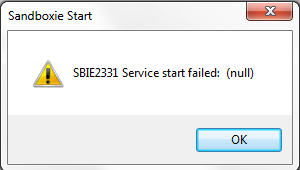
a5OSAZD


Second after hitting "OK" :

9GxuLNv


I have tried to manually launch the Sbiesvc and the driver but it doesn't work
Will appreciate any help :)
RW.
 
What OS are using? Vista/7/8?

Edit: I know that Sandboxie was failed to install its service dirver, this is the main cause
 
It's lack of admin rights.
You may try by running installer with "Run as Administrator" (uninstall first),
or starting the service manually (Run services.msc then choose "SbieSvc" and click start option.
 
It's lack of admin rights.
You may try by running installer with "Run as Administrator" (uninstall first),
or starting the service manually (Run services.msc then choose "SbieSvc" and click start option.

I can't find SbieSvc in the listed running programs. Anyway on how I can do this manually? Oh and yeah I tried with Admin option but still shows the same thing. +16 to anyone who can help me :)
 
Are you using version 4.02 64-bit?
Sometime it fails, I think that it should be just fine if you are using SB 32-bit version on Win7 64-bit.
I tried many times, I have no problem here.
 
Are you using version 4.02 64-bit?
Sometime it fails, I think that it should be just fine if you are using SB 32-bit version on Win7 64-bit.
I tried many times, I have no problem here.

Ok I'll try the 32 bit :)
 
I downloaded the setup from a torrent and it works. Wonder what's wrong with the official software :D
 
Back
Top