
You are using an out of date browser. It may not display this or other websites correctly.
You should upgrade or use an alternative browser.
You should upgrade or use an alternative browser.
Help with Facebook ADS
- Thread starter Azurooo
- Start date
D
Deleted member 173106
Guest
If you are using chrome then make sure to disable any extensions

Azurooo
Junior Member
- Dec 19, 2023
- 109
- 45
I try it on Gologin and Dolphin, you think it can affect it ?If you are using chrome then make sure to disable any extensions

back2form
Elite Member
- Jul 15, 2012
- 6,931
- 10,467
Here's a more detailed breakdown of troubleshooting steps:
Clear Browser Cache : clear your cache and cookies, as these can sometimes cause issues with loading media.
Try a Different Browser or Device:
If the problem persists on one browser, try using a different browser or accessing Facebook on a different device (phone or computer).
This can help determine if the issue is specific to your browser or device.
Update Facebook App:
Ensure you're using the latest version of the Facebook app. Outdated versions can cause compatibility issues.
Check for updates in your app store.
Restart Your Device:
A simple restart of your phone, tablet, or computer can resolve temporary glitches.
Log Out and Log Back In:
Log out of your Facebook account and then log back in to refresh your session.
Contact Facebook Support:
If the issue persists after trying the above steps, contact Facebook support for further assistance.
Clear Browser Cache : clear your cache and cookies, as these can sometimes cause issues with loading media.
Try a Different Browser or Device:
If the problem persists on one browser, try using a different browser or accessing Facebook on a different device (phone or computer).
This can help determine if the issue is specific to your browser or device.
Update Facebook App:
Ensure you're using the latest version of the Facebook app. Outdated versions can cause compatibility issues.
Check for updates in your app store.
Restart Your Device:
A simple restart of your phone, tablet, or computer can resolve temporary glitches.
Log Out and Log Back In:
Log out of your Facebook account and then log back in to refresh your session.
Contact Facebook Support:
If the issue persists after trying the above steps, contact Facebook support for further assistance.
D
Deleted member 173106
Guest
I am not 100% sure but maybe those browsers are blocking or not allowing them to load properly.I try it on Gologin and Dolphin, you think it can affect it ?

- Mar 13, 2022
- 2,622
- 559
It might be your browser, try another chrome, or another device.

Albert Meraki Agency
BANNED
- May 6, 2023
- 1,074
- 302
The video may not load due to an incorrect format, cache error, or Meta policy violation. Try changing browsers, checking formats, or creating a new ad to fix it!

Caden Marketing Agency
BANNED - Failed to resolve a dispute
- Feb 26, 2024
- 1,800
- 604
Video not loading may be due to format, cache or Meta policy errors. Try clearing cache, changing browsers or checking the video content again before uploading!

Miracle Agency
BANNED
- Sep 12, 2024
- 912
- 497
Your video may have a formatting error.Hi everyone, someone know why my media doesn't want to load ? My internet is good and the reels is already posted on Instagram on a other acount
View attachment 427708
Azurooo
Junior Member
- Dec 19, 2023
- 109
- 45
I don't know about the format because it's already uploaded on IG, I just connected my ig account to facebook ads and select the video.Your video may have a formatting error.

Revialon
Banned - Rules Violations
- Jul 22, 2023
- 99
- 18
Did you adjust settings on your browser?I try it on Gologin and Dolphin, you think it can affect it ?
- Jan 11, 2025
- 953
- 162
you can switch to ADSpower. i never see such error, it's very smoothHi everyone, someone know why my media doesn't want to load ? My internet is good and the reels is already posted on Instagram on a other acount
View attachment 427708
Azurooo
Junior Member
- Dec 19, 2023
- 109
- 45
It still didn't work, I add manually the video on my pc on facebook ads and it's working now.
But now they are telling me that :
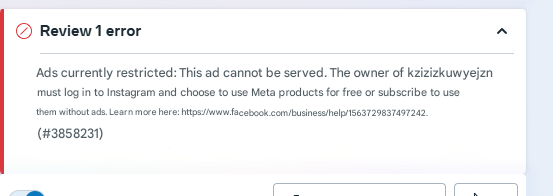
So I login on my IG account and fixed that (accept to use the product for free with ads) and I refresh the page but I still have this message ! (I disconnect and relogin on the account too, it doesn't change anything
But now they are telling me that :
So I login on my IG account and fixed that (accept to use the product for free with ads) and I refresh the page but I still have this message ! (I disconnect and relogin on the account too, it doesn't change anything
Your video may have a formatting error.

- Sep 22, 2024
- 1,792
- 292
Your video format is error, Try changing browser, check format again

- Dec 10, 2024
- 687
- 91
Video cannot be downloaded due to incorrect format, you should change the format

Media Mikenco Agency
BANNED
- Nov 11, 2024
- 292
- 45
you should change chome and change format
Social Tools
BANNED - Failed to resolve a dispute
- Sep 8, 2023
- 873
- 212
Facebook and Instagram have different recommended aspect ratios for ads.I refresh the page but I still have this message
Your video should be in a supported format (e.g. MP4) and within the size limits for Facebook ads.

Local Brand
Newbie
- Mar 7, 2025
- 7
- 2
Try another Chrome browser or another device.

NVH Agency
Regular Member
- Oct 24, 2024
- 204
- 27
Try changing the video format you want to uploadHi everyone, someone know why my media doesn't want to load ? My internet is good and the reels is already posted on Instagram on a other acount
View attachment 427708

NoBadReviews
Junior Member
- Jan 6, 2025
- 102
- 36
You can change the browser and try again or restarting your device may also work.