
You are using an out of date browser. It may not display this or other websites correctly.
You should upgrade or use an alternative browser.
You should upgrade or use an alternative browser.
Help To Fix LCP issue: longer than 2.5s (mobile)
- Thread starter Zshan
- Start date


Reffinej Audencial
Newbie
- Nov 14, 2019
- 25
- 4
I am also looking for solve the problem.

growthhacker_bob
Newbie
- Apr 20, 2021
- 33
- 13
Can you share with us the Lighthouse result on these pages? LCP stands for a too long load time. In chrome if you press F12 you can go to lighthouse and do a performance scan that's pretty insightful.

hideath
Elite Member
- Jun 16, 2019
- 6,620
- 7,350
fun fact how they can't optimise their own 1stDid you try this?
Code:https://www.seosandwitch.com/how-to-fix-lcp-issue/


True Damage
Registered Member
- Apr 30, 2021
- 53
- 38
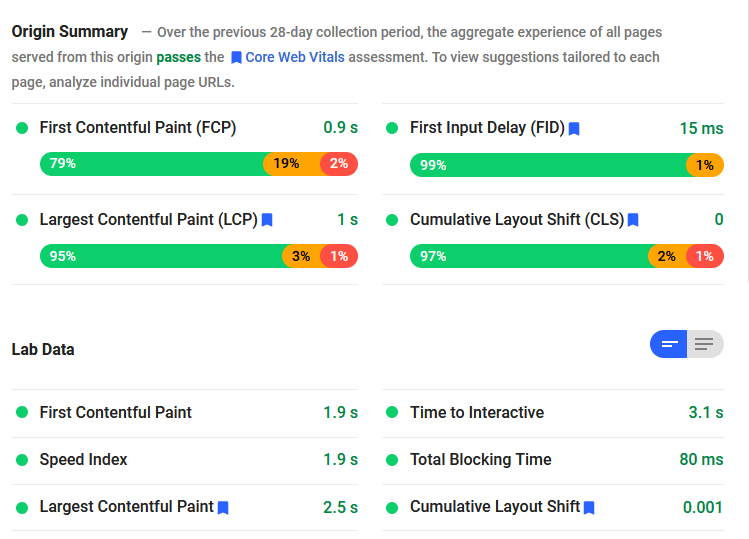
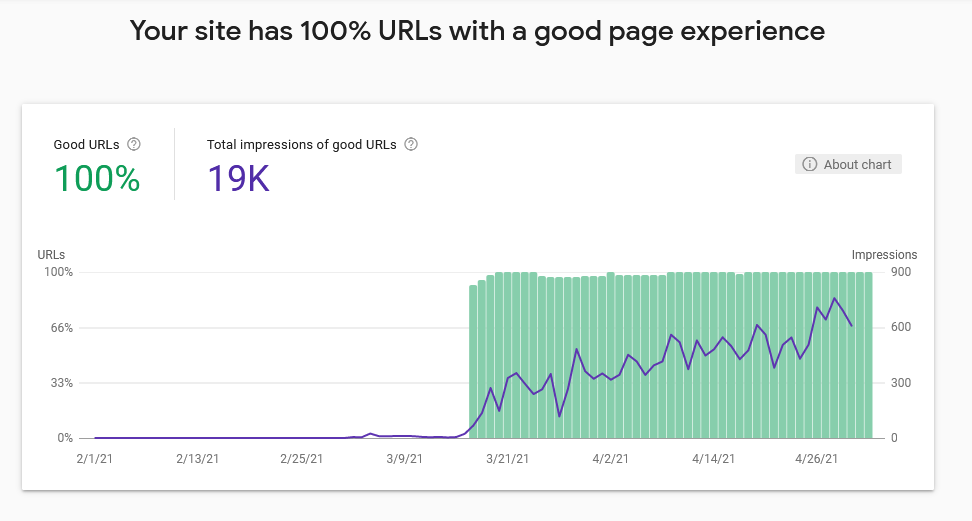
I fixed this problem by re-coding my website from scratch. Took me 2 weeks but I now have a 100% pass rate on my website.
Okay some advice:
1. Google is not testing how fast your page loads. Get that incorrect idea out of your head. Your page could take several minutes to load and still pass the test.
2. Google is testing how fast the first screen of your page loads on a simulated Google Nexus device. A small tablet device.
What's important here is the top of your page that will fit in the screen of a Google Nexus.
If the top of your page is plain text and then the slow to load images are further down, that's completely okay.
3. The biggest issue is likely to be having a large framework that needs to load before you can render the top of the page.
The tricks I used were:
Merged multiple CSS files into one. Less different resources that need to be fetched before rendering starts the better the score.
Converting images to low quality .webp (if they are at the top of the page) then embedding them into the web page as base64 encodes.
You need to use a picture tag for this otherwise it will break on old iOS devices.
<picture>
<source srcset="data:image/webp;base64,JKasdasddasasda full encoding string here" type="image/webp">
<source srcset="/static/img/imagename.png">
<img src="/static/img/imageName.png" alt="Image Alt Text">
</picture>
Dropped client side rendering for server side rendering.
Caching static portions of the page.
For pages that weren't passing, I used a cut down customized CSS file, that works just for that page, which I embedded directly into the page in a <style> tag.
That's how the problem is solved. How in earth you apply this to wordpress I have no idea through.
Okay some advice:
1. Google is not testing how fast your page loads. Get that incorrect idea out of your head. Your page could take several minutes to load and still pass the test.
2. Google is testing how fast the first screen of your page loads on a simulated Google Nexus device. A small tablet device.
What's important here is the top of your page that will fit in the screen of a Google Nexus.
If the top of your page is plain text and then the slow to load images are further down, that's completely okay.
3. The biggest issue is likely to be having a large framework that needs to load before you can render the top of the page.
The tricks I used were:
Merged multiple CSS files into one. Less different resources that need to be fetched before rendering starts the better the score.
Converting images to low quality .webp (if they are at the top of the page) then embedding them into the web page as base64 encodes.
You need to use a picture tag for this otherwise it will break on old iOS devices.
<picture>
<source srcset="data:image/webp;base64,JKasdasddasasda full encoding string here" type="image/webp">
<source srcset="/static/img/imagename.png">
<img src="/static/img/imageName.png" alt="Image Alt Text">
</picture>
Dropped client side rendering for server side rendering.
Caching static portions of the page.
For pages that weren't passing, I used a cut down customized CSS file, that works just for that page, which I embedded directly into the page in a <style> tag.
That's how the problem is solved. How in earth you apply this to wordpress I have no idea through.
Last edited:
Senpai Content
Junior Member
- Dec 6, 2019
- 143
- 45
Is thi something you applied on a wordpress blog or a custom coded website? What would you recommend to do on a site that is made on wordpress, like a blog or a site that sells services/products?
Last edited:
True Damage
Registered Member
- Apr 30, 2021
- 53
- 38
Custom coded website. After a quick google it looks like base64 images and caching can both be used in wordpress with plugins.
P.S. Thanks ^^
So I don't really use wordpress to make sites, this is some stuff you could try:
https://wordpress.org/support/article/optimization-caching/
https://wordpress.stackexchange.com...to-base64-encode-images-in-wordpress-template
P.S. Thanks ^^
So I don't really use wordpress to make sites, this is some stuff you could try:
https://wordpress.org/support/article/optimization-caching/
https://wordpress.stackexchange.com...to-base64-encode-images-in-wordpress-template
Last edited:
Senpai Content
Junior Member
- Dec 6, 2019
- 143
- 45
I see, I removed the quote as per your request. Any plugins you may have tried or know of which might help us all?

True Damage
Registered Member
- Apr 30, 2021
- 53
- 38
There appears to be a .webp plugin for wordpress here: https://wordpress.org/plugins/webp-converter-for-media/