Help Improving My Site Speed

Roger Marquez

Elite Member
Joined
Apr 17, 2017
Messages
5,126
Reaction score
7,822
I´ve been working these past few days to improve my website speed and even tho I'm not a programmer nor a web developer I was able to improve my metrics a lot.
My page loading speed went from 7 secs to 4 now and my PageSpeed Score now is 91% (From 87%) and YSlow Score is 75% (from 64%).

1e321ad698e5407add574b9b434eb18e.png


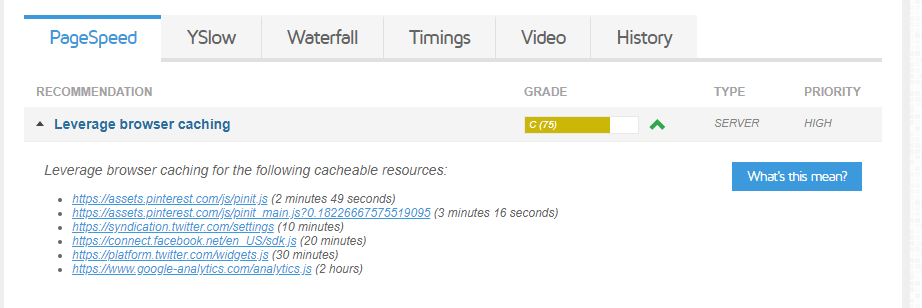
I see on the GTMetrix some issues with my Leverage browser caching for the following cacheable resources...
3866e622f2825c595e3018e988a701d0.png


Trying to find info on how to improve my results even further but i haven´t been able.
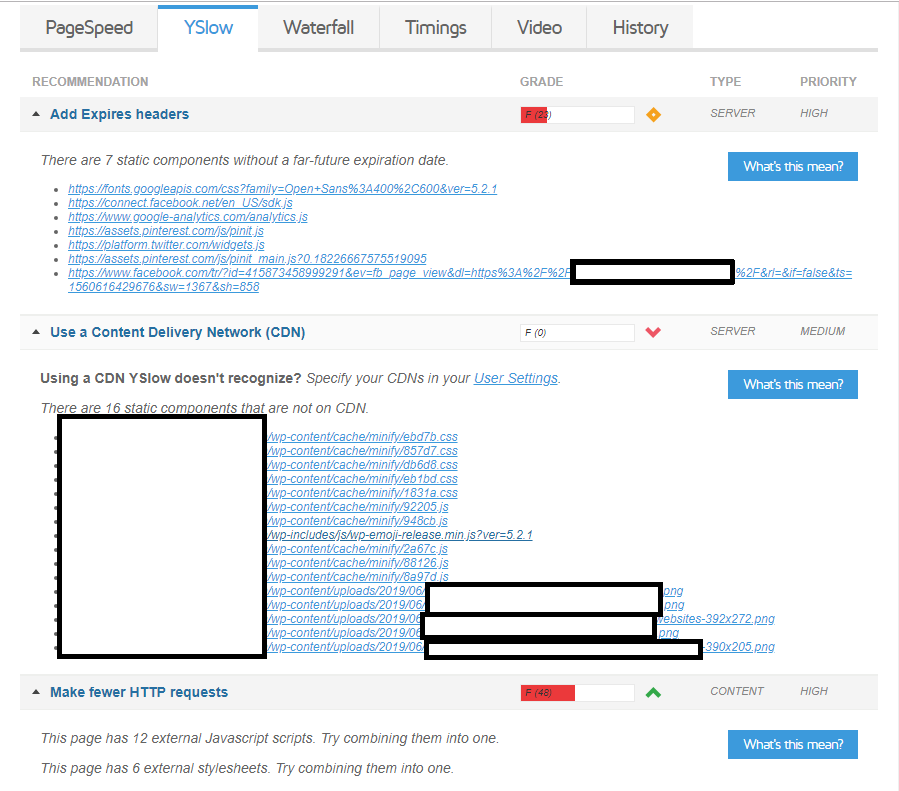
Also, my YSlow is lacking in some aspects...
a836120b59bb36589eed81594c3eced1.png


I'm using W3 Total Cache plugin and I feel it has to do with the configuration. I follow the steps from a youtube tutorial with lots of viewes and good positive recent comments.

Can anyone help me with this? Cheers!
 
Last edited:
This helped me:
Switch to an VPS
Use Cloudflare (CDN)
Get WP Rocket (nulled possible to)
Switch to a new Wordpress theme (you can find many fast ones on google)

I think switching to an VPS is going to help allot (if you did not already do that).

Good luck
 
I see on the GTMetrix some issues with my Leverage browser caching for the following cacheable resources...

3866e622f2825c595e3018e988a701d0.png


If you're using Wordpress, there's a plugin for this. I think W3 Total Cache or something like that.
Trying to find info on how to improve my results even further but i haven´t been able.
Also, my YSlow is lacking in some aspects...
a836120b59bb36589eed81594c3eced1.png


I'm using W3 Total Cache plugin and I feel it has to do with the configuration. I follow the steps from a youtube tutorial with lots of viewes and good positive recent comments.

Can anyone help me with this? Cheers!
For the "Add Expires Headers", you need to edit your htaccess file with some rules, you can Google it.

Also, use Cloudflare.

For the "Make fewer HTTP requests" use a bundler.
 
If you're using Wordpress, there's a plugin for this. I think W3 Total Cache or something like that.

For the "Add Expires Headers", you need to edit your htaccess file with some rules, you can Google it.

Also, use Cloudflare.

For the "Make fewer HTTP requests" use a bundler.
Read his post :p
I'm using W3 Total Cache plugin and I feel it has to do with the configuration. I follow the steps from a youtube tutorial with lots of viewes and good positive recent comments.
 
If you're using Wordpress, there's a plugin for this. I think W3 Total Cache or something like that.
Im actually using that plugin. I mention it above. I think i messed up the setup some way. I just followed a youtube tutorial on the matter.

For the "Add Expires Headers", you need to edit your htaccess file with some rules, you can Google it.
And how would that google search query go? "Add Expires Headers htaccess rules"? I want to be sure what im uploading to the htaccess files otherwise i might do more harm than good.

Also, use Cloudflare.

For the "Make fewer HTTP requests" use a bundler.
Will look into this...Cheers!
 
And how would that google search query go? "Add Expires Headers htaccess rules"? I want to be sure what im uploading to the htaccess files otherwise i might do more harm than good.
Yes, that's exactly what you should search for.
 
Yes, that's exactly what you should search for.
Oh yeah i already added those to my htaccess file..

This is what i added...

Code:
# BEGIN WordPress

<IfModule mod_rewrite.c>
RewriteEngine On
RewriteBase /
RewriteRule ^index\.php$ - [L]
RewriteCond %{REQUEST_FILENAME} !-f
RewriteCond %{REQUEST_FILENAME} !-d
RewriteRule . /index.php [L]
</IfModule>

# END WordPress

## EXPIRES CACHING ##

<IfModule mod_expires.c>
  ExpiresActive on

# Perhaps better to whitelist expires rules? Perhaps.
  ExpiresDefault                          "access plus 1 month"

# Data
  ExpiresByType text/xml                  "access plus 0 seconds"
  ExpiresByType application/xml           "access plus 0 seconds"
  ExpiresByType application/json          "access plus 0 seconds"

# Favicon (cannot be renamed)
  ExpiresByType image/x-icon              "access plus 1 week"

# Media: images, video, audio
  ExpiresByType image/gif                     "access plus 1 month"
  ExpiresByType image/png                     "access plus 1 month"
  ExpiresByType image/jpeg                    "access plus 1 month"
  ExpiresByType video/ogg                     "access plus 1 month"
  ExpiresByType audio/ogg                     "access plus 1 month"
  ExpiresByType video/mp4                     "access plus 1 month"
  ExpiresByType video/webm                    "access plus 1 month"
  ExpiresByType video/mpeg          "access plus 1 month"

# Webfonts
  ExpiresByType application/x-font-ttf    "access plus 1 month"
  ExpiresByType font/opentype             "access plus 1 month"
  ExpiresByType application/x-font-woff   "access plus 1 month"
  ExpiresByType image/svg+xml             "access plus 1 month"
  ExpiresByType application/vnd.ms-fontobject "access plus 1 month"

# CSS and JavaScript
  ExpiresByType text/css                  "access plus 1 year"
  ExpiresByType application/javascript    "access plus 1 year"
ExpiresByType text/javascript         "access plus 1 year"

# Others
  ExpiresByType application/pdf "access plus 1 month"
  ExpiresByType application/x-shockwave-flash "access plus 1 month"
</IfModule>
 
Thanks to your request i went again to verify the code was in fact there because i uninstall W3 Total cache from my website and install another more lighter plugin with just the cache.
I optimize the website through cpanel and uninstalled other plugins that were causing issues i don´t need like Smush Image compression. I am now optimizing images outside wordpress.
Also did some tweaking (THANK YOU YOUTUBE) and everything is working properly...

WE GOT´EM BOOYS!

75abf005220a03eda2c460498fadf27b.png


Considering im hosting my site on a share hosting plan i believe these are pretty decent results...What ya´ll think?
 
Fire up a cloud server on upcloud,vultr,digital ocean for $5. Load cyberpanel on it. Should probably get you under a second. Your page size and http requests are already good.

They charge by the hour, so you could test it out for a few cents or even free depending on current promotions.
 
Watching a few youtube videos on how to do it and one of the improvements i can make is to verify if my hosting offers Http/2 protocol which apparently it doesn't.
d055dec248f4dcdffad121596118f6c7.png

I believe that score is as good it will get considering I'm running my site on a shared account.
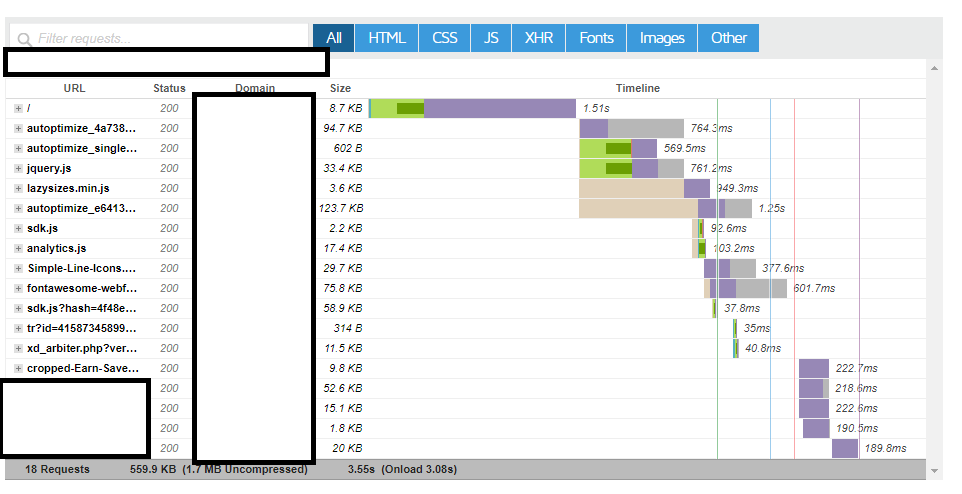
Cause after working all day on getting those results down i don´t see anything on my waterfall that jumps it can be causing an issue.
ba6e4de06a74305452028e36bb48e392.png

This 2 request there that are taking 1.25s, 949.3ms, 764.3ms and 569.5ms and to load is due to the autoptimize plugin im using. Should i delete and change to a different one? Will i get better results using a different one or not using any optimization plugin at all?
 
I think most of that is there just to sell you something. I have never been an analytics guy. I would say just focus on 99%-100% customer experience. The rest doesn't really matter unless its magento. At this point I use bridge by qode for everything and js-composer. I use maybe 3 plugins contact form 7 or current. Bridge has the meta on the page. You can disable gutenburg. Then you don't need that stuff. The rest doesn't matter IMO.
 
Also from what I can see, most of that stuff is your plugins loading. So not using the plugins would be more beneficial to you.
 
Watching a few youtube videos on how to do it and one of the improvements i can make is to verify if my hosting offers Http/2 protocol which apparently it doesn't.

I believe that score is as good it will get considering I'm running my site on a shared account.
Cause after working all day on getting those results down i don´t see anything on my waterfall that jumps it can be causing an issue.

This 2 request there that are taking 1.25s, 949.3ms, 764.3ms and 569.5ms and to load is due to the autoptimize plugin im using. Should i delete and change to a different one? Will i get better results using a different one or not using any optimization plugin at all?

i have rock solid scores (in particular first byte), by using the following plugins
  • autooptimze
  • lazy load
  • smush
  • w3 total cache


what plugins are you using exactly right now?
 
Are you running your sites on a shared web hosting plan?
 
what plugins are you using exactly right now?
Akismet Anti-Spam
Async JavaScript
Autoptimize
Classic Editor
Contextual Related Posts
Cookie Notice
Duplicate Post
Easy Table of Contents
Elementor
Elementor - Header, Footer & Blocks
Elementor Addons & Templates - Sizzify Lite
Elementor Pro
Essential Addons for Elementor
Google Analytics for WordPress by MonsterInsights
Lazy Load by WP Rocket
Ocean Extra
Polylang
Reading Progress Bar
Redirection
SVG Support
TinyMCE Advanced
WP Mail SMTP
WP Quiz
WP-Optimize
Yoast SEO Premium
 
Akismet Anti-Spam
Async JavaScript
Autoptimize
Classic Editor
Contextual Related Posts
Cookie Notice
Duplicate Post
Easy Table of Contents
Elementor
Elementor - Header, Footer & Blocks
Elementor Addons & Templates - Sizzify Lite
Elementor Pro
Essential Addons for Elementor
Google Analytics for WordPress by MonsterInsights
Lazy Load by WP Rocket
Ocean Extra
Polylang
Reading Progress Bar
Redirection
SVG Support
TinyMCE Advanced
WP Mail SMTP
WP Quiz
WP-Optimize
Yoast SEO Premium


that is way too many plugins and they have a negative impact on your page load speed. get rid off 70% of them. only keep speed related and seo related (yoast). it is just my 2 cents worth of advice. do a test. deactivate non-speed and yoast and then see how the speed tests go.
 
Back
Top