Help: Blocked by robots.txt

Upbarcablog

Newbie
Joined
Jul 7, 2024
Messages
41
Reaction score
9
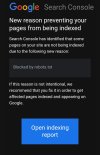
I got an email that robots.txt is why my blog isn't indexing.

I made some configuration on my blogger blog using tips I got from the net.

Anyone know how to resolve this problem?

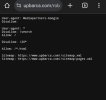
I've attached screenshots to assist with identifying the issue.
 

Attachments

  • Screenshot_20240801-055351~2.jpg
    Screenshot_20240801-055351~2.jpg
    75.3 KB · Views: 21
  • Screenshot_20240801-060458~2.jpg
    Screenshot_20240801-060458~2.jpg
    28.9 KB · Views: 20
You didn't share your robots.txt.
That will give a good idea to us.
 
You didn't share your robots.txt.
That will give a good idea to us.
I think the issue of robots.txt has been resolved after I edited out 'disallow' feeds. What do you think looking at the attach file?
 
User-agent: Mediapartners-Google
Disallow:

User-agent: *
Disallow: /search
Allow: /

Disallow: /20*

Allow: /*.html

Sitemap: https://www.upbarca.com//sitemap.xml
Sitemap: https://www.upbarca.com//sitemap-pages.xml

The lines Disallow: /search, Disallow: /20*, and Disallow: /feeds* are likely blocking important parts of your blog. For example, Disallow: /search prevents search engines from accessing URLs with "/search" in them, which could include your internal search results pages or search-based URLs.

If you want to allow all pages to be indexed, you can modify the robots.txt file to permit crawling. Here's a basic configuration to allow all pages:

User-agent: *
Disallow:
Sitemap: https://www.upbarca.com/sitemap.xml

This configuration allows all user-agents (crawlers) to access all pages.
 
I got an email that robots.txt is why my blog isn't indexing.

I made some configuration on my blogger blog using tips I got from the net.

Anyone know how to resolve this problem?

I've attached screenshots to assist with identifying the issue.
You need to edit it to make it allowed.
 
Back
Top