

Greasedonkey
Regular Member
- Mar 27, 2018
- 254
- 90
I've been looking for a way to track link clicks to Amazon for sometime now and I figured out it will be worth sharing.
We'll be using Google analytics to see what pages are driving traffic to Amazon and the CTR (percentage of people that click affiliate links)

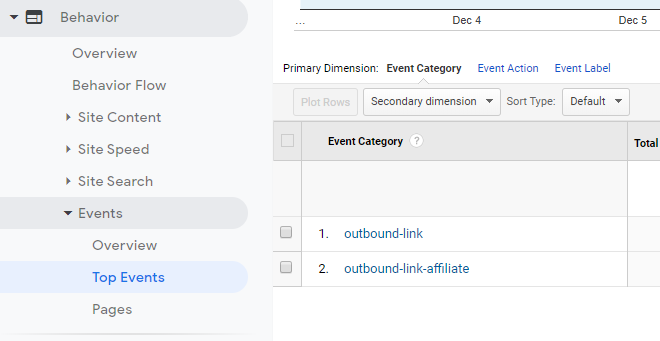
1. Install Monster Insights Wordpress plugin on your Wordpress site. It will configure Google Analytics and create this menu in Google Analytics
2. On Google Analytics, go to Admin > Calculated Metrics

3. Create a new calculated metric with
name: CTR
formula: {{Total Events}} / {{Pageviews}} * 100

4. Go to Customization > Custom Reports and create a new custom report

5. Edit it as follows

6. You'll be getting this report
We'll be using Google analytics to see what pages are driving traffic to Amazon and the CTR (percentage of people that click affiliate links)
1. Install Monster Insights Wordpress plugin on your Wordpress site. It will configure Google Analytics and create this menu in Google Analytics
2. On Google Analytics, go to Admin > Calculated Metrics
3. Create a new calculated metric with
name: CTR
formula: {{Total Events}} / {{Pageviews}} * 100
4. Go to Customization > Custom Reports and create a new custom report
5. Edit it as follows
6. You'll be getting this report


