[GUIDE]How to Block ChatGPT from stealing content from your website!

sscaz

BANNED - Discussion of Prohibited Activities
Joined
Jul 18, 2022
Messages
5,693
Reaction score
5,815
There is concern that there is no easy way to opt out of letting your content be used to train large language models (LLMs) such as ChatGPT. There is a way to do this, but it's not easy and it's not guaranteed to work. Data from multiple sources is used to train large language models (LLMs). Many of these datasets are open source. They are freely available for use in AI training. A wide variety of sources are generally used to train Large Language Models.

Examples of types of sources used:

Wikipedia
Government court records
Books
Emails
Crawled websites
There are actually portals and websites that offer datasets. These portals and websites offer huge amounts of information.

The training data sets for GPT-3.5 are the same as the training data sets for GPT-3. The main difference is that GPT-3.5 used a technique called Reinforcement Learning from Human Feedback (RLHF).

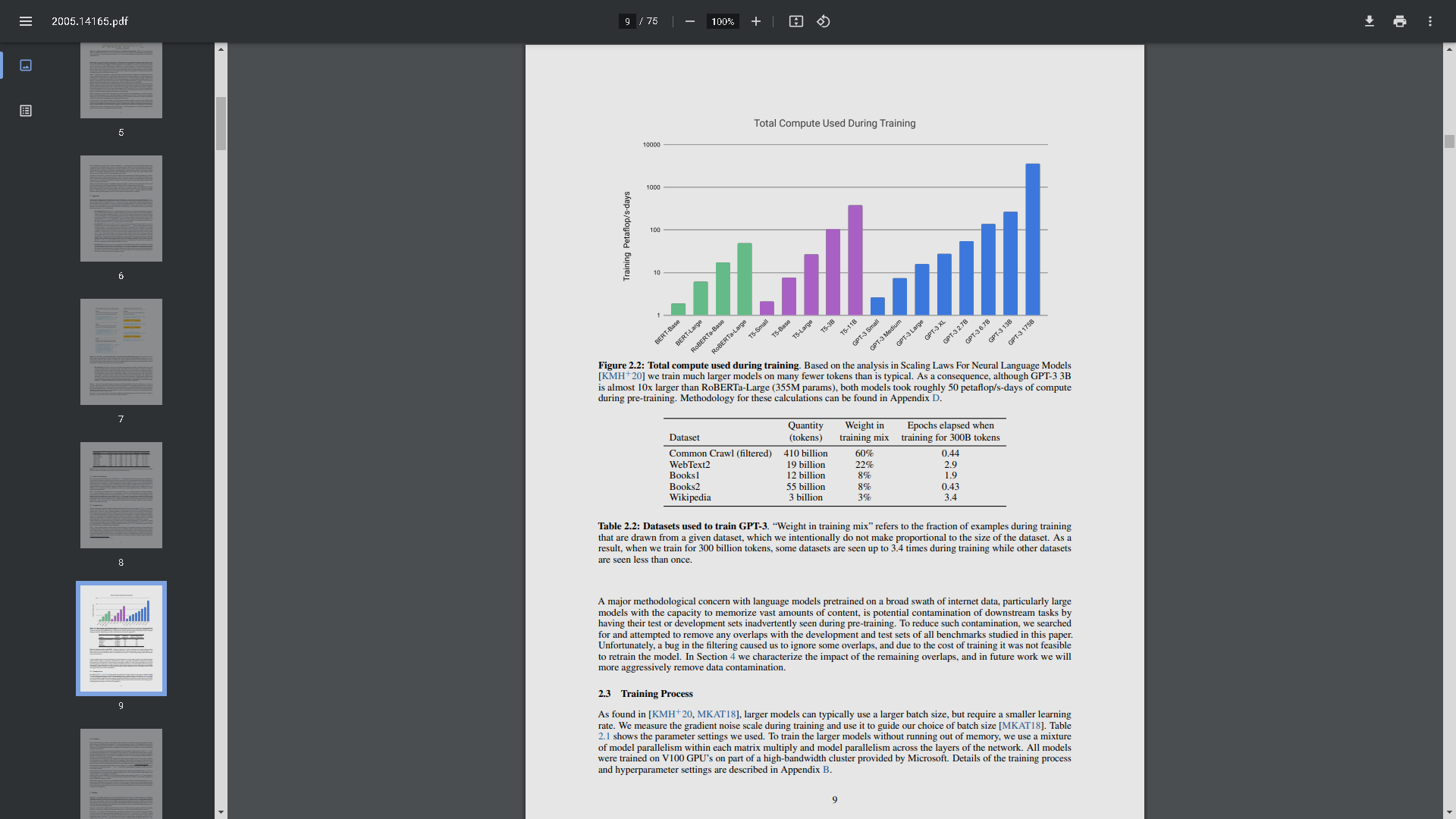
The five data sets used to train GPT-3 (and GPT-3.5) are described on page 9 of the research paper, Language Models are Few-Shot Learners.
https://arxiv.org/pdf/2005.14165.pdf
1678633458047.png

The datasets are:

  1. Common Crawl (filtered)
  2. WebText2
  3. Books1
  4. Books2
  5. Wikipedia
Common Crawl and WebText2 are based on basically scraping the entire internet.

WebText2 is a private OpenAI dataset. It is created by crawling links from Reddit that have received three upvotes. The idea is that these URLs are trustworthy. They contain quality content. WebText2 (OpenAI's creation) is not publicly available. However, there is a publicly available open-source version of it called OpenWebText2. OpenWebText2 is a public dataset that was created using the same crawl patterns. It is likely to provide a similar, if not the same, dataset of URLs as OpenAI WebText2. I'm only mentioning this in case someone wants to know what's in the WebText2. You can download OpenWebText2. This will give you an idea of the URLs it contains. A cleaned-up version of OpenWebText2 can be https://openwebtext2.readthedocs.io/en/latest/#download-plug-and-play-version. The raw version of OpenWebText2 https://openwebtext2.readthedocs.io/en/latest/#download-raw-scrapes-version. I couldn't find any information about the user agent used for either crawler. Maybe it's just identified as Python, I'm not sure. To my knowledge, there is no user agent to be blocked, although I'm not 100% sure. However, we do know that there's a good chance that your site is in both the closed-source OpenAI WebText2 dataset and the open-source version of it, OpenWebText2, if your site is linked from Reddit with at least three upvotes.

The Common Crawl dataset is one of the most commonly used Internet content datasets. It's produced by a non-profit organization called Common Crawl. Common Crawl data comes from a bot. The bot crawls the entire Internet. The data is downloaded by organizations that want to use it. It is then cleaned of spammy sites, etc. The Common Crawl Bot is named CCBot. CCBot obeys the robots.txt protocol. Therefore, it is possible to block Common Crawl with Robots.txt and prevent your site's data from being included in another dataset. However, if your site has already been crawled, it is likely that it is already part of multiple datasets. However, by blocking Common Crawl, it's possible to prevent your site's content from being included in new datasets that are sourced from newer Common Crawl datasets.

The CCBot User-Agent string is:

Code:
CCBot/2.0

Add the following to your robots.txt file to block the Common Crawl bot:

Code:
User-agent: CCBot
Disallow: /

An additional way to confirm if a CCBot user agent is legit is that it crawls from Amazon AWS IP addresses.

CCBot also obeys the nofollow robots meta tag directives.

Use this in your robots meta tag:

Code:
<meta name="CCBot" content="nofollow">

On top of this, I went a step further and on Cloudflare, made a firewall rule blocking CCBot and some other bots like Python, etc...

If you're new to WordPress and don't know what a robots.txt file is, using the Yoast SEO WordPress plugin is the easiest way to create and edit one.
Yoast SEO: https://wordpress.org/plugins/wordpress-seo/


  1. Once you have installed the plugin:
  2. Click on "Yoast SEO" in the menu
  3. Click on "Tools"
  4. Click on "File Editor"
  5. Click the "Create robots.txt file" button
  6. Copy/paste the above lines into the file
  7. Click "Save changes to robots.txt" button

Unfortunately, there's no way to opt your previously crawled content out of OpenAI's database. You should assume that ChatGPT has access to everything you published before CCBot was blocked.

However, this will prevent your site from being included in future crawls and will protect any new content you publish.

Here is one of my bots blocking cloudflarerule:
https://www.awesomescreenshot.com/image/37902745?key=83d18d0af31423176aa2366d3f1ac681
 
Last edited:
Personally, I'd rather let AI use my content for machine learning because they're technically not stealing anything.
Nice write-up
 
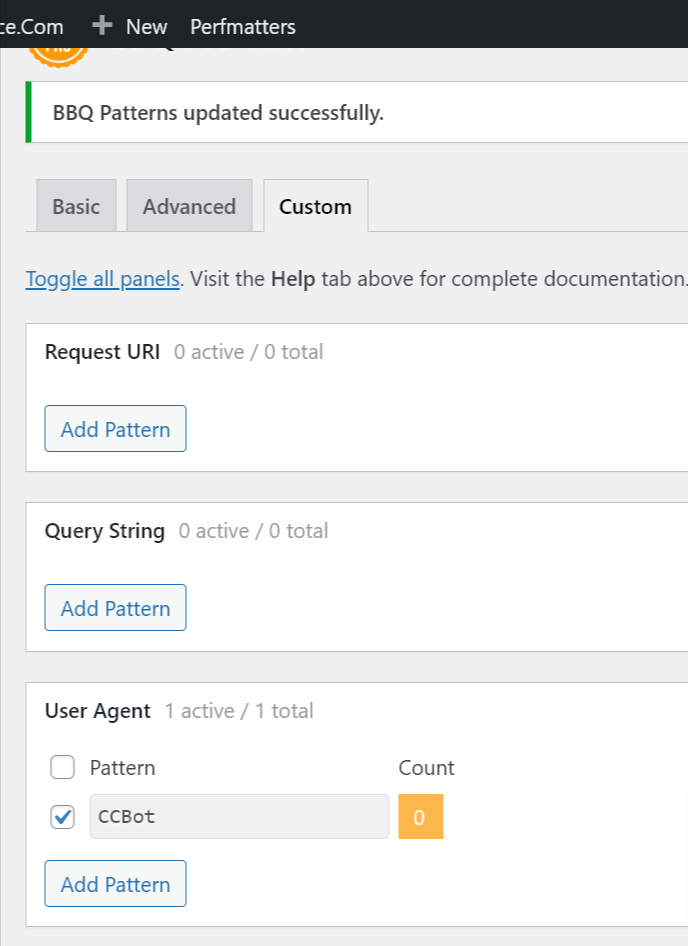
Nice, now I´m just adding CCBot in my BBQ custom firewall rules. Thanks.
https://www.awesomescreenshot.com/image/37902745?key=83d18d0af31423176aa2366d3f1ac681
 
https://www.awesomescreenshot.com/image/37902745?key=83d18d0af31423176aa2366d3f1ac681
(http.user_agent contains "Yandex") or (http.user_agent contains "muckrack") or (http.user_agent contains "Qwantify") or (http.user_agent contains "Sogou") or (http.user_agent contains "BUbiNG") or (http.user_agent contains "knowledge") or (http.user_agent contains "CFNetwork") or (http.user_agent contains "Scrapy") or (http.user_agent contains "SemrushBot") or (http.user_agent contains "AhrefsBot") or (http.user_agent contains "Baiduspider") or (http.user_agent contains "python-requests") or (http.user_agent contains "crawl" and not cf.client.bot) or (http.user_agent contains "Crawl" and not cf.client.bot) or (http.user_agent contains "bot" and not http.user_agent contains "bingbot" and not http.user_agent contains "Google" and not http.user_agent contains "Twitter" and not cf.client.bot) or (http.user_agent contains "Bot" and not http.user_agent contains "Google" and not cf.client.bot) or (http.user_agent contains "Spider" and not cf.client.bot) or (http.user_agent contains "spider" and not cf.client.bot)
 
How does it help my blog if AI not doing the copy/paste work like other robot (e.g SEO article machine in the earlier days). In fact, if they just use those content to become better. That would be good for me as well in future, isn't it
 
How does it help my blog if AI not doing the copy/paste work like other robot (e.g SEO article machine in the earlier days). In fact, if they just use those content to become better. That would be good for me as well in future, isn't it
Good until they totally replace SEO and search engines because they already have all information in there, and you lose a bunch of visitors, start earning less, and because of that you start drinking and going into strip clubs, you spend all your money there, after that, you will not have any food to eat, and after food, you also won't be able to pay your bills, hence you go to prison. NOT BLOCKING CHATGPT/AI FROM YOUR SITE= PRISON
 
(http.user_agent contains "Yandex") or (http.user_agent contains "muckrack") or (http.user_agent contains "Qwantify") or (http.user_agent contains "Sogou") or (http.user_agent contains "BUbiNG") or (http.user_agent contains "knowledge") or (http.user_agent contains "CFNetwork") or (http.user_agent contains "Scrapy") or (http.user_agent contains "SemrushBot") or (http.user_agent contains "AhrefsBot") or (http.user_agent contains "Baiduspider") or (http.user_agent contains "python-requests") or (http.user_agent contains "crawl" and not cf.client.bot) or (http.user_agent contains "Crawl" and not cf.client.bot) or (http.user_agent contains "bot" and not http.user_agent contains "bingbot" and not http.user_agent contains "Google" and not http.user_agent contains "Twitter" and not cf.client.bot) or (http.user_agent contains "Bot" and not http.user_agent contains "Google" and not cf.client.bot) or (http.user_agent contains "Spider" and not cf.client.bot) or (http.user_agent contains "spider" and not cf.client.bot)
Most of these are already in BBQ Pro, but thanks .. =)
 
Most of these are already in BBQ Pro, but thanks .. =)
I don't use any WordPress side plugins since I do it on Cloudflare level as to make my website faster and less CPU/ram usage
 
There is concern that there is no easy way to opt out of letting your content be used to train large language models (LLMs) such as ChatGPT. There is a way to do this, but it's not easy and it's not guaranteed to work. Data from multiple sources is used to train large language models (LLMs). Many of these datasets are open source. They are freely available for use in AI training. A wide variety of sources are generally used to train Large Language Models.

Examples of types of sources used:

Wikipedia
Government court records
Books
Emails
Crawled websites
There are actually portals and websites that offer datasets. These portals and websites offer huge amounts of information.

The training data sets for GPT-3.5 are the same as the training data sets for GPT-3. The main difference is that GPT-3.5 used a technique called Reinforcement Learning from Human Feedback (RLHF).

The five data sets used to train GPT-3 (and GPT-3.5) are described on page 9 of the research paper, Language Models are Few-Shot Learners.
https://arxiv.org/pdf/2005.14165.pdfView attachment 246470
The datasets are:

  1. Common Crawl (filtered)
  2. WebText2
  3. Books1
  4. Books2
  5. Wikipedia
Common Crawl and WebText2 are based on basically scraping the entire internet.

WebText2 is a private OpenAI dataset. It is created by crawling links from Reddit that have received three upvotes. The idea is that these URLs are trustworthy. They contain quality content. WebText2 (OpenAI's creation) is not publicly available. However, there is a publicly available open-source version of it called OpenWebText2. OpenWebText2 is a public dataset that was created using the same crawl patterns. It is likely to provide a similar, if not the same, dataset of URLs as OpenAI WebText2. I'm only mentioning this in case someone wants to know what's in the WebText2. You can download OpenWebText2. This will give you an idea of the URLs it contains. A cleaned-up version of OpenWebText2 can be downloaded here. The raw version of OpenWebText2 can be found here. I couldn't find any information about the user agent used for either crawler. Maybe it's just identified as Python, I'm not sure. To my knowledge, there is no user agent to be blocked, although I'm not 100% sure. However, we do know that there's a good chance that your site is in both the closed-source OpenAI WebText2 dataset and the open-source version of it, OpenWebText2, if your site is linked from Reddit with at least three upvotes.

The Common Crawl dataset is one of the most commonly used Internet content datasets. It's produced by a non-profit organization called Common Crawl. Common Crawl data comes from a bot. The bot crawls the entire Internet. The data is downloaded by organizations that want to use it. It is then cleaned of spammy sites, etc. The Common Crawl Bot is named CCBot. CCBot obeys the robots.txt protocol. Therefore, it is possible to block Common Crawl with Robots.txt and prevent your site's data from being included in another dataset. However, if your site has already been crawled, it is likely that it is already part of multiple datasets. However, by blocking Common Crawl, it's possible to prevent your site's content from being included in new datasets that are sourced from newer Common Crawl datasets.

The CCBot User-Agent string is:

Code:
CCBot/2.0

Add the following to your robots.txt file to block the Common Crawl bot:

Code:
User-agent: CCBot
Disallow: /

An additional way to confirm if a CCBot user agent is legit is that it crawls from Amazon AWS IP addresses.

CCBot also obeys the nofollow robots meta tag directives.

Use this in your robots meta tag:

Code:
<meta name="CCBot" content="nofollow">

On top of this, I went a step further and on Cloudflare, made a firewall rule blocking CCBot and some other bots like Python, etc...

If you're new to WordPress and don't know what a robots.txt file is, using the Yoast SEO WordPress plugin is the easiest way to create and edit one.
Yoast SEO: https://wordpress.org/plugins/wordpress-seo/


  1. Once you have installed the plugin:
  2. Click on "Yoast SEO" in the menu
  3. Click on "Tools"
  4. Click on "File Editor"
  5. Click the "Create robots.txt file" button
  6. Copy/paste the above lines into the file
  7. Click "Save changes to robots.txt" button

Unfortunately, there's no way to opt your previously crawled content out of OpenAI's database. You should assume that ChatGPT has access to everything you published before CCBot was blocked.

However, this will prevent your site from being included in future crawls and will protect any new content you publish.

Here is one of my bots blocking cloudflarerule:
https://www.awesomescreenshot.com/image/37902745?key=83d18d0af31423176aa2366d3f1ac681
Very informative.Thanks for sharing bro! We need more forum members like you.
 
I don't use any WordPress side plugins since I do it on Cloudflare level as to make my website faster and less CPU/ram usage
BBQ is not slowing it down much, it is made by a real security expert and WordPress veteran Jeff.
 
There is concern that there is no easy way to opt out of letting your content be used to train large language models (LLMs) such as ChatGPT. There is a way to do this, but it's not easy and it's not guaranteed to work. Data from multiple sources is used to train large language models (LLMs). Many of these datasets are open source. They are freely available for use in AI training. A wide variety of sources are generally used to train Large Language Models.

Examples of types of sources used:

Wikipedia
Government court records
Books
Emails
Crawled websites
There are actually portals and websites that offer datasets. These portals and websites offer huge amounts of information.

The training data sets for GPT-3.5 are the same as the training data sets for GPT-3. The main difference is that GPT-3.5 used a technique called Reinforcement Learning from Human Feedback (RLHF).

The five data sets used to train GPT-3 (and GPT-3.5) are described on page 9 of the research paper, Language Models are Few-Shot Learners.
https://arxiv.org/pdf/2005.14165.pdfView attachment 246470
The datasets are:

  1. Common Crawl (filtered)
  2. WebText2
  3. Books1
  4. Books2
  5. Wikipedia
Common Crawl and WebText2 are based on basically scraping the entire internet.

WebText2 is a private OpenAI dataset. It is created by crawling links from Reddit that have received three upvotes. The idea is that these URLs are trustworthy. They contain quality content. WebText2 (OpenAI's creation) is not publicly available. However, there is a publicly available open-source version of it called OpenWebText2. OpenWebText2 is a public dataset that was created using the same crawl patterns. It is likely to provide a similar, if not the same, dataset of URLs as OpenAI WebText2. I'm only mentioning this in case someone wants to know what's in the WebText2. You can download OpenWebText2. This will give you an idea of the URLs it contains. A cleaned-up version of OpenWebText2 can be downloaded here. The raw version of OpenWebText2 can be found here. I couldn't find any information about the user agent used for either crawler. Maybe it's just identified as Python, I'm not sure. To my knowledge, there is no user agent to be blocked, although I'm not 100% sure. However, we do know that there's a good chance that your site is in both the closed-source OpenAI WebText2 dataset and the open-source version of it, OpenWebText2, if your site is linked from Reddit with at least three upvotes.

The Common Crawl dataset is one of the most commonly used Internet content datasets. It's produced by a non-profit organization called Common Crawl. Common Crawl data comes from a bot. The bot crawls the entire Internet. The data is downloaded by organizations that want to use it. It is then cleaned of spammy sites, etc. The Common Crawl Bot is named CCBot. CCBot obeys the robots.txt protocol. Therefore, it is possible to block Common Crawl with Robots.txt and prevent your site's data from being included in another dataset. However, if your site has already been crawled, it is likely that it is already part of multiple datasets. However, by blocking Common Crawl, it's possible to prevent your site's content from being included in new datasets that are sourced from newer Common Crawl datasets.

The CCBot User-Agent string is:

Code:
CCBot/2.0

Add the following to your robots.txt file to block the Common Crawl bot:

Code:
User-agent: CCBot
Disallow: /

An additional way to confirm if a CCBot user agent is legit is that it crawls from Amazon AWS IP addresses.

CCBot also obeys the nofollow robots meta tag directives.

Use this in your robots meta tag:

Code:
<meta name="CCBot" content="nofollow">

On top of this, I went a step further and on Cloudflare, made a firewall rule blocking CCBot and some other bots like Python, etc...

If you're new to WordPress and don't know what a robots.txt file is, using the Yoast SEO WordPress plugin is the easiest way to create and edit one.
Yoast SEO: https://wordpress.org/plugins/wordpress-seo/


  1. Once you have installed the plugin:
  2. Click on "Yoast SEO" in the menu
  3. Click on "Tools"
  4. Click on "File Editor"
  5. Click the "Create robots.txt file" button
  6. Copy/paste the above lines into the file
  7. Click "Save changes to robots.txt" button

Unfortunately, there's no way to opt your previously crawled content out of OpenAI's database. You should assume that ChatGPT has access to everything you published before CCBot was blocked.

However, this will prevent your site from being included in future crawls and will protect any new content you publish.

Here is one of my bots blocking cloudflarerule:
https://www.awesomescreenshot.com/image/37902745?key=83d18d0af31423176aa2366d3f1ac681
I knew it's only a matter of time before this becomes widespread.
 
Problem is when they bypass you´re Cloudflare, and go thru the IP, then you´re CF firewall ain´t much worth.
I set up cloudflare to block it not captcha hehe
I knew it's only a matter of time before this becomes widespread.
what exactly xD
 
Also got some litespeed server side firewalls
Good, it´s like most people here think they can setup their SSL thru CF only .. I don´t know were all those nuts are learning .. Do stuff at server level then compliment with cloud services, not the other way around.
 
Back
Top