
D
Deleted member 969102
Guest
While I have seen posts similar to this on the forum before, I felt like it was a good idea to provide a clear and concise guide addressing the questions I see asked here all the time.
So, in order to begin trading Cryptocurrencies, you first need to purchase one of the bigger coins (Bitcoin, Ethereum, Litecoin) and then exchange that into the currencies of your choice.
While there are many different sites that offer exchanges services like this, there are two that I use regularly and would recommend: Coinbase and LocalBTC. Both are well known and have trusted escrow systems, so there's no need to worry about not getting what you paid for. Cex.io is also one I have used in the past.
While I registered my accounts many months ago, I have heard that Coinbase's ID verification process can take a few days. While it is definitely annoying having to wait (Possibly missing out on $$$) it's incredibly important that sites like this stick to the rules. (I'll mention some exchanges that don't need ID right away later on)
Where Can I Trade Cryptocurrencies?
Now that you have got your Bitcoin/ Ethereum/ Litecoin, you can begin to trade the hundreds of other Cryptocurrencies out there. Just like traditional stock brokers, there are many exchanges out there that allow you to do this.
It's probably a good idea that you read the next section before picking an exchange, but here's a list of ones I would recommend:
You can find a list of the biggest exchanges (For the last 24 hours) here.
While I would definitely recommend that you verify your accounts with your ID, I understand that some people don't want to wait. Binance allows you to withdraw up to 2 BTC's worth of any coin every 24 hours without adding an ID & Kucoin don't have any limits (That I have found).
Where Can I Buy [X] Coin?
So you've got set-up on an exchange, but you can't see the coin you want to buy? That's because different coins are listed on different exchanges. It's annoying I know, but once you get an account set up on a number of the bigger exchanges, it shouldn't be much of an issue.
In order to see where you can buy a specific coin, navigate to the appropriate Coinmarketcap page and select the "Markets" tab just below the pricing information.
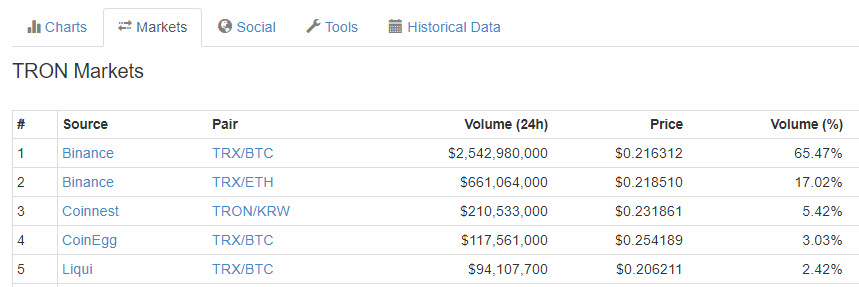
This should show you most of the markets for that coin, sorted by volume. TRON's market page, for example, TRON's page would be https://coinmarketcap.com/currencies/tron/#markets
How Do I ACTUALLY Trade?
This is the important part, as messing up could see you lose $2m with the click of a button.
So after deciding which exchange you want to use and the coin that you would like to buy, you need to find the appropriate page on that exchange. Let's use Bittrex as our example here. They offer Bitcoin, Ethereum, and USDT markets. Imagine we bought BTC earlier on and we want to buy NEO.
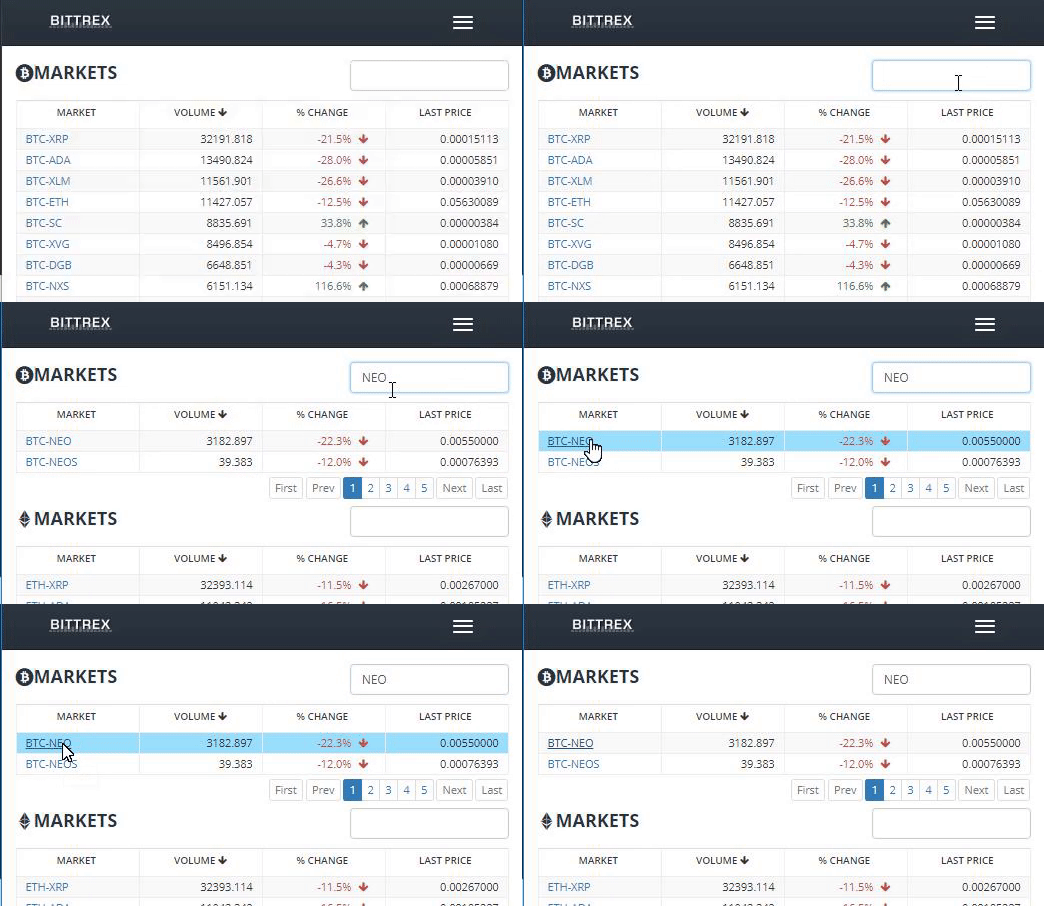
From the Markets page on Bittrex, you can see the top 20 coins, sorted by 24hr Volume. If the coin you want to trade isn't in the top 20, you can search it in the top-right. (Use the abbreviation, not the whole name i.e BTC not Bitcoin)
Now you should be able to see the actual trading page. This may seem a little daunting, but it's actually pretty easy to understand. The graph is usually a candlestick chart that shows what price the coin opened/ closed at for every interval. You can change the charts all the way from 1-minute interval candles all the way up to monthly.

Assuming that you now know what price you would like to buy your coin at, we can move on to how that actually works. Somewhere on the screen, you should see a box containing the LAST, BID, ASK, 24hr High, 24hr Low prices.
The ASK price is the lowest offer a seller will accept. The BID price is the highest price that buyers are offering. The LAST price represents the price at which the last trade occurred. 24hr High/Low is obviously the highest & lowest price that a coin has been traded within the last 24 hours. Unless stated otherwise, prices are set in the currency you are buying with - in this case, BTC.
Depending on whether you are selling or buying the currency, you need to look for the BUY/SELL NEO box. (This should all look a little different if you're using another exchange but it's all pretty similar)
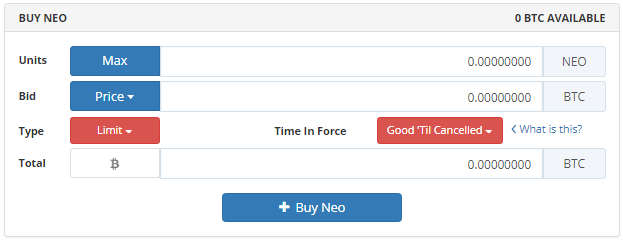
Here we want to enter the total number of NEO that we would like to buy. In this case, let's get 10. In the bid box, we are going to pay the price we are willing to pay for EACH NEO. (Make sure this is not the total, especially when selling) Clicking on the "Price" box allows you to enter the LAST, BID, or ASK price. Typically, I just enter the LAST price.
I won't explain what the time in force means here. Usually, I just leave it on "Good 'Til Cancelled" (Read more here) If you enter your BID first, you can then click on "MAX" to buy the maximum number of NEO that you can, with your current balance.
Once you're happy, press the buy button. You should then be met with the confirmation screen. DO NOT SKIP THROUGH THIS. It's important and could stop you losing a lot of money if you entered something wrong.
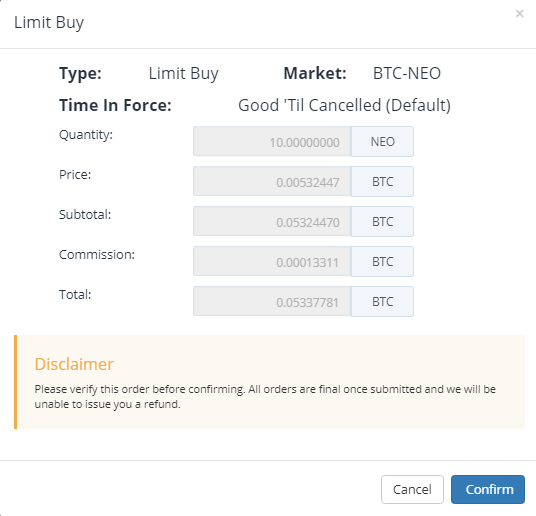
Assuming you have the funds in your account (Read the next section) you should be good to place the order. Your order will then be filled, partially filled, or missed depending on the prices you chose & the volume at that time. You can cancel an order at any time from the Orders page.
Where Do I Keep My Coins?
Assuming that you purchased a bigger Crypto, as I talked about earlier, you will have automatically been assigned an internal online wallet from the broker. It's definitely a good idea to move your money out of there, but where too really depends on what you are doing with your money.
If you would like to exchange it right away (and it's a relatively small amount) then you can send it straight to your exchange wallet. By default, you won't have been assigned a wallet so you will need to open one. (This is very easy on an exchange)
Navigate to the Balance/ Wallets/ Assets/ Deposit etc. page of your exchange and then find the coin you want to deposit. Press the + / Deposit (etc. etc.) button. Some exchanges will create a wallet for you right away, others will ask you if you want to make one. Just select yes and wait a few seconds.
You should now see an address and maybe a QR code, depending on the coin. For example, 17A16QmavnUfCW11DAApiJxp7ARnxN5pGX (Wish this was mine). Make sure to make a note of this address (Seriously)
From whatever site you used to purchase the coin (Coinbase etc) you should now be able to withdraw your funds directly into your exchange. MAKE SURE YOU SEND YOUR FUNDS TO THE RIGHT ADDRESS. Seriously. Again, I know it sounds obvious but I have seen many people make this mistake. Also, make sure that the address you are sending to is one from the same coin. You can't send Bitcoin to a NEO address directly.
Don't be worried if it doesn't show up in your account directly. Depending on the coin, it may take a few hours to appear. If you're sending BTC (Same process with any other coin, just use their explorer instead) you can navigate to https://blockchain.info/address/[YOURADDRESS].
Warning: Don't keep all of your money in exchanges. Don't keep all of your exchange money in a single exchange. Spread your assets.
There are various online wallets, like Blockchain.info that offer secure, online wallets.
You can also store coins on your computer. Jaxx Wallet is a well-known one for the bigger coins, but you can also use the officially-released wallet for your coin of choice.
I would recommend having a number of hardware wallets, like the Ledger Wallets, if you have a large amount of money invested.

You can even use a paper wallet, but that's really just a novelty.
That's it!
Hopefully, you now know how to buy & sell any Cryptocurrency you want. If you have any questions, leave them here & I'll try to answer them all.
Please don't ask for/ offer any investing advice here. This is a guide for people who are new to Cryptocurrencies and I would like to keep it that way, thanks.
----
Unlike the stock market, which makes it possible to buy pretty much any stock available with traditional currency (£, $, € etc.) it's often difficult to directly purchase the Cryptocurrency you want. (I'm not going to go deep into why that is)
So, in order to begin trading Cryptocurrencies, you first need to purchase one of the bigger coins (Bitcoin, Ethereum, Litecoin) and then exchange that into the currencies of your choice.
While there are many different sites that offer exchanges services like this, there are two that I use regularly and would recommend: Coinbase and LocalBTC. Both are well known and have trusted escrow systems, so there's no need to worry about not getting what you paid for. Cex.io is also one I have used in the past.
While I registered my accounts many months ago, I have heard that Coinbase's ID verification process can take a few days. While it is definitely annoying having to wait (Possibly missing out on $$$) it's incredibly important that sites like this stick to the rules. (I'll mention some exchanges that don't need ID right away later on)
Where Can I Trade Cryptocurrencies?
Now that you have got your Bitcoin/ Ethereum/ Litecoin, you can begin to trade the hundreds of other Cryptocurrencies out there. Just like traditional stock brokers, there are many exchanges out there that allow you to do this.
It's probably a good idea that you read the next section before picking an exchange, but here's a list of ones I would recommend:
You can find a list of the biggest exchanges (For the last 24 hours) here.
While I would definitely recommend that you verify your accounts with your ID, I understand that some people don't want to wait. Binance allows you to withdraw up to 2 BTC's worth of any coin every 24 hours without adding an ID & Kucoin don't have any limits (That I have found).
Where Can I Buy [X] Coin?
So you've got set-up on an exchange, but you can't see the coin you want to buy? That's because different coins are listed on different exchanges. It's annoying I know, but once you get an account set up on a number of the bigger exchanges, it shouldn't be much of an issue.
In order to see where you can buy a specific coin, navigate to the appropriate Coinmarketcap page and select the "Markets" tab just below the pricing information.
This should show you most of the markets for that coin, sorted by volume. TRON's market page, for example, TRON's page would be https://coinmarketcap.com/currencies/tron/#markets
How Do I ACTUALLY Trade?
This is the important part, as messing up could see you lose $2m with the click of a button.
So after deciding which exchange you want to use and the coin that you would like to buy, you need to find the appropriate page on that exchange. Let's use Bittrex as our example here. They offer Bitcoin, Ethereum, and USDT markets. Imagine we bought BTC earlier on and we want to buy NEO.
From the Markets page on Bittrex, you can see the top 20 coins, sorted by 24hr Volume. If the coin you want to trade isn't in the top 20, you can search it in the top-right. (Use the abbreviation, not the whole name i.e BTC not Bitcoin)
Now you should be able to see the actual trading page. This may seem a little daunting, but it's actually pretty easy to understand. The graph is usually a candlestick chart that shows what price the coin opened/ closed at for every interval. You can change the charts all the way from 1-minute interval candles all the way up to monthly.
Assuming that you now know what price you would like to buy your coin at, we can move on to how that actually works. Somewhere on the screen, you should see a box containing the LAST, BID, ASK, 24hr High, 24hr Low prices.
The ASK price is the lowest offer a seller will accept. The BID price is the highest price that buyers are offering. The LAST price represents the price at which the last trade occurred. 24hr High/Low is obviously the highest & lowest price that a coin has been traded within the last 24 hours. Unless stated otherwise, prices are set in the currency you are buying with - in this case, BTC.
Depending on whether you are selling or buying the currency, you need to look for the BUY/SELL NEO box. (This should all look a little different if you're using another exchange but it's all pretty similar)
Here we want to enter the total number of NEO that we would like to buy. In this case, let's get 10. In the bid box, we are going to pay the price we are willing to pay for EACH NEO. (Make sure this is not the total, especially when selling) Clicking on the "Price" box allows you to enter the LAST, BID, or ASK price. Typically, I just enter the LAST price.
I won't explain what the time in force means here. Usually, I just leave it on "Good 'Til Cancelled" (Read more here) If you enter your BID first, you can then click on "MAX" to buy the maximum number of NEO that you can, with your current balance.
Once you're happy, press the buy button. You should then be met with the confirmation screen. DO NOT SKIP THROUGH THIS. It's important and could stop you losing a lot of money if you entered something wrong.
Assuming you have the funds in your account (Read the next section) you should be good to place the order. Your order will then be filled, partially filled, or missed depending on the prices you chose & the volume at that time. You can cancel an order at any time from the Orders page.
Where Do I Keep My Coins?
Assuming that you purchased a bigger Crypto, as I talked about earlier, you will have automatically been assigned an internal online wallet from the broker. It's definitely a good idea to move your money out of there, but where too really depends on what you are doing with your money.
If you would like to exchange it right away (and it's a relatively small amount) then you can send it straight to your exchange wallet. By default, you won't have been assigned a wallet so you will need to open one. (This is very easy on an exchange)
Navigate to the Balance/ Wallets/ Assets/ Deposit etc. page of your exchange and then find the coin you want to deposit. Press the + / Deposit (etc. etc.) button. Some exchanges will create a wallet for you right away, others will ask you if you want to make one. Just select yes and wait a few seconds.
You should now see an address and maybe a QR code, depending on the coin. For example, 17A16QmavnUfCW11DAApiJxp7ARnxN5pGX (Wish this was mine). Make sure to make a note of this address (Seriously)
From whatever site you used to purchase the coin (Coinbase etc) you should now be able to withdraw your funds directly into your exchange. MAKE SURE YOU SEND YOUR FUNDS TO THE RIGHT ADDRESS. Seriously. Again, I know it sounds obvious but I have seen many people make this mistake. Also, make sure that the address you are sending to is one from the same coin. You can't send Bitcoin to a NEO address directly.
Don't be worried if it doesn't show up in your account directly. Depending on the coin, it may take a few hours to appear. If you're sending BTC (Same process with any other coin, just use their explorer instead) you can navigate to https://blockchain.info/address/[YOURADDRESS].
Warning: Don't keep all of your money in exchanges. Don't keep all of your exchange money in a single exchange. Spread your assets.
There are various online wallets, like Blockchain.info that offer secure, online wallets.
You can also store coins on your computer. Jaxx Wallet is a well-known one for the bigger coins, but you can also use the officially-released wallet for your coin of choice.
I would recommend having a number of hardware wallets, like the Ledger Wallets, if you have a large amount of money invested.
You can even use a paper wallet, but that's really just a novelty.
That's it!
Hopefully, you now know how to buy & sell any Cryptocurrency you want. If you have any questions, leave them here & I'll try to answer them all.
Please don't ask for/ offer any investing advice here. This is a guide for people who are new to Cryptocurrencies and I would like to keep it that way, thanks.


