
zerofoxtrot
Senior Member
- Dec 17, 2011
- 810
- 539
I've recently seen a lot of people asking on how to have a hyperlink annotation on their YouTube video, I'm about to show you on how to get these. It's extremely easy to do, and is a huge benefit.
1. Add your website to Google https://www.google.com/webmasters/tools/home?hl=en (your money website, the one you want to have a link for).

2. Click on your website to get to the Dashboard, from the left sidebar select Configuration -> Associates -> Add New User.
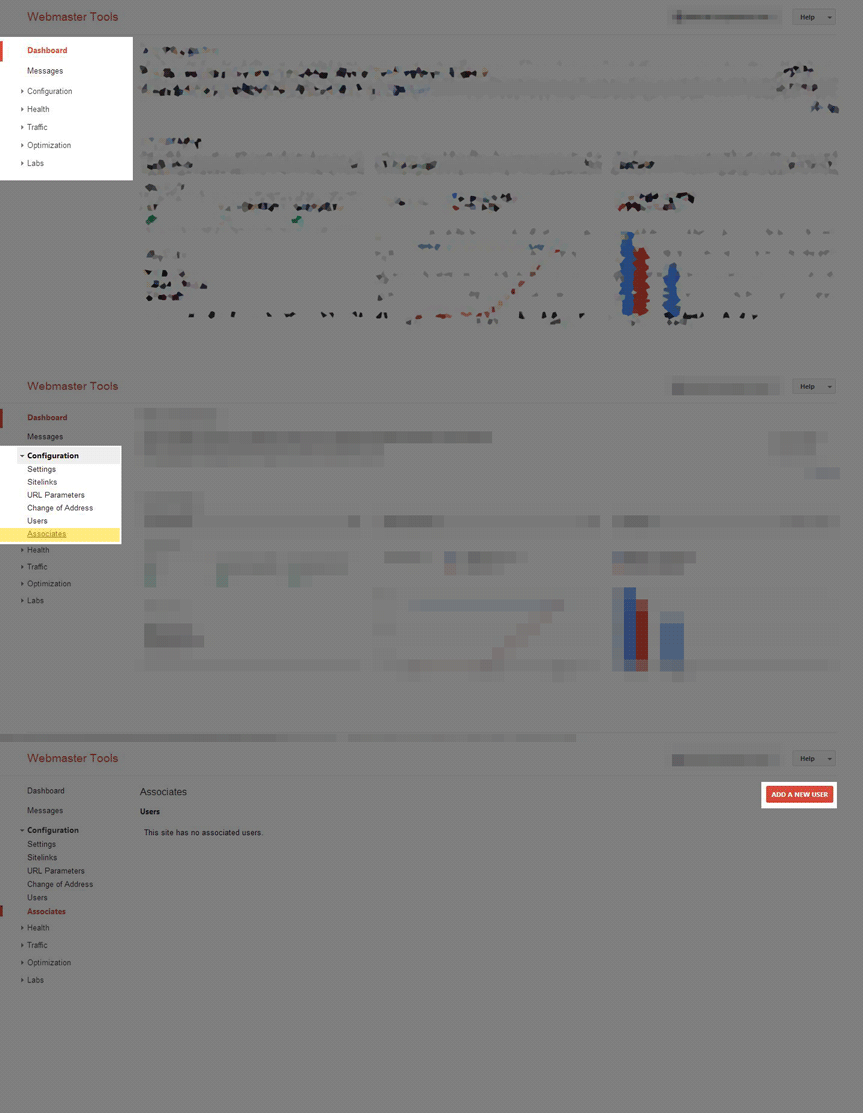
3. Fill in the email address of your YouTube account, make sure you also have ticked the YouTube checkbox.

4. Your YouTube account is now "associated" with your website, now go to https://www.youtube.com/verify?next_url=%2Faccount_features to verify your YouTube account (skip this if you have already phone verified you YouTube account).
5. Confirm if everything is done successfully by checking out your http://www.youtube.com/account_features. It should say this if everything went correctly, if not, try again from step 1, or try logging in again.

6. Get started! Edit any video you want and open the "Annotations", this banner should pop-up. Hit the enable button.

7. Now add any sort of annotation you want, I like to use the Note & Spotlight annotation. I'm going to show you on using the Note annotation. Basically fill in the content of your annotation, check the "Link" checkbox, and fill in your associated website you setup on Webmaster Tools.

8. Now edit the annotation to your demands. I basically like to watermark the whole video by showing the hyperlink annotation from beginning to end in the top right of the video or something like that. Once you're done hit save and publish!
9. View your video, test the link, and edit it further if you want. I had the best CTR when I placed my hyperlink annotation in the top middle with a red color, try it out too!
Hopefully I have helped you guys out, these annotation hyperlinks are definitely worth it. I had an increased CTR of 20% by just placing these things. This is my way of giving back to BHW after this forum has given me so much in return. Good luck!
1. Add your website to Google https://www.google.com/webmasters/tools/home?hl=en (your money website, the one you want to have a link for).
2. Click on your website to get to the Dashboard, from the left sidebar select Configuration -> Associates -> Add New User.
3. Fill in the email address of your YouTube account, make sure you also have ticked the YouTube checkbox.
4. Your YouTube account is now "associated" with your website, now go to https://www.youtube.com/verify?next_url=%2Faccount_features to verify your YouTube account (skip this if you have already phone verified you YouTube account).
5. Confirm if everything is done successfully by checking out your http://www.youtube.com/account_features. It should say this if everything went correctly, if not, try again from step 1, or try logging in again.
6. Get started! Edit any video you want and open the "Annotations", this banner should pop-up. Hit the enable button.
7. Now add any sort of annotation you want, I like to use the Note & Spotlight annotation. I'm going to show you on using the Note annotation. Basically fill in the content of your annotation, check the "Link" checkbox, and fill in your associated website you setup on Webmaster Tools.
8. Now edit the annotation to your demands. I basically like to watermark the whole video by showing the hyperlink annotation from beginning to end in the top right of the video or something like that. Once you're done hit save and publish!
9. View your video, test the link, and edit it further if you want. I had the best CTR when I placed my hyperlink annotation in the top middle with a red color, try it out too!
Hopefully I have helped you guys out, these annotation hyperlinks are definitely worth it. I had an increased CTR of 20% by just placing these things. This is my way of giving back to BHW after this forum has given me so much in return. Good luck!


