GTmetrix and PageSpeed

Index Sites

Regular Member
Joined
Mar 27, 2019
Messages
266
Reaction score
125
I've been trying to get good at fully optimized a website for performance the best possible within reason. I feel like I've made great progress but what still bothers me is pagespeed desktop and mobile.. definitely mobile also the fully loaded time. PageSpeed is REALLY hard man wtf

upload_2020-3-12_22-0-9.png
upload_2020-3-12_22-3-17.png
upload_2020-3-12_22-0-16.png
upload_2020-3-12_22-0-22.png
 
Try trimming off unused CSS, and also use font-display to increase score to some extent.
 
Don’t bother about goggle gt metrix and pingdom matters a lot, but if you yet are obsessed with google speed then. You can use @kindablack service
I've read quite a bit to not worry about google speeds but have also read that when it comes to ranking speed matters so I rather optimize for page speed as best as possible
Try trimming off unused CSS, and also use font-display to increase score to some extent.
Currently trying to figure out how to separate used from unused css now
 
I am actually learning CSS, HTML and JS script at the moment myself. Not trying to build an entire website from scratch, just to learn enough to be able to read through lines of codes and be able to tweak stuff up and improve a site´s page loading speed.

I recently download it Visual Studio Code and started playing with a demo site I just installed a bunch of plugins and shitty demo content build with Elementor to test the waters.

Personally, I am using lighthouse a lot to detect any unused kilobytes, GTMetrix when it comes to page loading speed and Google PageSpeed Insights for mobile optimization mostly.

Thus far, I´ve broken the site up like half a dozen time but as time goes by, it´s less frequent the times I do it and I am actually started to get the hang of it.

Right now, I was able to drop the page loading speed from 5s to just under 2s.

The weight of the site from 4mb to 300kb and, the HTTP request from 72 to 24.

And in regards to Google PageSpeed Insight, it went from 68 to 97 in Desktop and from 46 to 88 on mobile.

I feel there´s still room for improvement, but I am very happy with the results.
 
Currently trying to figure out how to separate used from unused css now
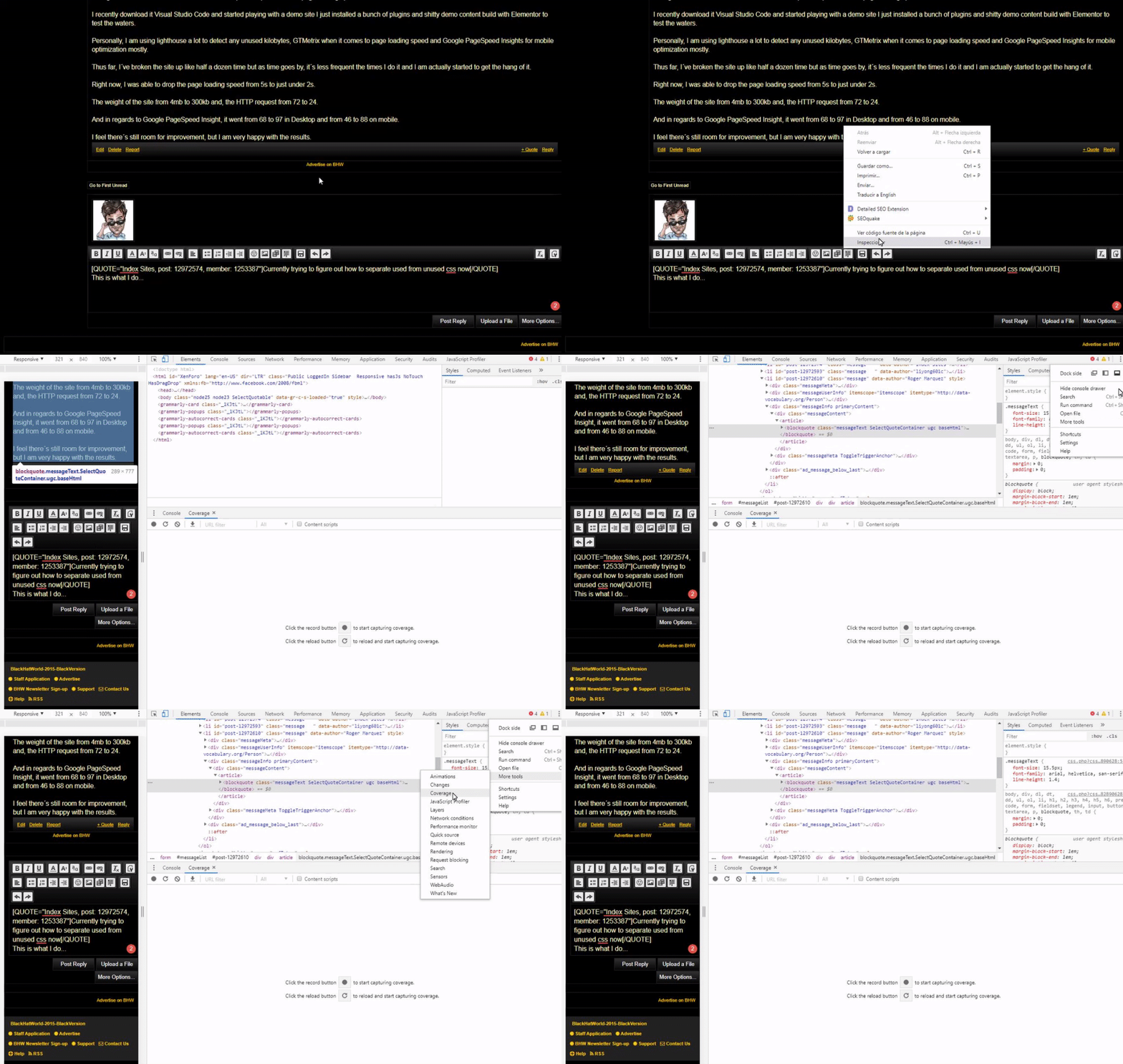
This is what I do...
c9488bcdb01a428a5021395275925c1c.gif

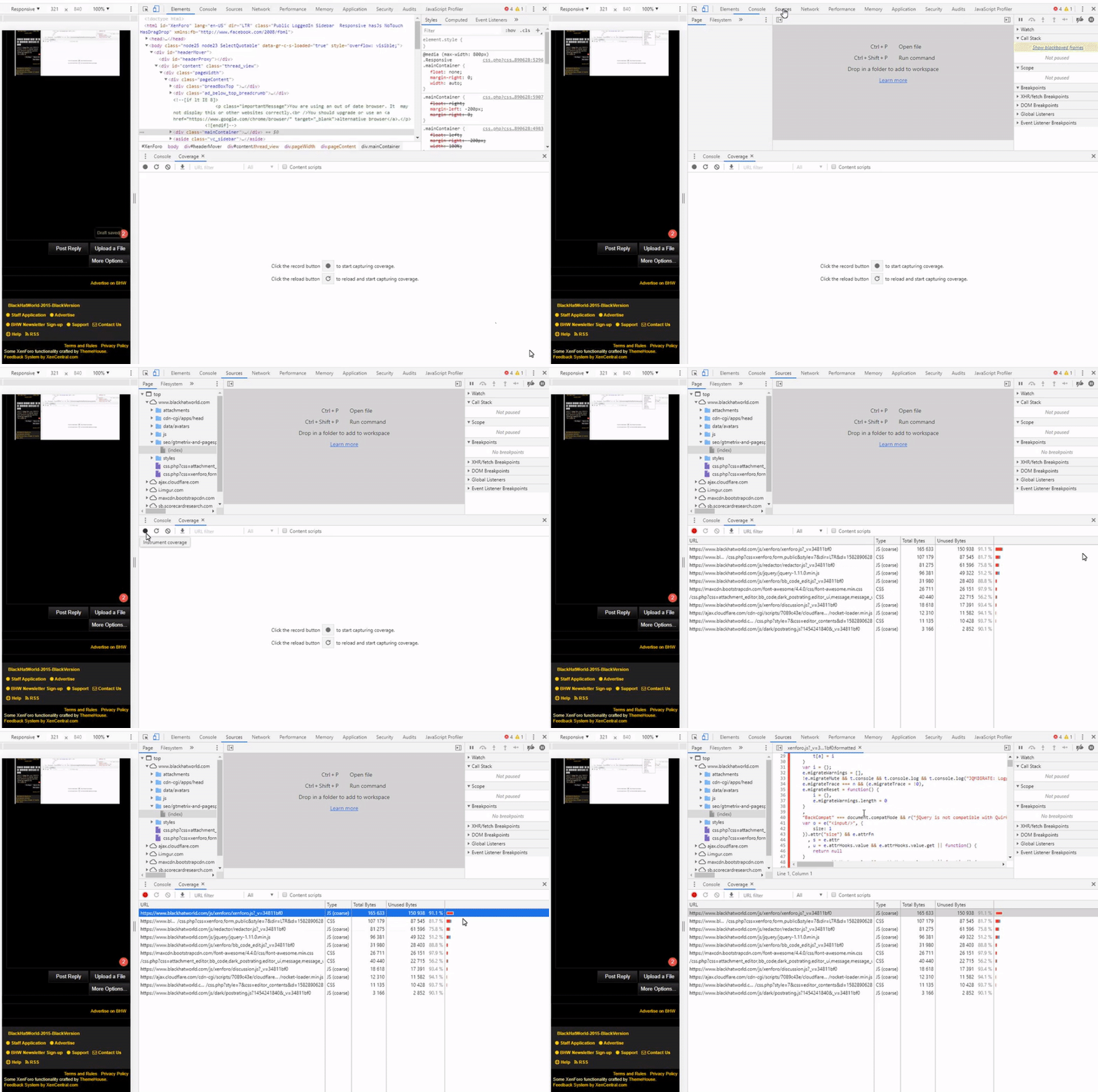
Then, after clicking on coverage...
de62c92a831d6bd1f4bca0efcc85fbcb.gif

On this tab, you will be able to see all the elements that are loading on that particular page, what its been used and whats been unused. When clicking on each element, you will see in the window above all the codes mark in reading as the unused part of the coding.

What I am doing is to copy and paste that code into Visual Code Editor and just get rid of it, export the file and re-upload it into the site and keep testing.

Make sure to keep the original file intact just in case.
 
Keep the page lite, have a good host and use a good plugin, I recommend WP Rocket.
 
You host is slow..

First data transfer itself is taking more than 1 second.
 
This is what I do...
c9488bcdb01a428a5021395275925c1c.gif

Then, after clicking on coverage...
de62c92a831d6bd1f4bca0efcc85fbcb.gif

On this tab, you will be able to see all the elements that are loading on that particular page, what its been used and whats been unused. When clicking on each element, you will see in the window above all the codes mark in reading as the unused part of the coding.

What I am doing is to copy and paste that code into Visual Code Editor and just get rid of it, export the file and re-upload it into the site and keep testing.

Make sure to keep the original file intact just in case.
This should be a great help appreciate it man

Keep the page lite, have a good host and use a good plugin, I recommend WP Rocket.
WP-Rocket is my go-to as for my host it's one from the marketplace

You host is slow..

First data transfer itself is taking more than 1 second.

Perhaps, but it might be my fault more than the host because I have too many websites on not a strong enough host
 
This is what I do...
c9488bcdb01a428a5021395275925c1c.gif

Then, after clicking on coverage...
de62c92a831d6bd1f4bca0efcc85fbcb.gif

On this tab, you will be able to see all the elements that are loading on that particular page, what its been used and whats been unused. When clicking on each element, you will see in the window above all the codes mark in reading as the unused part of the coding.

What I am doing is to copy and paste that code into Visual Code Editor and just get rid of it, export the file and re-upload it into the site and keep testing.

Make sure to keep the original file intact just in case.
Wait you are telling me the "red" part of coverage is the ununsed css?
 
Yeah, I browse the code of a single element on VSC and it had over 50k lines of coding.

Let me give you a couple of recommendations if you´re going to test this yourself.
  1. ALWAYS BACK THE ORIGINAL FILE - I think this is self-explanatory. You WILL want that file back if you break something on your site.
  2. START AT THE BOTTOM - If you´re going to clean the code, it makes it a shit lot easier to do it starting from the bottom and work your way up. You can do this by following the original coding on your chrome browser.
Hope this helps,

Cheers!
 
Yeah, I browse the code of a single element on VSC and it had over 50k lines of coding.

Let me give you a couple of recommendations if you´re going to test this yourself.
  1. ALWAYS BACK THE ORIGINAL FILE - I think this is self-explanatory. You WILL want that file back if you break something on your site.
  2. START AT THE BOTTOM - If you´re going to clean the code, it makes it a shit lot easier to do it starting from the bottom and work your way up. You can do this by following the original coding on your chrome browser.
Hope this helps,

Cheers!
You've been a great help
 
Back
Top